AR5000 OPERATING MANUAL PAGE 45
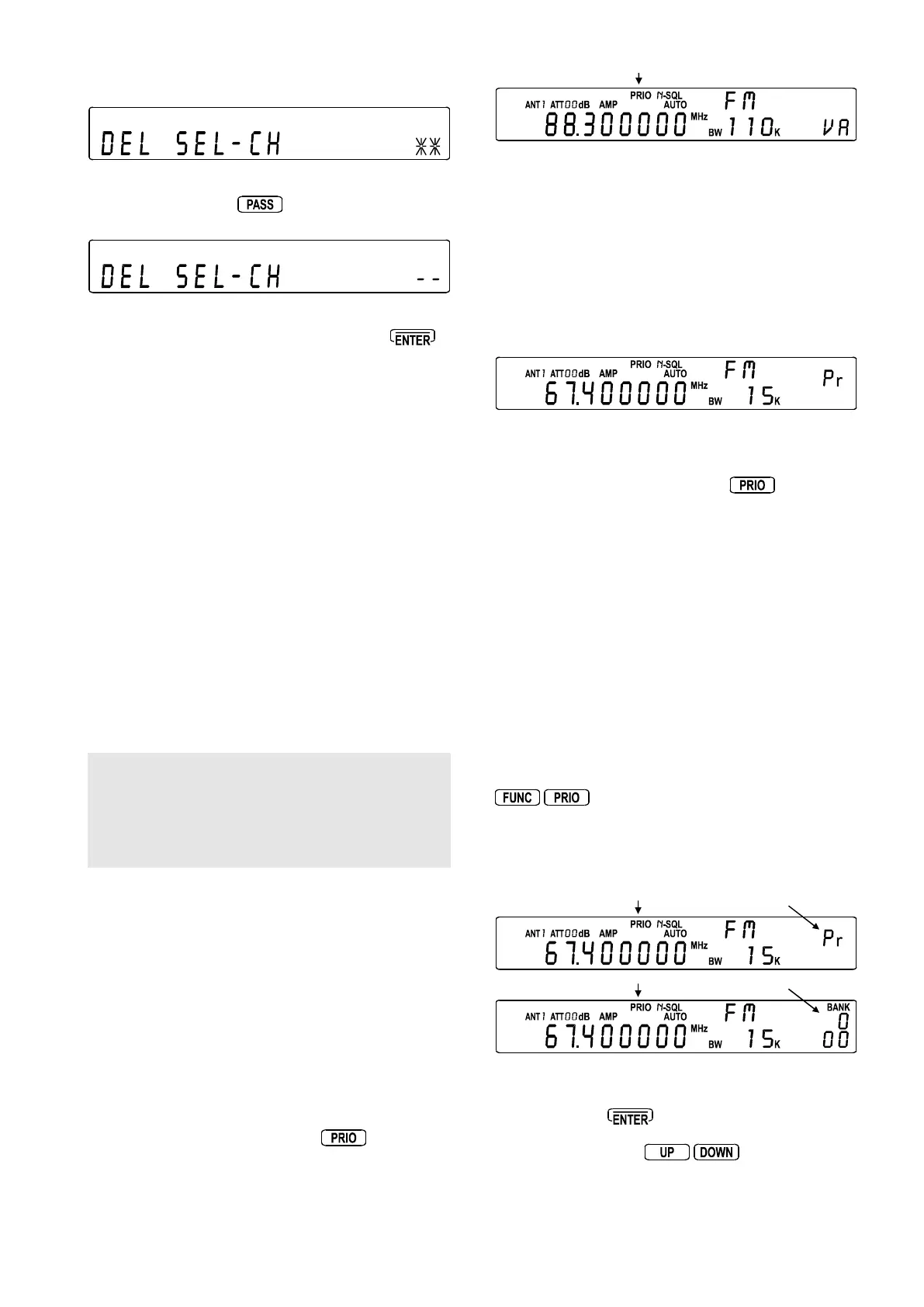
The right of the LCD will display the legend “* *” if select
scan channels exist and “- -” if there are none to delete.
To delete all select scan channels
(un-tag them all) press
, the legend will change to
“- -” to confirm operation.
The memory channels themselves will not be deleted, only
the select scan tags will be removed. Press
to
return to VFO, SCAN or SEARCH, whichever was
previously used.
(11) Priority operation
The PRIORITY feature enables you to carry on scanning,
searching or monitoring while the AR5000 checks a
selected frequency for activity (taken from one of the 1000
memory channels - default 000 every 5 seconds).
The priority checking is accomplished by momentarily
tuning the receive circuit to the priority frequency to see if
it is active. If activity is found, the AR5000 will remain on
the active frequency until the signal disappears. If no
activity is detected, the receiver returns to the VFO
frequency, scan channel or search bank from where it
originated.
The priority facility has a large number of applications and
is particularly useful for keeping an eye on a distress
frequency while scanning or searching another frequency
band.
Note: Depending upon the frequency and mode stored
as priority, an audible click may be heard when the priority
facility is in operation. This is quite normal and is caused
by the internal switching of circuitry necessary to
accomplish the frequency change (as two frequencies
cannot simultaneously be monitored).
The priority mode is automatically suspended during entry
of frequencies via the numeric keypad, this prevents the
AR5000 from changing frequency while you are busy
programming.
11-1 Engaging PRIORITY channel
Once engaged, the default channel used for PRIORITY
is “
000000
000000
000” and the frequency is checked for activity every
5 seconds.
First ensure that there is data stored in memory channel
“
000000
000000
000”.
To engage the priority facility press
, this may be
carried out while in SCAN, SEARCH or VFO modes. The
legend “PRIO” appears toward the centre of the top line
of the LCD to indicate that PRIORITY IS ENGAGED
(switched on).
Once priority has been activated, the contents of the
memory channel used (default 000) may be altered without
affecting the data used for PRIORITY operation which is
stored separately and assumes an identity of its own
irrespective of the data contents of memory 000.
When the priority channel becomes active (signal present
and squelch open), the legend “
PP
PP
Pr” will be displayed on
the right of the LCD. The active priority frequency will be
monitored until it clears, this will temporarily halt any scan
and search process.
Should you subsequently wish to alter the priority data,
you will have to use the PRIORITY SETUP menu.
To cancel priority operation press
, the legend
“PRIO” will be removed from the top line of the LCD to
confirm de-selection.
11-2 Changing PRIORITY channel
parameters
The default channel used for PRIORITY is “
000000
000000
000” and
the frequency copied from this channel is checked for
activity every 5 seconds.
You may select a different memory channel from which
the priority data will be taken or may vary the sampling
time for priority activity checking. This is accomplished
by using the PRIORITY SETUP menu accessed by
pressing
. The flashing legend “PRIO” appears on
the top line of the LCD to confirm selection.
The legend “
PP
PP
Pr” also alternates with the bank/channel
number on the right of the LCD inviting a new memory
location to be chosen.
Use the MAIN DIAL, SUB DIAL or enter a three digit memory
location via the numeric keypad. To transfer the data to
PRIORITY press
.
Alternatively press the
keys to select the
priority sampling interval (how often priority is checked for
activity).



 To Next Page