AR5000 OPERATING MANUAL PAGE 51
12-7 Programming and reprogramming
PROGRAM SEARCH BANKS
You may wish to specify your own frequency limits or
modes for program search banks. There are 20 program
search banks in total 00, 01, 02, 03, 04, 05, 06, 07, 08,
09, 10, 11, 12, 13, 14, 15, 16, 17, 18 & 19.
Example of reprogramming a search bank - “
0505
0505
05”
Let’s assume that you wish to reprogram the data contents
of search bank “
55
55
5”: 433.000 to 433.6000 MHz, mode to
NFM, 15kHz I.F. bandwidth, 25 kHz tuning steps,
step-adjust off and comment to 70CM.
Note: The attenuator and aerial selection is made while
program search is in operation and is not programmed
into the stored data, this greatly increases the versatility
when in live use !
To make things easier for this example, first delete the
existing data.
Press
to place the receiver in a known state of
operation.
Press
then press the
key for more than one
second to access the DELETE menu. Press the
key three times to access the “
DEL SRCHDEL SRCH
DEL SRCHDEL SRCH
DEL SRCH” menu (or
you could press the
key twice to get to the same
place).
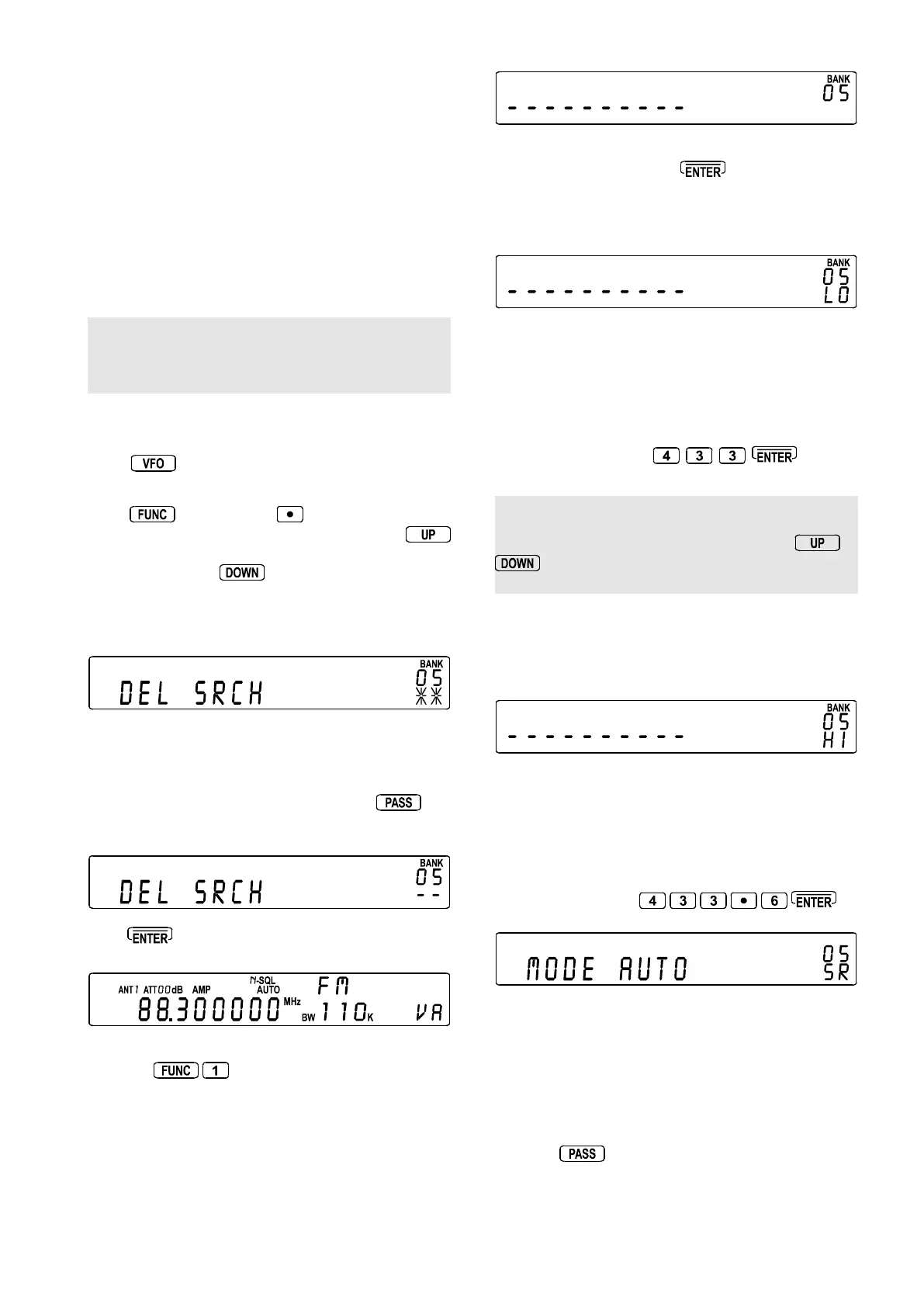
Rotate the SUB DIAL until “BANK
0505
0505
05” is displayed on the
right of the LCD.
If data is already programmed into this bank the legend “*
*” will be displayed, if no data is present the legend “- -”
will be displayed.
Assuming that data is present, press the
key
to delete the contents, after about one or two seconds
delay the legend will change to “- -” to confirm deletion.
Press to complete the sequence and return to VFO
mode.
To start programming select the data input menu by
pressing
Select the required bank by rotating the SUB DIAL, until
“BANK
0505
0505
05” is displayed on the right of the LCD (for this
example). As no data exists the legend “- - - - - - - - - -” will
be displayed, if data was present the upper (“
HIHI
HIHI
HI”) and
lower (“
LOLO
LOLO
LO”) frequency limits would alternatively be
displayed to warn that data was about to be over-written.
To accept the bank location of “
0505
0505
05” and initiate the
programming process press
Input the lower frequency limit: The legend “
LOLO
LOLO
LO” will
flash on the right of the LCD inviting entry of the LOWER
frequency limit.
LO <<<LO <<<
LO <<<LO <<<
LO <<<
HI
MODE FM (set to AUTO if AUTOMODE is used)
IFBW 0.5 (skipped if AUTOMODE is used)
STEP 1.000 (skipped if AUTOMODE is used)
TXT
In this example key in
, the key
strokes are echoed onto the LCD.
Note: If a mistake was made keying in previous data,
you may move backward (or forward) through the
data input selection process by holding the
or
key for more than one second depending upon
which way you wish to move.
Input the upper frequency limit: The legend “
HIHI
HIHI
HI” will
now flash on the right of the LCD confirming entry of the
previous data and inviting entry of the UPPER frequency
limit.
LO
HI <<<HI <<<
HI <<<HI <<<
HI <<<
MODE FM (set to AUTO if AUTOMODE is used)
IFBW 0.5 (skipped if AUTOMODE is used)
STEP 1.000 (skipped if AUTOMODE is used)
TXT
In this example key in
Select the receive mode: The legend “
MODEMODE
MODEMODE
MODE” will flash
on the display (along with the legend “
SRSR
SRSR
SR” on the right of
the LCD) inviting the receive mode to be entered. The
current receive mode is displayed to the right of the
“
MODEMODE
MODEMODE
MODE” legend. For example, if the receiver is currently
in AUTOMODE the legend “
MODE AUTOMODE AUTO
MODE AUTOMODE AUTO
MODE AUTO” will be
displayed. Rotate the SUB DIAL to select the receive mode,
the choice is:
AUTOAUTO
AUTOAUTO
AUTO,
FMFM
FMFM
FM,
AMAM
AMAM
AM,
LSBLSB
LSBLSB
LSB,
USBUSB
USBUSB
USB &
CWCW
CWCW
CW.
Note: the
key acts as a short cut to AUTOMODE.



 To Next Page