1082 Smart Switch Operation Manual
CHA-1082-8000/11
__________________________________________________________________________________________________________
__________________________________________________________________________________________________________
Page 19 of 48
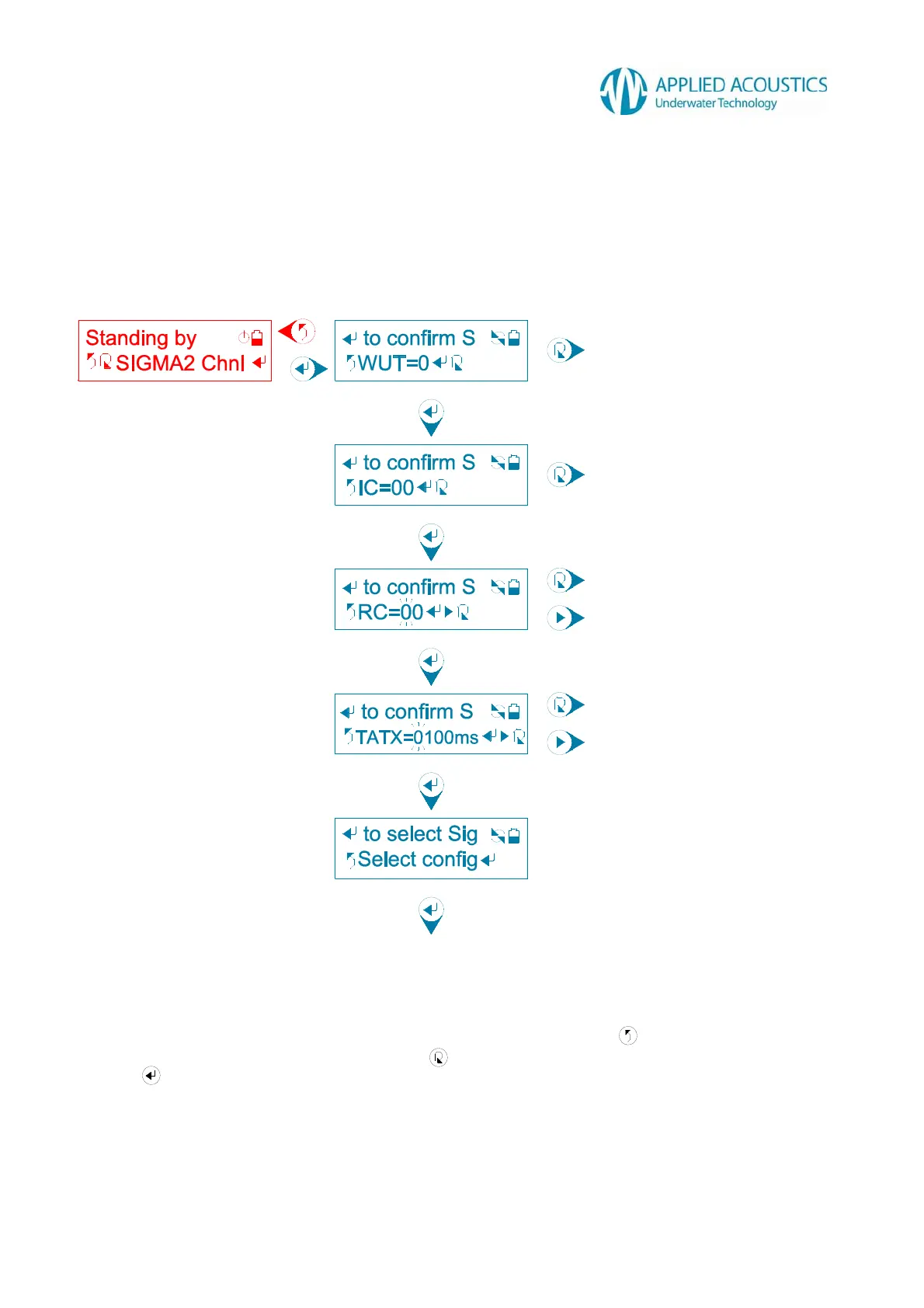
3.5.1.3 Sigma2 Channel
Sigma2 Channel configuration consists of confirming a Wake-Up Tone (WUT), Interrogate Code
(IC), Reply Code (RC) and Turn-Around-Time Extension (TATX) in sequence before selecting the
confirmed configuration: -
Fig. 11
First, a user selection for Wake-Up Tone (WUT) is displayed. Press to return to the previous
tier sub menu option “SIGMA2 Chnl”. Press to change the Wake-Up Tone (WUT) 0 through 7.
Press to confirm the Wake-Up Tone (WUT). The Smart Switch will display a “Confirmed!”
message.
Change Wake-Up Tone (WUT)
Confirm Wake-Up Tone (WUT)
Change Interrogate Code (IC)
Confirm Interrogate Code (IC)
Change digit
Shift flashing cursor
Change digit
Shift flashing cursor
Confirm Reply Code (RC)
Confirm Turn-Around-Time Extension (TATX)
Select configuration



 To Next Page