© Ikonix USA
43
4.5.3 Delete
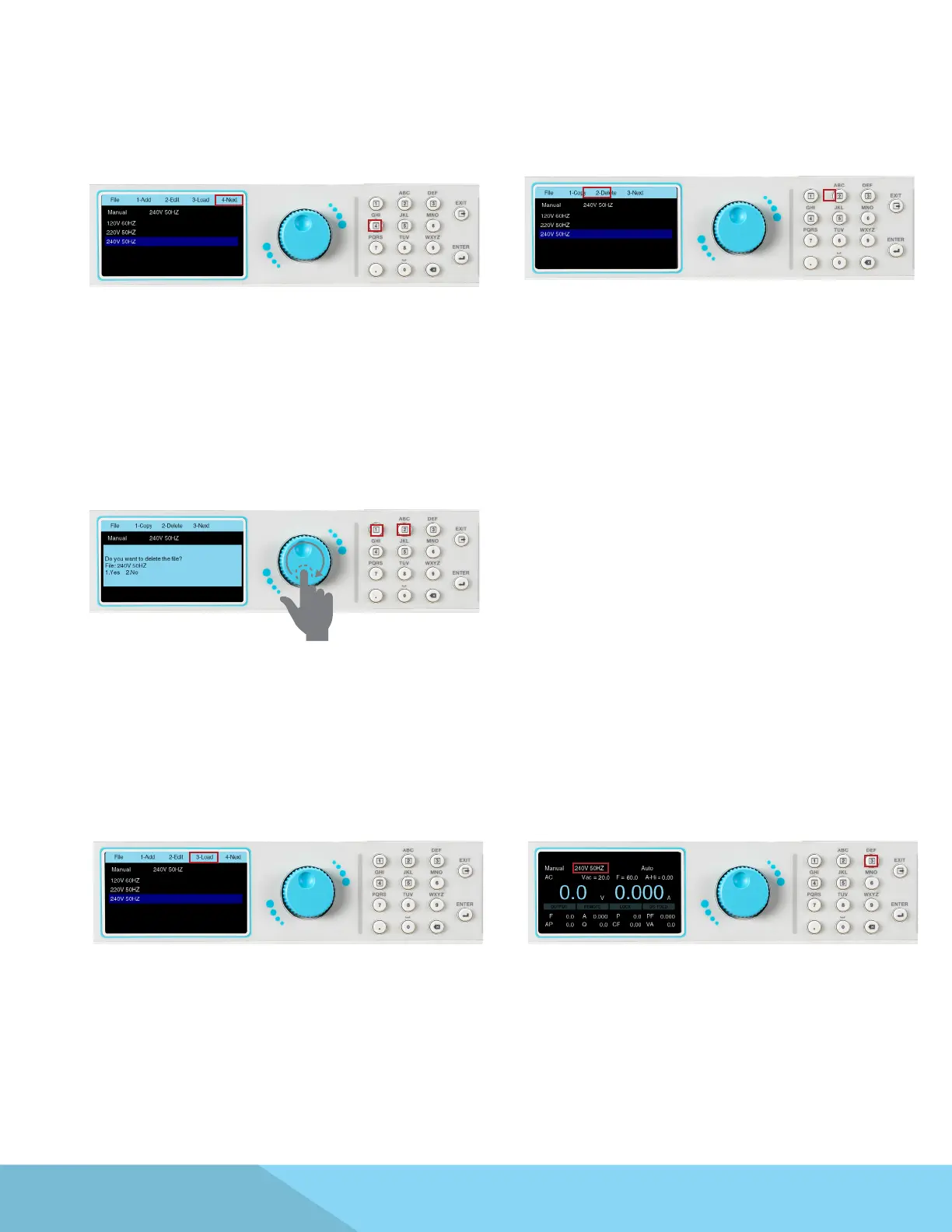
1. To Delete a test le select the Mode and go to
the File menu to view the list of test les. Press
the number 4 key on the keypad to view the next
page:
2. Use the rotary knob to select the le to be
deleted. The Delete selection will appear on the
menu bar, press the number 2 key on the keypad
to delete the highlighted le:
3. The following message will appear on the
screen to conrm that you would like to proceed
with deleting the selected le. Press the number
1 key on the keypad to select Yes, or press the
number 2 key on the keypad to select No. If Yes is
selected the le will be permanently deleted and
the screen will display any remaining test les.
4.5.4 Load
1. To load a le select the Mode in which the
le was created and access the File menu. The
selection to Load will appear on the menu bar:
2. Press the number 3 key on the keypad to
select Load and the screen will change to the test
screen. The test le name that was loaded will
appear on the screen:
4. The power source will start outputting if you
press the OUTPUT/RESET key on the front panel.
Make sure all of the output connections are
secure and all other safety precautions are taken.



 To Next Page