ARB INTENSITY IQ • USER MANUAL
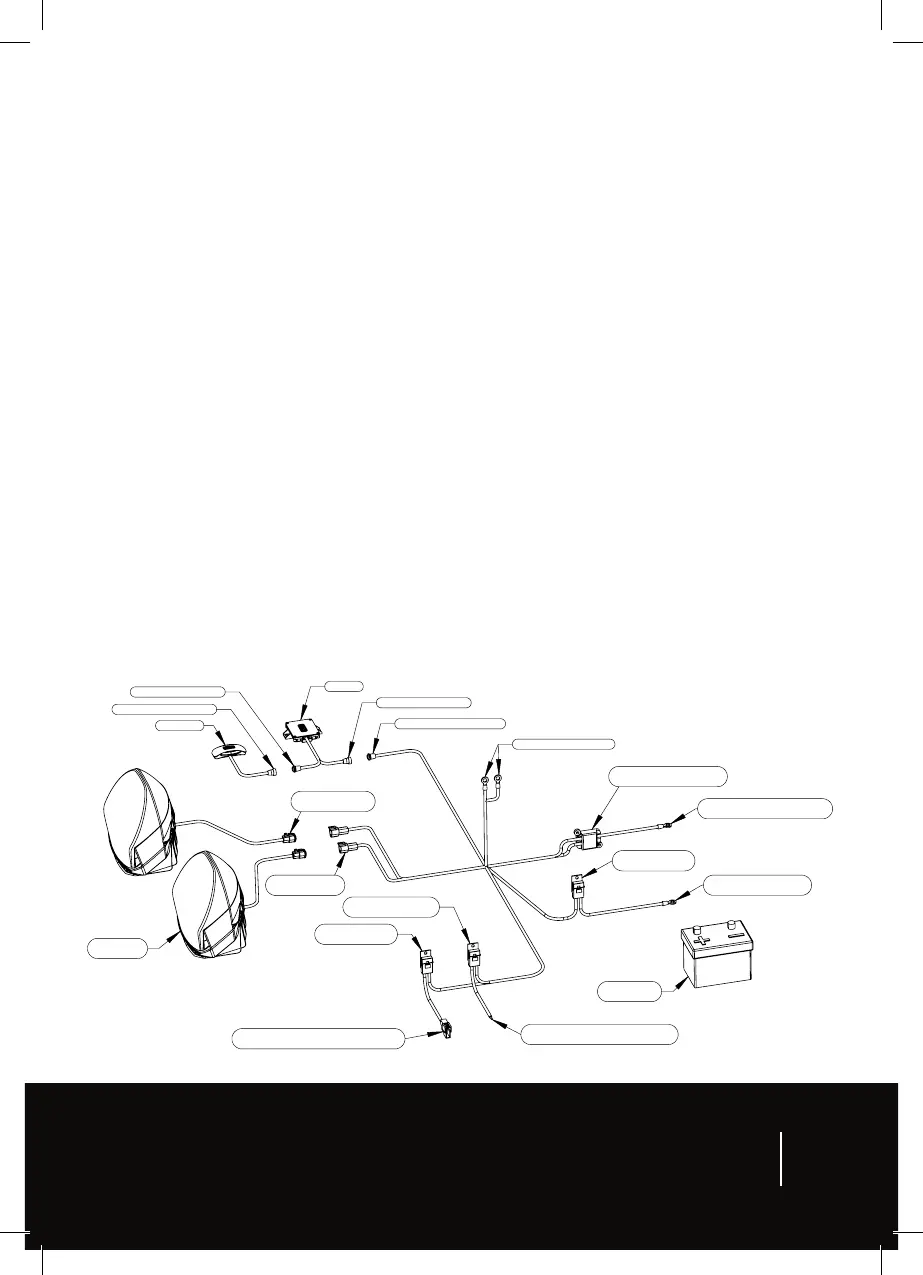
10. The system active trigger wire can be connected to either the vehicle ignition circuit or vehicle
illumination circuit. When the vehicle has automatic headlights, ARB recommends connecting
to the vehicle ignition. When the vehicle has manually operated headlights, ARB recommends
connecting to the vehicle illumination circuit (parker). Note, this wire switches on the LCM and
when switched of, activates the driving lights courtesy feature.
11. Connect the driving light connectors to the harness connectors.
12. Connect the driving lights terminal and LCM terminal to the batery positive terminal.
13. Connect the ground terminals to a suitable ground point on the vehicle body or chassis. Do not
connect directly to batery negative.
14. Secure all cables, check all connections.
15. Ensure the vehicle headlamps are switched OFF and reconnect the negative (-ve) cable to the
batery.
16. Check full operation of the driving lights including the below.
a. Vehicle ignition or headlights on and of should turn switch on and of. When turning ON,
the switch should flash to indicate LCM reboot. When turning OFF, the courtesy feature
should operate.
b. Vehicle high beams on and of should turn driving lights on and of.
c. Pressing the switch buton on and of (ARB logo) should turn the switch on and of.
d. Scrolling through the switch positions (1-6, QS and QS) should change the light output.
e. With a smartphone, connect with the LCM to confirm connection.
LCM
Driving
lights
Ground terminals
Driving lights
dual 20-amp fuses
System Active
3-amp fuse
Vehicle
battery
Driving lights terminal
(red)
System active trigger wire
(orange)
High beam
3-amp fuse
High beam trigger connector
(yellow)
LCM
3-amp fuse
Switch
LCM terminal
(Red)
LCM connector
Harness connector
Switch connector
LCM connector
Driving light
connector
Harness
connector
Figure 1
7


 To Next Page