4.10 Technique Factor Settings and Adjustments
The factory settings in this chart are intended as a reference starting point only, and are based upon
average preferences and use with the cone perpendicular to the image receptor. Individual results may
vary based upon a number of factors including image density preferences, the various imaging sensors
or available film speeds and brands, patient size, practitioner techniques and preferences.
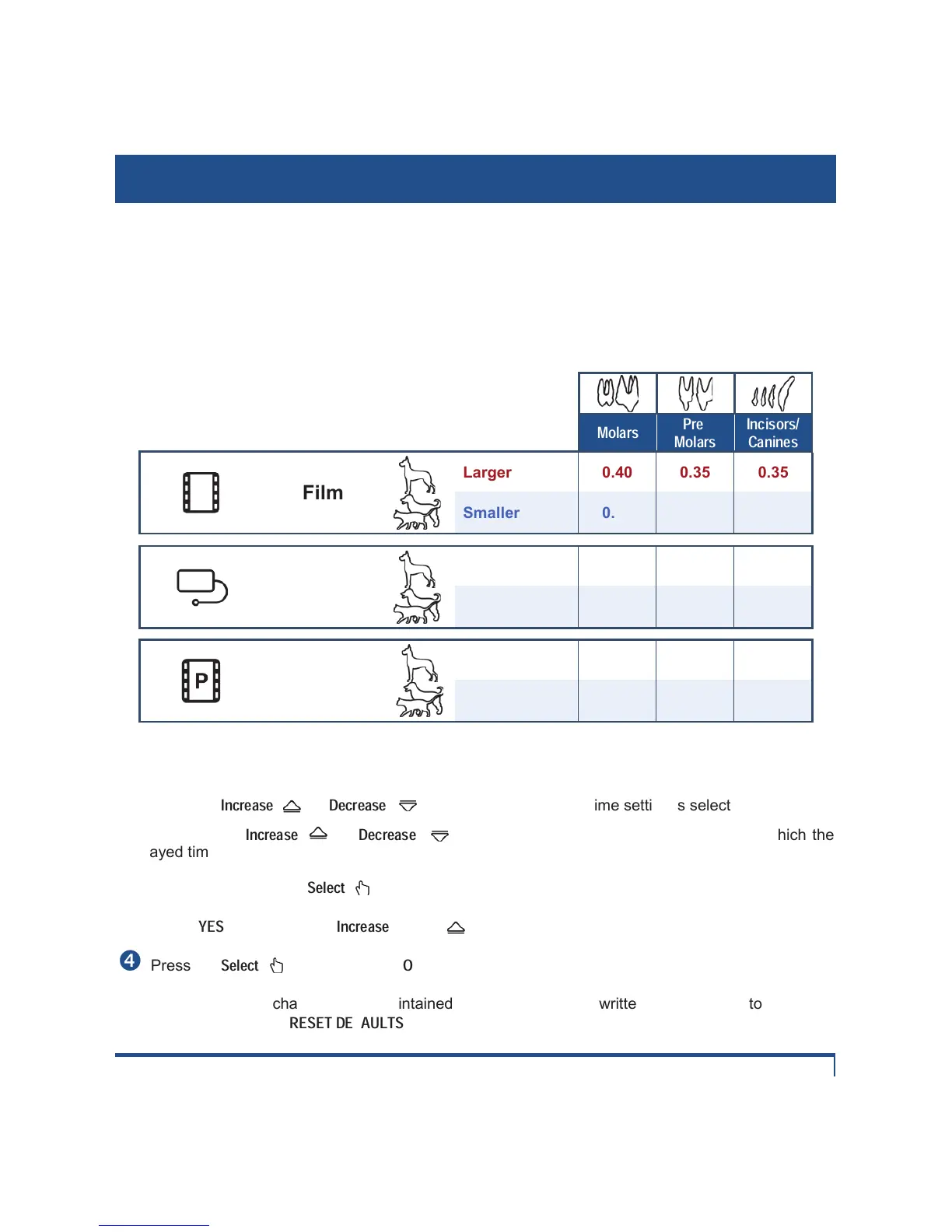
Preset Technique Factors Chart
Film
Larger 0.40 0.35 0.35
Smaller 0.21 0.17 0.17
Digital
Sensor
Larger 0.28 0.25 0.20
Smaller 0.15 0.13 0.12
Phosphor
Plate
Larger 0.35 0.30 0.30
Smaller 0.18 0.15 0.15
Technique Factor time setting can be adjusted by the operator. This is done from the main display
screen following these steps:
n Press the
Increase
( ) or
Decrease
( ) button until the desired time setting is selected.
NOTE: When the
Increase
(
) or
Decrease
( ) buttons are pressed AND held, the rate at which the
displayed time setting changes on screen suddenly accelerates.
o Press and release the
Select
( ) button to activate the Save menu.
p Select
YES
by pressing the
Increase
button ( ).
q Press the
Select
( ) button to select
OK
.
r Once saved, this change will be maintained in memory until overwritten or until the factory defaults
are restored through the
RESET DEFAULTS
Menu item.


 To Next Page