Quick Start Guide: CloudVision Appliance 21
Appendix C
Front Panel Features and Indicators
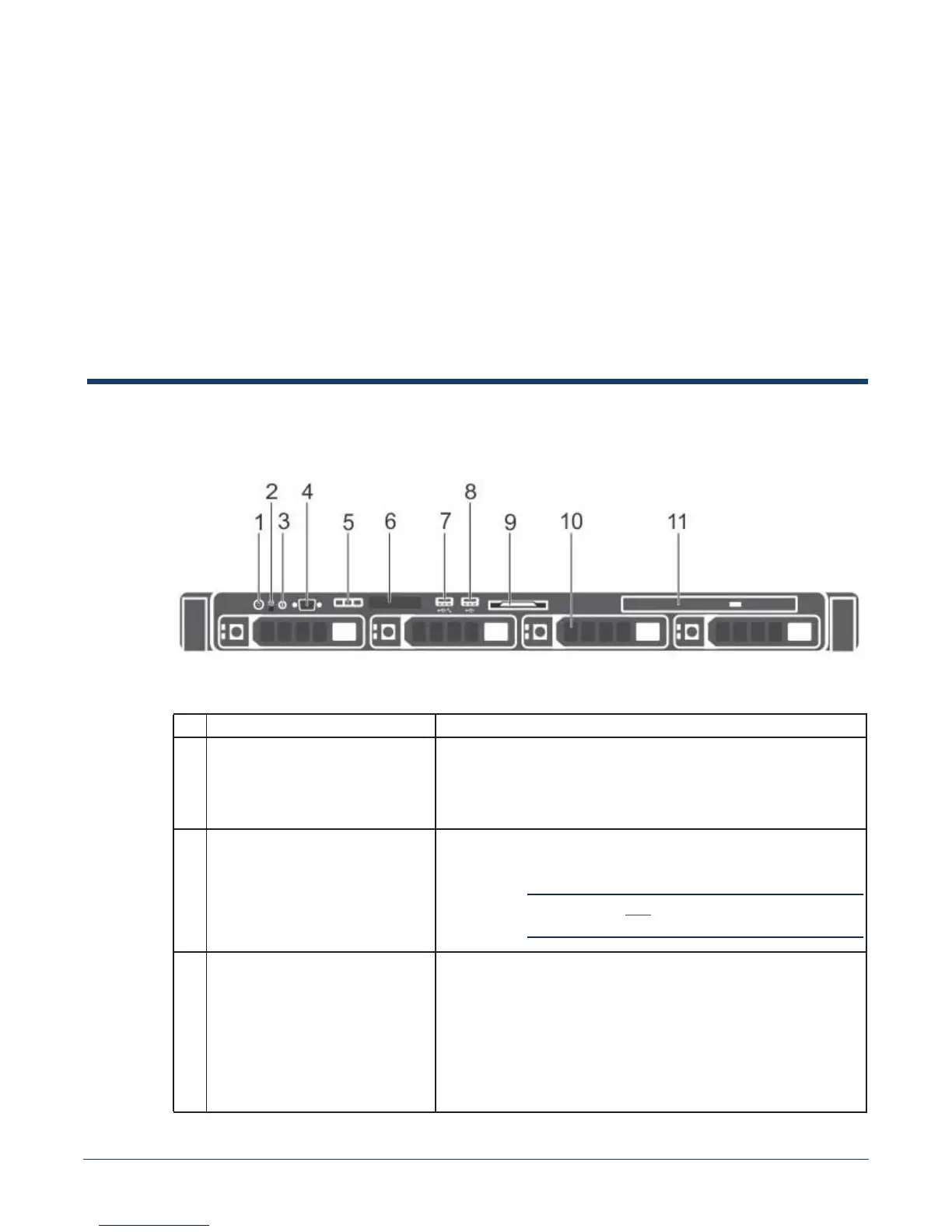
This appendix displays the front panel of the CloudVision appliance.
Figure C-1: CloudVision appliance (front view)
Table C-1 Front-panel features and indicators
Indicator, Button, or Connector Description
1 Power-on indicator, power button The power-on indicator lights when the system power is on. The
power button controls the power supply output to the system.
Note: On ACPI-compliant operating systems, turning off the system
using the power button causes the system to perform a graceful
shutdown before power to the system is turned off.
2 NMI button Used to troubleshoot software and device driver errors when running
certain operating systems. This button can be pressed using the end
of a paper clip.
Important! Use this button only if directed to do so by qualified
support personnel.
3 System identification button The identification buttons on the front and back panels can be used
to locate a particular system within a rack. When one of these
buttons is pressed, the system status indicator on the back flashes
until one of the buttons is pressed again.
Press to toggle the system ID on and off. If the system stops
responding during POST, press and hold the system ID button for
more than five seconds to enter BIOS progress mode.
To reset the iDRAC (if not disabled in F2 iDRAC setup) press and
hold the button for more than 15 seconds.



 To Next Page