Quick Start Guide: CloudVision Appliance 23
Appendix D
Back Panel Features and Indicators
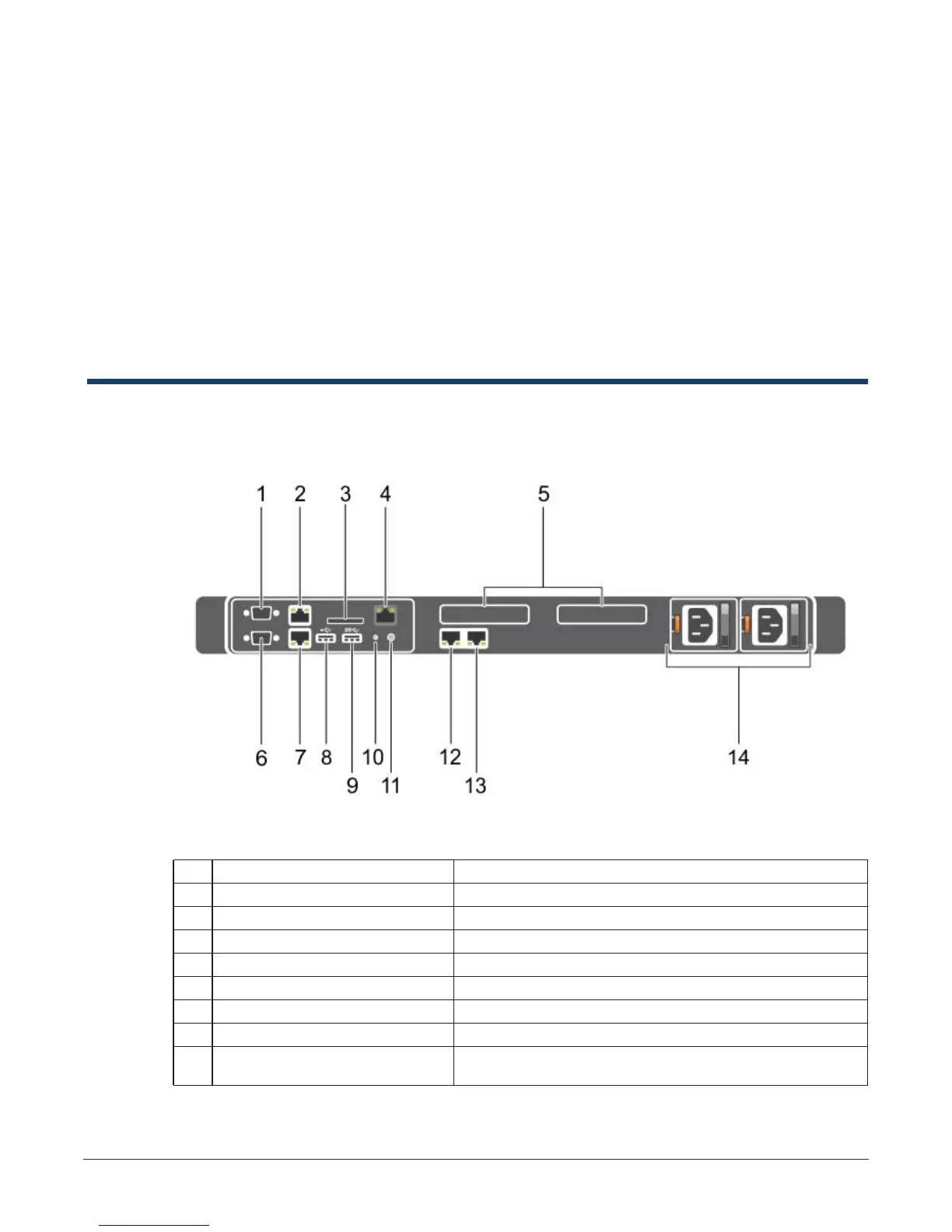
This appendix displays the back panel of the CloudVision appliance.
Figure D-1: CloudVision appliance (back view)
Table D-1 Back-panel features and indicators
Indicator, Button, or Connector Description
1 Serial connector Allows you to connect a serial device to the system.
2 Ethernet connector 1 Integrated 10/100/1000 Mbps NIC connector.
3 vFlash card slot (optional) Allows you to connect the vFlash card.
4 iDRAC port (optional) Dedicated management port on the iDRAC ports card.
5 PCIe expansion card slots (2) Allows you to connect a PCI Express expansion card.
6 Video connector Allows you to connect a VGA display to the system.
7 Ethernet connector 2 Integrated 10/100/1000 Mbps NIC connector.
8 USB connector Allow you to connect USB devices to the system. The port is USB
2.0-compliant.



 To Next Page