11
I/O Panel
1 2
3 4
5 6 7 8 9 11 10
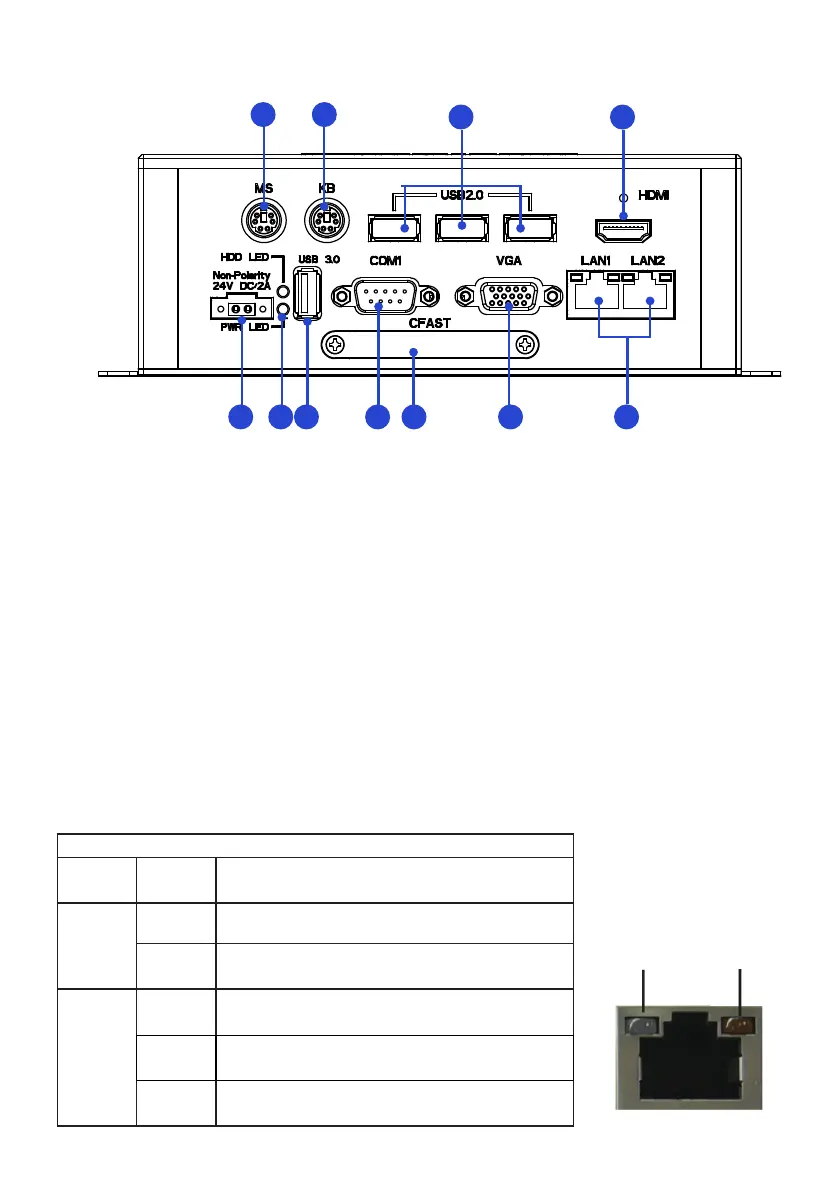
1. PS/2 Mouse connector 7. CFAST card slot
2. PS/2 Keyboard connector 8. Serial ports (COM1)
3. USB2.0 port x 3 9. USB3.0 port x 1
4. HDMI port 10. Power LED(up)/HDD LED(down) indicator
5. RJ45 LAN port x 2 11. 24V DC-IN power connector
6. VGA port
Speed LED Activity LED
LED Indications on the LAN port
Status Description
Activity
LED
O No network connection
On Data transmission activity
Speed
LED
O Data transmission at the rate of 10Mbps
Orange Data transmission at the rate of 1Gbps
Green Data transmission at the rate of 100Mbps
PWR LED: Power LED indicator -
The LED lights up when you turn on the system,
andswitchesoinstandbymode.
HDD LED: Hard Disk Activity LED indicator-
Read or write activities of the hard
disk cause the LED to light up.


 To Next Page