19
Mounting the MicroBox computer
1. Wall mounting
There are two methods to mount the MicroBox-7824B E-Series industrial microbox
computer: Wall and DIN-rail mounting.
The MicroBox-7824B E-Series microbox computer can be placed on a shelf, table,
or mounted onto a wall or board. To mount it onto a wall or board, you will require the
mounting screws found in the accessory box.
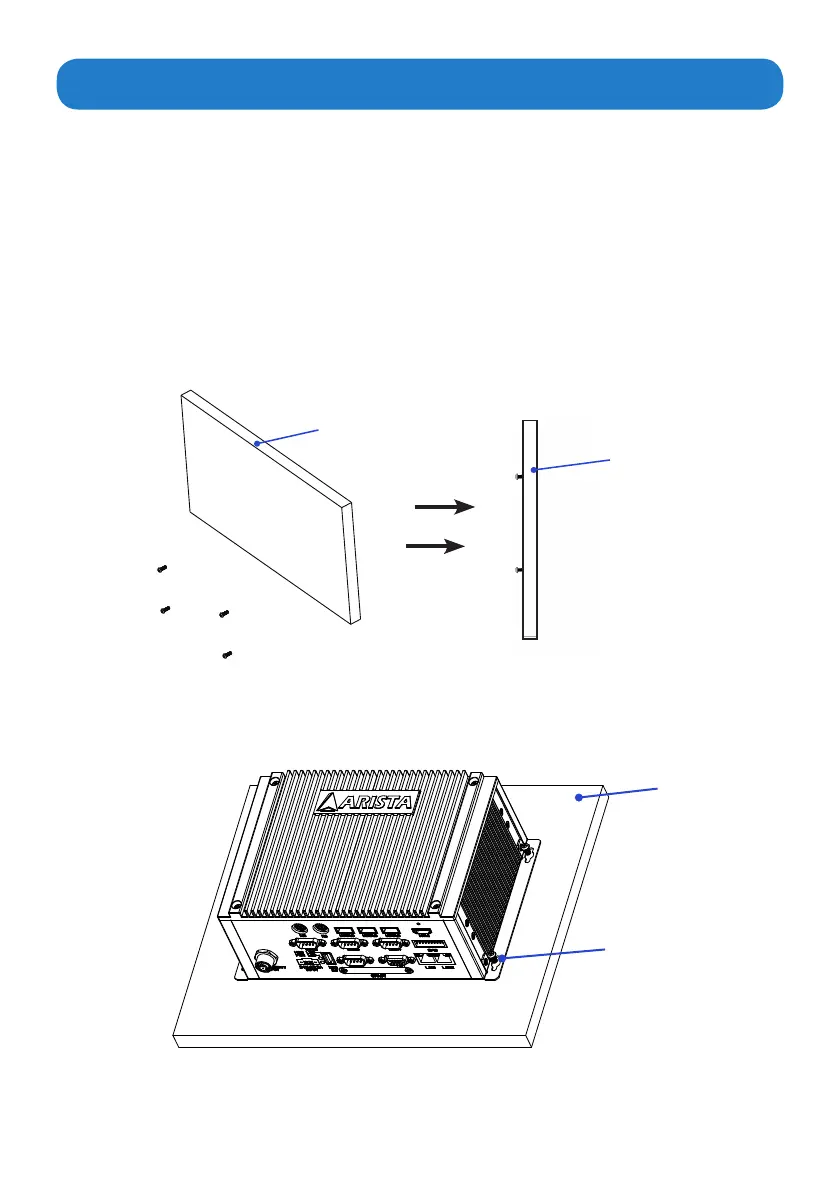
Please follow the steps shown in the diagram below:
Step1.
Situate the four “#8-32UNC” size screws on a board or a wall and use a screwdriver
tormlyxthemintothewallorboard(Donotcompletelytightenthescrews).
Step2.
Then put the MicroBox-7824B E-Series microbox computer onto the screws through
the mounting hole on the computer.
Wall or board
(side view)
Screws
Wall or board
Wall or board
Mounting hole


 To Next Page