29
Installing memory module/expansion card
Before you install the memory module or expansion card, please follow the instructions
below to open the chassis of the MicroBox-7824B E-Series fanless industrial microbox
computer.
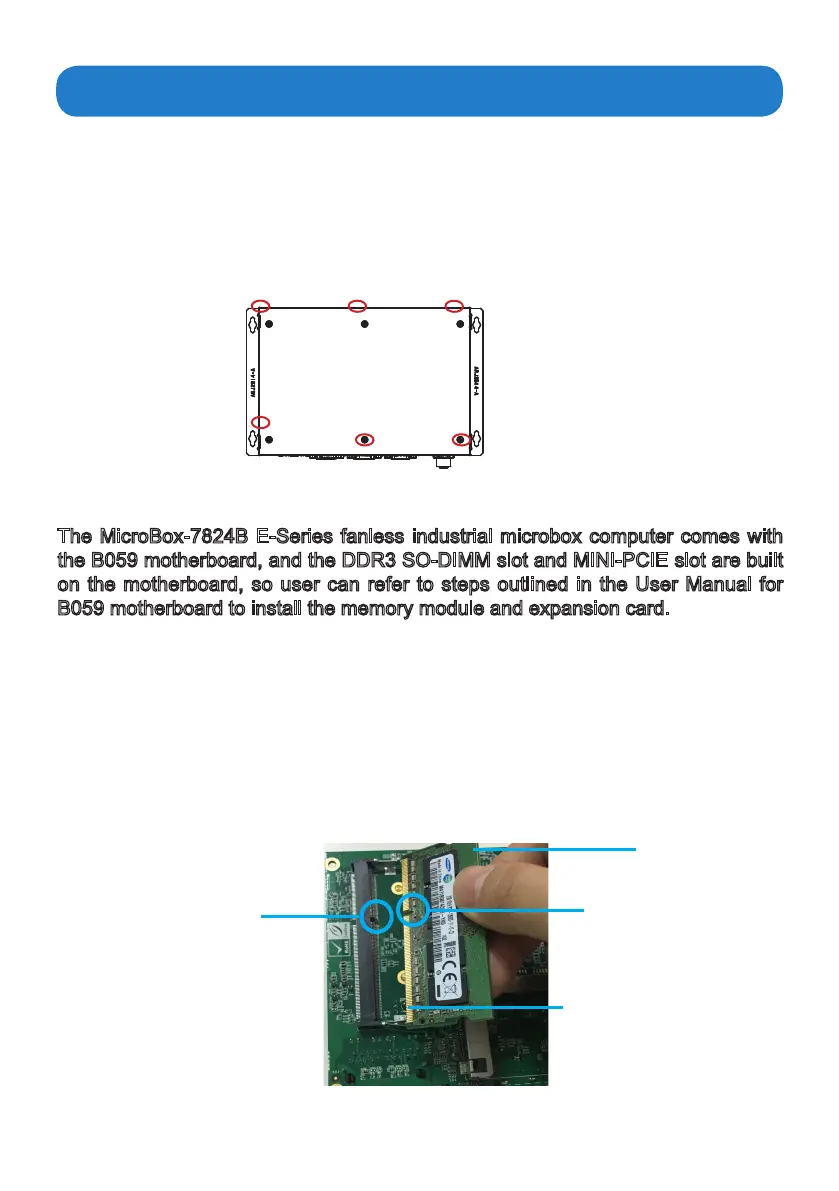
1. Remove the six screws on both sides of the bottom case( Figure 1).
2. Then remove the bottom case of the computer, youwillndtheDDR3SO-DIMMslot
and MINI_PCIE slots.
Figure 1
The notch on
the DIMM
DIMM
Goldenngeron
the DIMM
The key on
the slot
1. Locate the DIMM on the SO-DIMM slot and align the notch on the DIMM with
the key on the slot.
Note:
DO NOT force a DIMM into a slot to avoid damaging the DIMM.
Installing the memory module
The B059 motherboard provides one SO-DIMM slot for DDR3 1333MHz SDRAM
memory modules and supports memory size up to 8GB.
The MicroBox-7824B E-Series fanless industrial microbox computer comes with
the B059 motherboard, and the DDR3 SO-DIMM slot and MINI-PCIE slot are built
on the motherboard, so user can refer to steps outlined in the User Manual for
B059 motherboard to install the memory module and expansion card.


 To Next Page