47
Security Menu
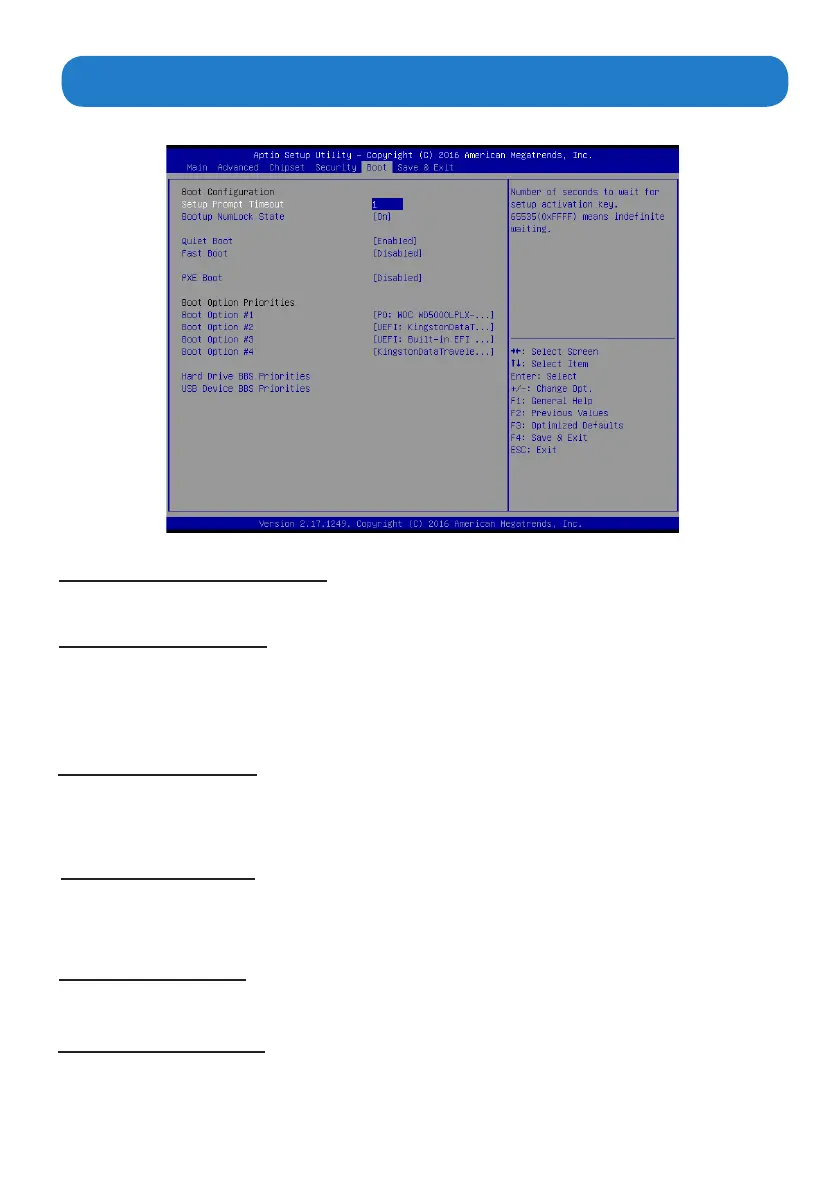
Boot Menu
The Boot Menu allows changing in the system boot options.
UPS FUNCTION (OFF)
Bootup Num-lock state (ON)
This item allows the Uninterruptible Power System(UPS) setting. Set this item to “OFF”, work well with
the system unit using battery power when sudden power lost occurs. this item “ON” automatically power
o without any damage on the data of the hard disk.
If this item is set to “On”, it will automatically activate the Numeric Lock funcition after boot-up.
Quiet Boot (Enabled)
This item allows bootup screen options to be modied between POST messages or the OEM logo.Select
“Disabled” to display POST messages. Select “Enabled” to display the OEM logo instead of the normal
POST messages.
Fast Boot (Disabled)
This item enables BIOS to skip certain tests in order to speed up the boot sequence. This feature has two
options: [Enabled] [Disabled].
PXE Boot(Disabled)
Boot Option Priorities
This item allows the execution of UEFI and Legacy PXE OpROM.
This item allows system boot order selection.


 To Next Page