Chapter 4: Installing and Connecting your Data Gateway
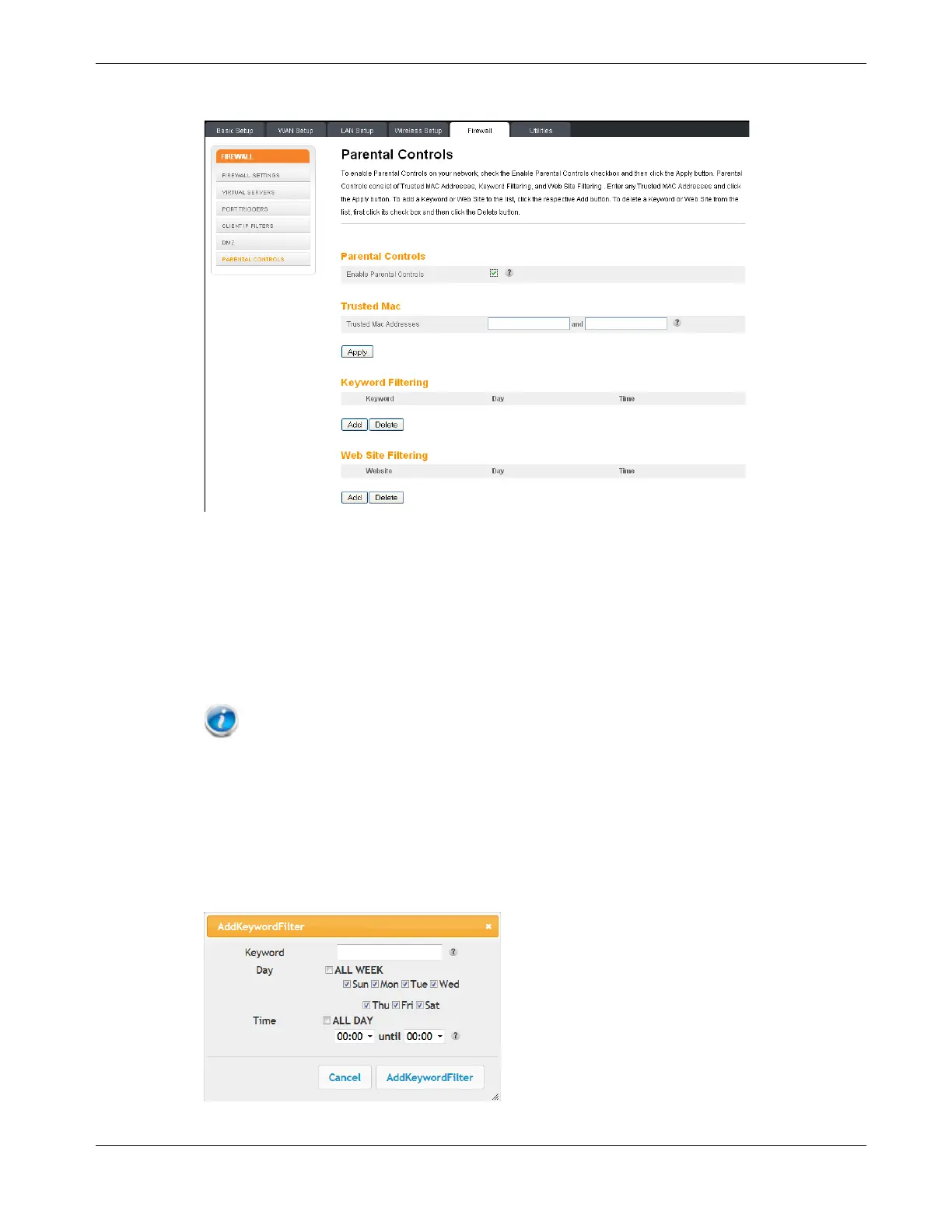
3. Check the Enable Parental Controls checkbox and click the Apply button.
4. Configure any or all of the following parental controls:
Trusted MAC Addresses:
Enter the MAC addresses of any “trusted” computers on the network and click the Apply
button. You can add two trusted computers. Once added, these trusted computers will
not be affected by the parental control settings. For example, you may want the
computers of the father and mother to be trusted, while the childrens’ computers have
parental controls in effect.
Note: Refer to the Finding the MAC Address of a Computer (page 23) for information
on determining the MAC address of your computer.
Keyword and Web Site Filtering:
You can add a list of keywords and web sites that you want to block. To add a keyword
or web site to the list, click the respective
Add button. To delete a keyword or web site
from the list, first click its check box and then click the
Delete button.
Add Keyword Filter Dialog Box
Release 16 STANDARD 1.3 March 2015 Touchstone DG1680 Data Gateway User Guide 24














 To Next Page