Chapter 4: Installing and Connecting your Data Gateway
Connecting the Data Gateway
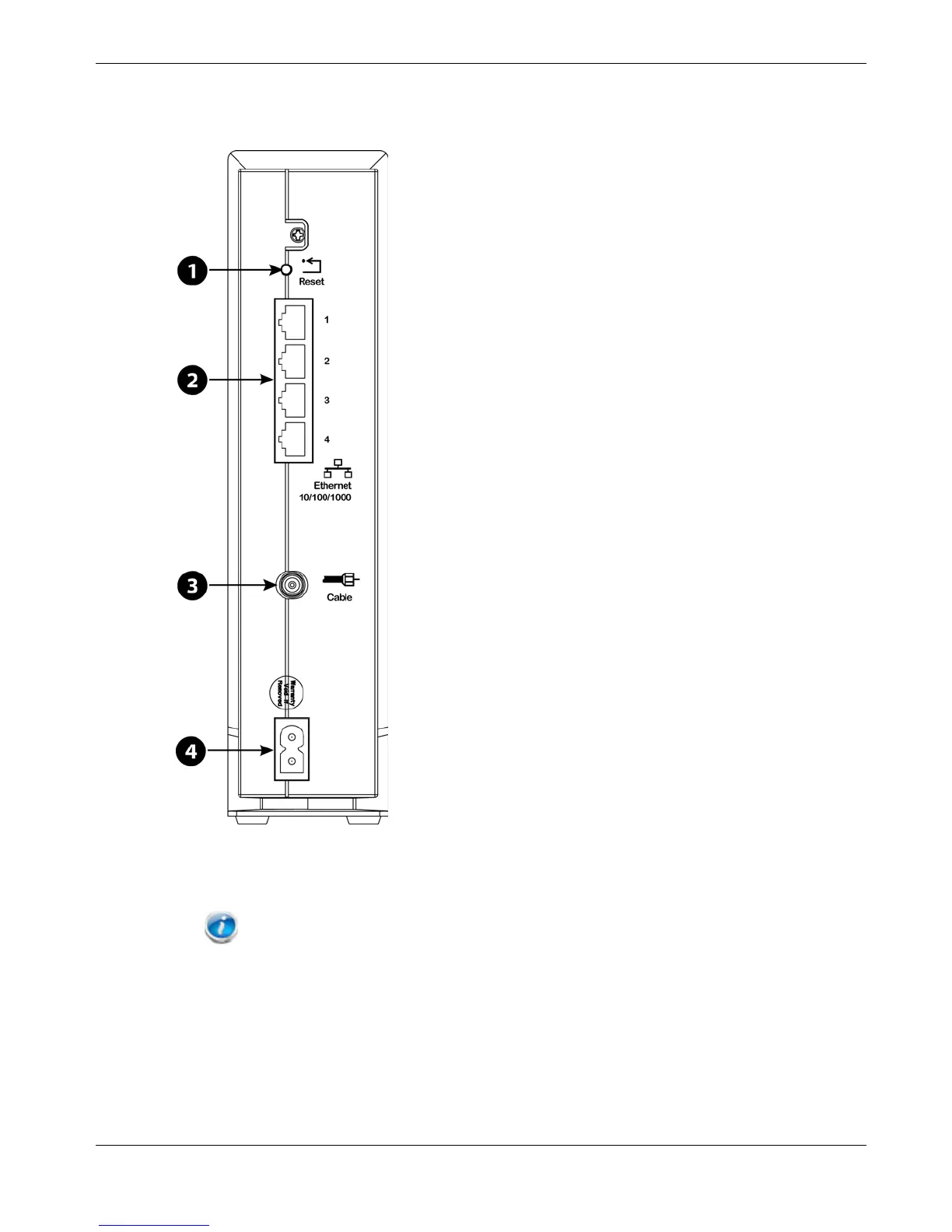
1. Connect one end of the coax cable to the cable outlet or splitter, and the other end to
the Data Gateway’s Cable connector (3). Tighten the connections by hand, then tighten
an additional 1/8 turn with a wrench.
Note: For best performance, use high-quality coax cable and minimize or eliminate
splitters between the cable jack and the Data Gateway.
2. Insert the plug from the power cord into the Power connector on the back of the Data
Gateway (4) and insert the power cord into a convenient AC outlet.
The Power light on the front of the Data Gateway lights up, then flashes once (refer to
the LED tables shown in Using the Data Gateway). See Troubleshooting (page 33) if the
Power light does not turn on.
Release 24 STANDARD 1.1 February 2015 Touchstone DG2460 Data Gateway User Guide 20



 To Next Page