17
TM508/TM512 Installation Guide Release 5 Standard 1.2 Mar 2007
5 Tighten the screws to firmly hold the punch-down block against the
mounting surface.
Connecting
Subscriber Wiring
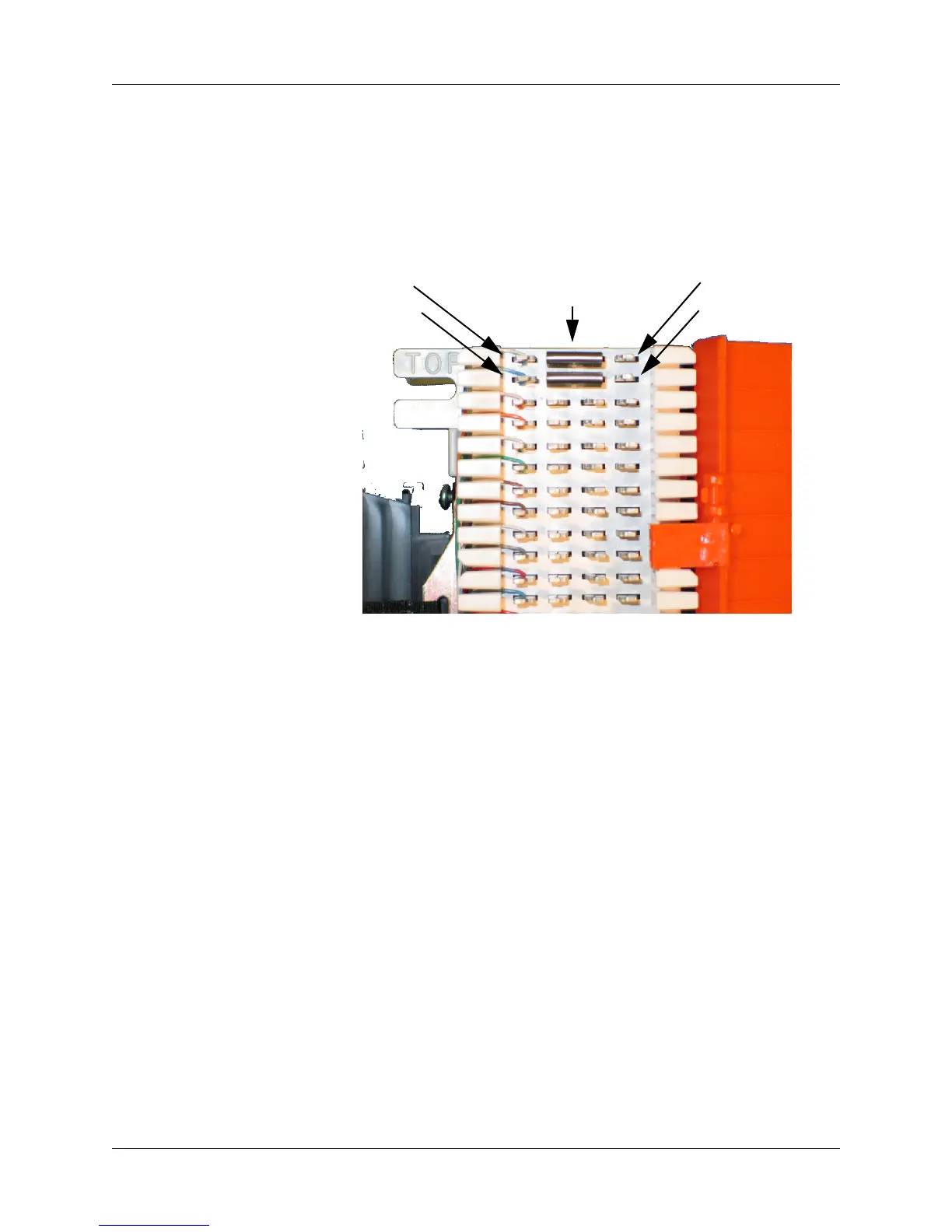
Follow these steps to connect subscriber wiring to the punch-down
block. Consult the following diagram while making connections.
1 Identify the tip-ring wire pair that should be associated with the
Telephony Modem line that you are connecting.
2 Route the wire pair to reach the right side of the punch-down block.
3 Using the punch tool, punch the tip wire into the first of the two
connections for the line, and the ring wire into the second connec-
tion. It is not necessary to strip the wires before punching.
4 Install two bridging clips across the tip and ring lines to enable tele-
phone service (clips for line 1 are shown above).
5 Repeat steps 1 through 4 for each line to install.
6 Close the punch-down block cover after connecting all lines.
Bridging Clips
(required to
enable service)
Network side Subscriber side
Line 1 – Tip
Line 1 – Ring
Line 1 – Tip
Line 1 – Ring















 To Next Page