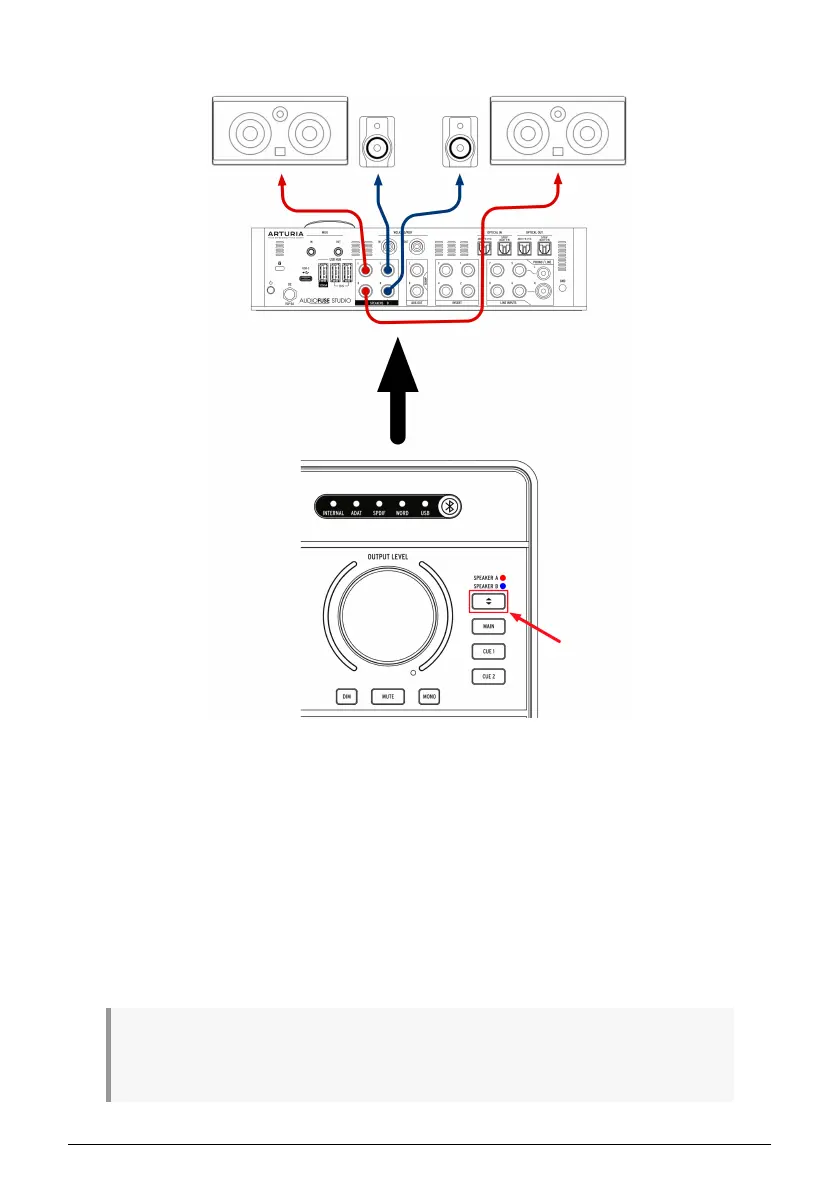
1.4.6. Use AudioFuse to switch between 2 sets of active speakers
It is common practice for recording engineers to audition their mixes on different speakers
as they work. For example, they may have professional studio monitors as their main
speakers but a pair of cheap hi-fi speakers as a "reality check" to ensure that the mix is
sounding good even on lower quality speakers. Other engineers may have professional
studio monitors as their main speakers but a massive PA speaker system for visiting clients
that like to hear it turned up loud.
The Speaker A and Speaker B outputs on AudioFuse Studio make doing this very easy.
1. Connect your main speakers to Speaker Output A
2. Connect your second set of speakers to Speaker Output B
3. Press the Speaker Selector button to switch between your two pairs of speakers.
♪: The AudioFuse Control Center application includes a trim knob that lets you precisely match
loudness levels between your A and B speakers. Please refer to the AudioFuse control Center User
Manual [p.45] to learn how to do this.
22 Arturia - User Manual AudioFuse Studio - AudioFuse Studio



 To Next Page