1.5. An in-depth look at AudioFuse Studio
This chapter covers the inner workings of AudioFuse Studio. While the knowledge contained
in this chapter is not strictly necessary for everyday use, we think technically minded users
may find it interesting!
1.5.1. Input Paths in Detail
1.5.1.1. Input Channels 1 - 4
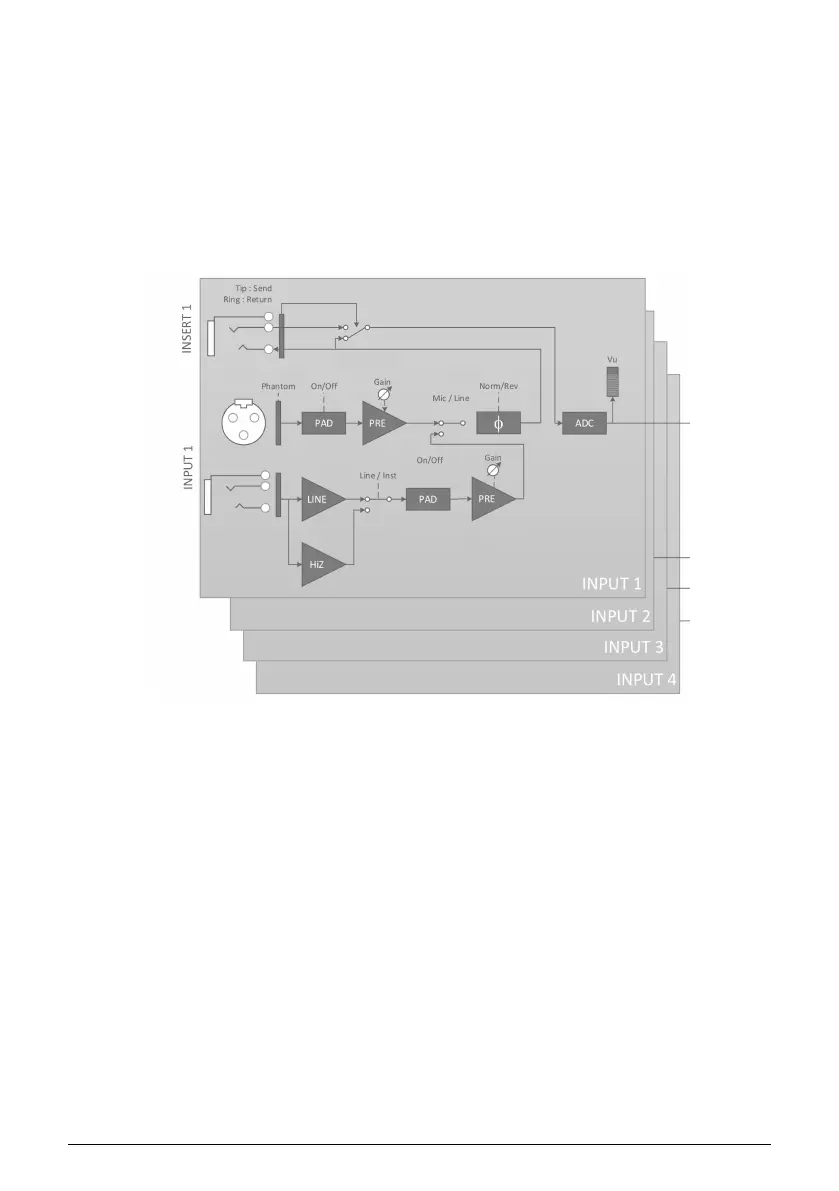
The functional block diagram above shows the complete input signal path of the four Input
Channels of AudioFuse Studio. Notice that DiscretePro preamplifiers actually consist of two
separate preamplifiers!
• The XLR input path is designed specifically to handle microphone signals with
the highest fidelity.
• The 1/4" input path is similarly designed to handle Line and Instrument-level
signals with the highest possible fidelity. This path is sub-divided into two
different paths, one for standard line-level and the other for "hi-z" instrument level
inputs (the
Inst
button on the front panel determines which path is selected).
• Each input path (Mic and Instrument) has its own dedicated Pad, and--as
mentioned before--there are two separate high-end preamplifiers for each path
to ensure the highest possibly fidelity for each source.
The amplified signal is then sent through the (optional) phase-reversal circuit and send on
to the insert jack. If nothing is connected to the insert jack, the signal is automatically sent
on to the analog-to-digital converter. If you do connect a device like a compressor or EQ to
the insert jack, then the signal is "sent" to that device and "returned" to the analog-to-digital
converter. You can learn how to do this in Chapter 4.
Finally, notice that VU metering happens after the analog-to-digital conversion. This ensures
that you are monitoring the actual digital signal that is being sent to the computer. If there
is any digital clipping taking place, you will be sure to see it here.
26 Arturia - User Manual AudioFuse Studio - AudioFuse Studio



 To Next Page