• SPDIF Type options are Coaxial and Optical. The Coaxial setting sends and
receives SPDIF data at the WCLK | S/PDIF In/Out RCA connectors. The Optical
setting sends and receives SPDIF data at the Optical In/Out S/PDIF ports (also
labeled ADAT 5-8).
• Digital Coax Format Selection options are SPDIF and Word. SPDIF sends and
receives SPDIF data at the WCLK | S/PDIF In/Out RCA connectors. The Word
setting means that the WCLK | S/PDIF connectors will send and receive Word
clock signals only.
♪: The Digital Coax Format Selection is not accessible when the SPDIF Type is set to Optical.
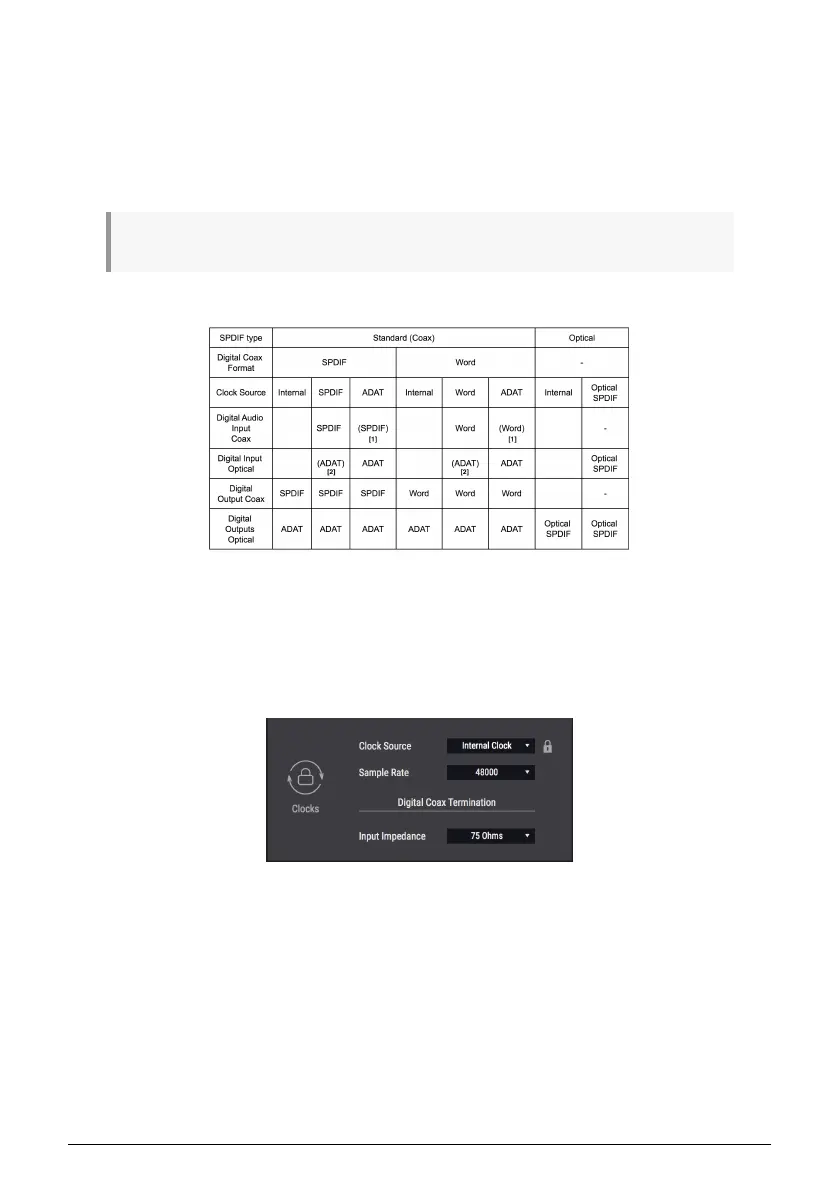
The following chart presents this information in another way that may be helpful.
[1] = Specified format can be received if incoming sample rate matches the Clock Source
selection [2] = ADAT audio can be sent at a sample rate that matches the Clock Source
selection n/a = not available or not applicable
Clocks
46 Arturia - User Manual AudioFuse Studio - AudioFuse Control Center



 To Next Page