Need help?
Do you have a question about the ASCOM NIRC4-xMN and is the answer not in the manual?
Provides critical safety instructions and symbols for installation and operation.
Step-by-step guide for attaching the NIRC4-xMN base to EU and North American style backboxes.
Instructions for mounting the NIRC4-xMN base directly onto a flat wall surface without using a backbox.
Step-by-step guide to seating 8-pin block connectors onto the active room bus terminals.
Step-by-step guide to seating 8-pin block connectors onto the active room bus terminals for NI-series.
Explains how to place the ferrite cable clamp around the LAN cable near the RJ45 connector.
Details powering the NIRC4-xMN using an auxiliary 24VDC power supply via a power injector.
Instructions for placing NILD2 or NILD4-RGB LED boards to function as a corridor lamp.
Details installing the NIRX wireless transceiver module for wireless nurse call functionality.
Instructions for installing the NIVP4 voice module for speech functionality.
Explains how to create a Wireless Gateway by connecting a NUREP to the NIRC4-xMN USB port.
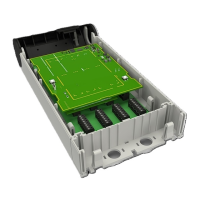
The Ascom Room Controller 4 (NIRC4-xMN) is a teleCARE IP controller designed to establish a decentralized node within an IP network, acting as a gateway between four digital room buses and the IP network. This device is compatible with NU-series modules, supporting up to 12 such modules per room bus.
The NIRC4-xMN serves as a central control unit in a teleCARE IP system, facilitating communication and functionality for various connected modules. It integrates with the IP network via a 100Mb Ethernet connection, supporting Power over Ethernet (PoE) for power input, or an auxiliary power supply through a PoE Midspan. The controller also provides firmware upgrade support for connected NU-series modules, ensuring system maintainability and future compatibility.
Beyond its core control functions, the NIRC4-xMN offers several optional expansion capabilities. It includes a connection for an optional wireless transceiver (NIRX), enabling wireless nurse call functionality. An optional voice module (NIVP4) can be integrated to support speech communication for NU-series modules. The device can also function as a corridor lamp, accommodating up to four LED boards (NILD2 and NILD4-RGB) behind a translucent dome cover, allowing for visual signaling and workflow indications. An integrated USB 2.0HS Host Port and Device Port provide connectivity for a Wireless Gateway, which, when combined with a NUREP, can establish a full wireless infrastructure supporting up to 12 Wireless Repeaters per gateway.
 General
| Brand | ASCOM |
|---|---|
| Model | NIRC4-xMN |
| Category | Controller |
| Language | English |

 To Next Page