INSTALLATION GUIDE
Room Controller 4 (NIRC4-xMN) Setting the Room Bus Type Selection
6 Setting the Room Bus Type Selection
Before connecting any of the wires, first set the bus-type selection DIP switch to match the modules (NU-
series or NI-series) that are going to be connected to the NIRC4-xMN.
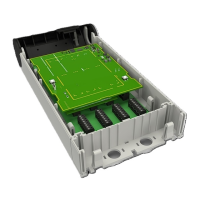
The following figure illustrates the DIP switch found on the back of a NIRC4-xMN circuit board.
Figure 4. Room bus type selection DIP switch
DIP switch settings for room bus type selection
(1) DIP switch 1 (OFF) = NU-series Modules
(2) DIP switch 1 (ON) = NI-series Modules
To set a DIP switch:
1. Set DIP switch 1 to the room bus type required for the connected modules. Use the bus type settings
above to determine the correct positions (ON or OFF) for DIP switch 1.
2. Using a small screwdriver, gently slide the switch up for “ON” or slide it down for “OFF”.
DIP switch settings only take effect after a power cycle.
TD 93351EN / 21 March 2022 / Ver. B 9


 To Next Page