Mounting
INSTALLATION GUIDE
Room Controller 4 (NIRC4-xMN)
4 Mounting
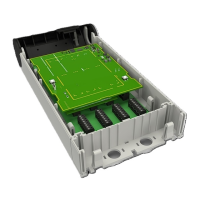
The base of the NIRC4-xMN mounts to backboxes using an array of holes that allow for mounting on
various EU and North American-style backboxes. In areas where no backboxes are available, the base can
be mounted directly onto flat wall surfaces.
Caution: To prevent a fire hazard because of dust buildup inside the NIRC4-xMN, regular
inspection and/or cleaning of the NIRC4-xMN is required.
Take proper measures to avoid spreading dust and other particles when applying
maintenance to an NIRC4-xMN that is mounted inside a clinical area.
4.1 Mount the NIRC4-xMN base onto a backbox
1. Place the base over the backbox with the spring type holding clip (1) pointing to the left.
2. For EU-style backboxes, loosen the screws so that approximately 5mm extend from the backbox so
that the heads of the screws can pass through the key-hole slots.
For North American-style backboxes, insert the screws (included) through the backplate and into the 2-
gang backbox.
3. Position the base until its top is level.
4. Tighten the screws until they are snug. Do not overtighten.
5. Pull the cables from the backbox through the base hole.
4
TD 93351EN / 21 March 2022 / Ver. B


 To Next Page