Mounting
INSTALLATION GUIDE
Room Controller 4 (NIRC4-xMN)
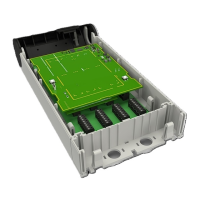
To mount the NIRC4-xMN base on a wall
1. Place the base against a flat wall and orient it so that arrow is pointing up and that the base is level.
(See Figure 1. NIRC4-xMN base orientation and cutouts, page 5, item 1.) Use a leveling device to check,
if necessary.
2. Make sure that the knockouts are pointing down and to the right. (See Figure 1. NIRC4-xMN base
orientation and cutouts, page 5, items 3).
3. Using the base as a template, mark four holes for the screws using the slotted fitting holes located in
the base.
4. Remove the base and drill holes for the screws that will be used, such as wood, concrete, or drywall
screws, or screws with anchors.
5. Place the base (with the knockouts removed) over the holes, insert the screws, and then tighten.
6. Pull the cables through the knockout holes and follow the directions in the following sections.
The NIRC4-xMN must be mounted in a way that the module is firmly attached to the background.
6 TD 93351EN / 21 March 2022 / Ver. B


 To Next Page