22
Auto setup function
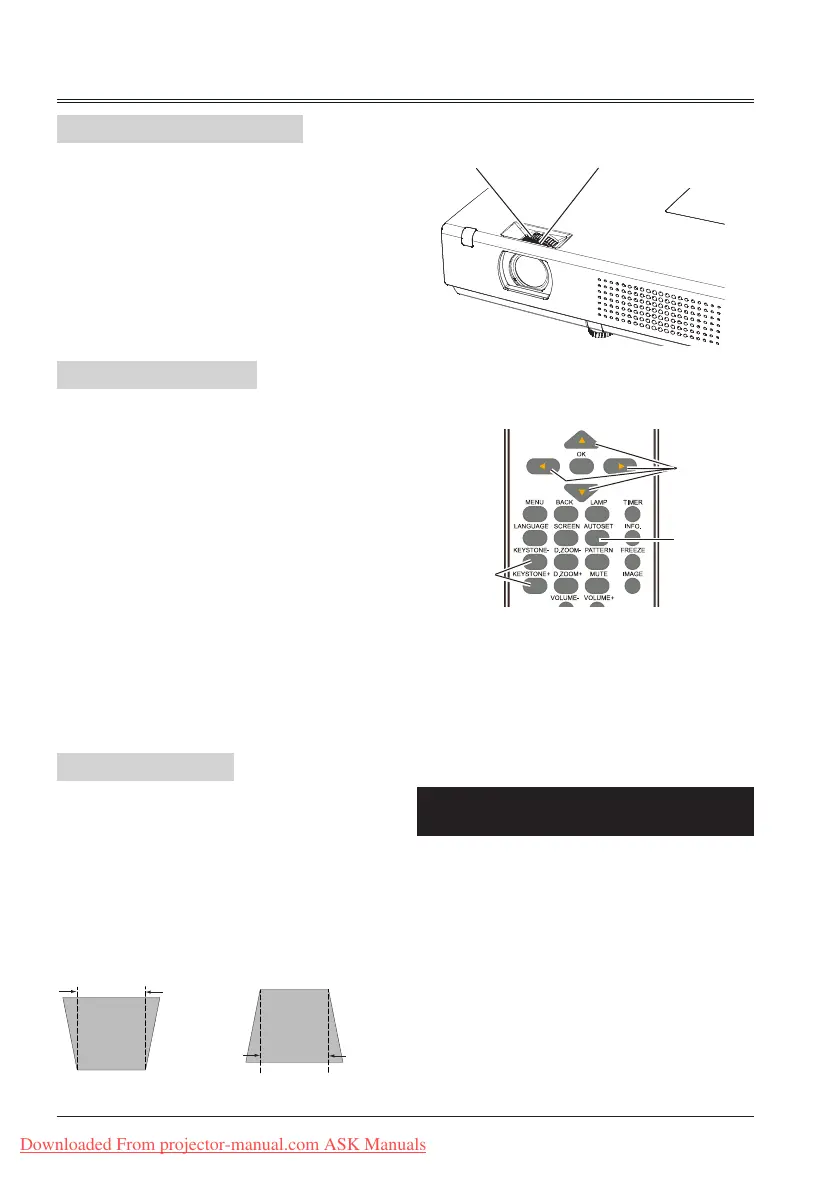
Adjust zoom and foucus
Keystone
This function is available just by pressing the
AUTOSET button on the remote control. The
system then automatically performs various
settings in the setup menu, including input source
search and auto pc adjust.
Rotate the zoom ring to zoom in or zoom out
the image.
Rotate the focus ring to adjust the focus of the
image.
Zoom ring
(back)
If a projected picture has keystone distortion,
follow the steps below to manually correct the
image.
Press the KEYSTONE button on the remote
control. The keystone dialog box appears.
Correct keystone distortion with
buttons.
Keystone adjustment can be stored.
● The arrows are white when there is no
correction.
● The arrows that are used for correction turns
red.
● The arrows disappear at the maximum
correction.
● If you press the KEYSTONE button on the
remote control once more while the keystone
dialog box is being displayed, the keystone
adjustment is canceled.
● The adjustable range can be limited
depending on the input signal.
Remote control
AUTOSET
button
KEYSTONE+/-
button
button
Keystone
Focus ring
(front)
Basic operation
Reduce the upper
width with
button.
Reduce the lower
width with
button.
Downloaded From projector-manual.com ASK Manuals



 To Next Page