9
Part names and functions
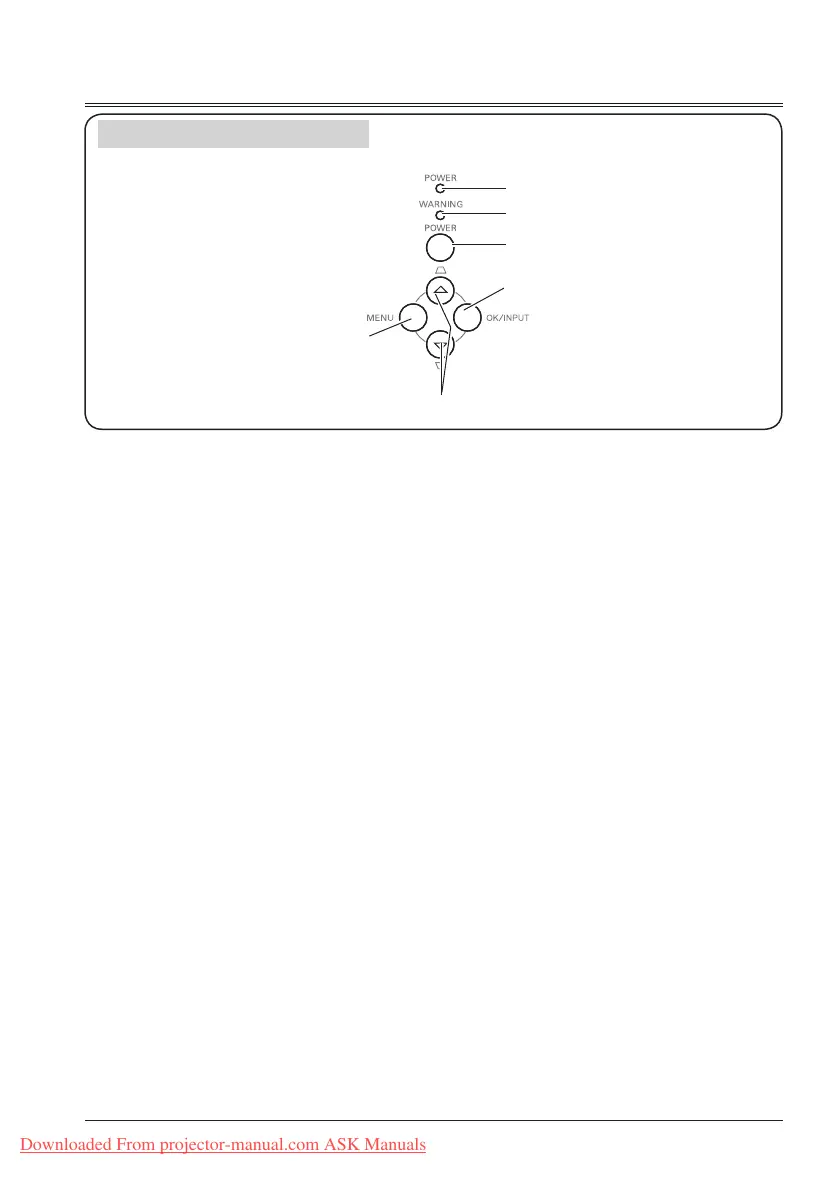
Top Control and Indicators
①
POWER indicator
-
Lights red when the projector is in stand-
by mode.
-
Lights green during operations.
-
Flashes green in the Power management
mode.
-
Flashes red during fans cooling.
-
lights orange when abnormal is detected
in the projector.
-
Flashes orange when internal temperature
is abnormally high.
②
WARNING indicator
Lights red when the life of the projection
lamp draws to an end.
③
POWER button
To turn on/off the projector.
④
OK/INPUT button
-
Press INPUT button to select input source
while no screen menu displayed.
-
Enter screen menu or execute the
selected item.
⑤
MENU button
Open or close the screen menu.
⑥
▲▼/Keystone button
-
Select items or adjust the data in screen
menu.
-
Correct image keystone distortion.
①
②
④
⑥
③
⑤
Downloaded From projector-manual.com ASK Manuals



 To Next Page