39
Setting
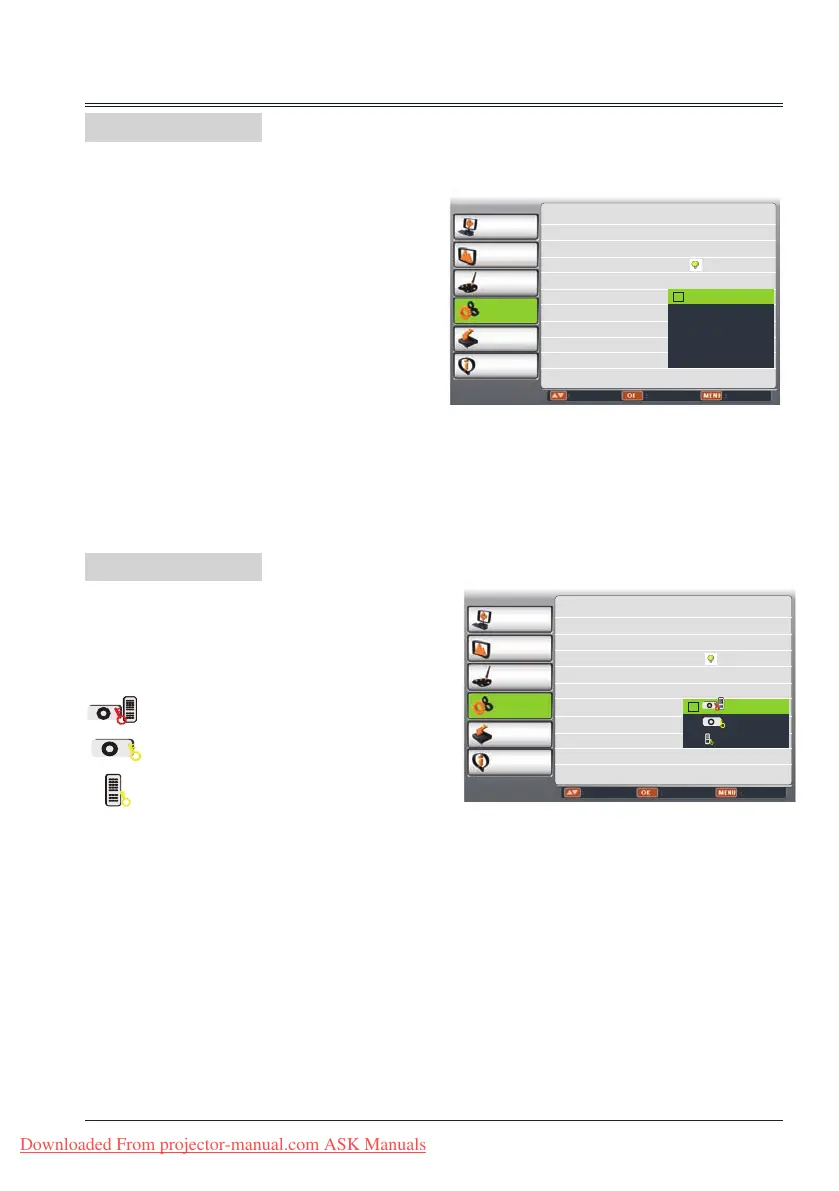
Key lock
This function allows you to use the Key lock
and PIN code lock function to set the security
for the projector operation.
Select "Key lock" and press OK button, then
press
button to select the item you desire
.
Off ....Unlock.
Projector . Lock the operation of the
top control. To unlock,
use the remote control.
Remote Control ..... Lock the operation
of the remote control. To
unlock, use the top control.
If the top control accidentally becomes locked
and you do not have the remote control
nearby or there is something wrong with your
remote control, contact the dealer where you
purchased the projector or the service center.
Key lock
PC adjust
Display
Color adjust
Setting
Expand
Info.
Adjust Select Back
On start Off
Standby mode Normal
High land Off
Lamp control
Cooling fast Normal
Closed caption Off
Key lock
Iris Off
Terminal Monitor out
Sound
Closed Caption
Allows the subtitle to be displayed for the
audio contents or other information. If the input
source contains closed caption, you can enable
this function and change the channel. Press
to select OFF, CC1, CC2, CC3 or CC4.
If Closed Caption is not clear, you can change
the text color to white from the original.
Note:
- The icon of Closed Caption is displayed in
grey when it is disable.
- Closed caption is disable when screen menu
or Timer displayed on screen.
Closed Caption
PC adjust
Display
Color adjust
Setting
Expand
Info.
Adjust Select Back
On start Off
Standby mode Normal
High land Off
Lamp control
Cooling fast Normal
Closed caption Off
Key lock
Iris Off
Terminal Monitor out
Sound
Off
CC1
CC2
CC3
CC4
Downloaded From projector-manual.com ASK Manuals



 To Next Page