Plus4YouTS
User Manual
47 of 216
6.5.3 Programming
Each dose must be programmed with freshly
ground coffee and not with previously-used coffee
grounds.
The machine is programmed by default. Should the coffee
dosesneedtobemodied,proceedasfollows:
• Alwaysprogrammetheleftpushbuttonpanelrst.Thisway,
all the pushbutton panels will be automatically programmed.
If necessary, subsequently pro-
gramme the others.
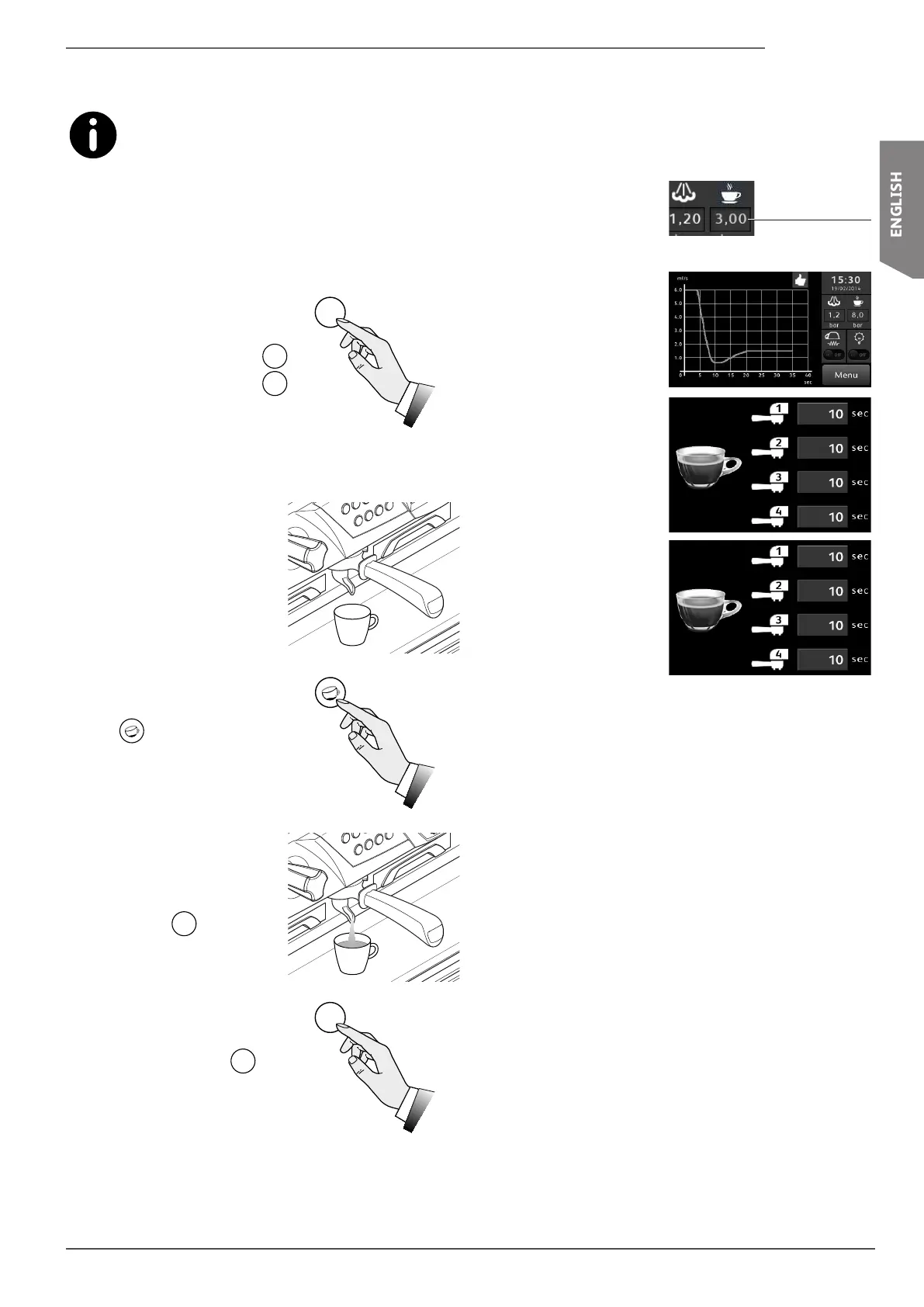
• Press and hold down the
Prog
Stop
button for 5 seconds: the
Prog
Stop
button will ash and all the
pushbutton panel buttons be-
ing programmed will turn on.
• Fill the lter with a dose of
ground coffee and press it
down using the coffee press.
• Attachthelterholdertothe
dispensing group.
• Place the coffee cup under
the dispensing spout.
• Press the desired dose button
(e.g.
).
• AlloftheLEDswillturnoff,ex-
cept for the dose buttons being
programmed.
• Wait for the dispensing pro-
cesstonish; to conrm the
dose, press the dose button
again or the
Prog
Stop
button.
• Repeat this operation for the
other dose buttons.
• When you have nished pro-
gramming, press the
Prog
Stop
but-
ton to voluntarily exit the dose
programming mode.
6.5.4 Displaying information
Dependingonhowthemachinehasbeencongured,when
the coffee is being dispensed, some information will appear
on the display.
Flow diagram
in time (ml/s) of
coffee dispensed for a
single group.
Viewing the
dispensing time
(secs) for all groups.
Viewing
the dispensing
temperature (°C) for
all groups.
Dispensing
pressure
Group 1
Prog
Stop
Prog
Stop










 To Next Page