Plus4YouTS
User Manual
49 of 216
6.7.2 Programming
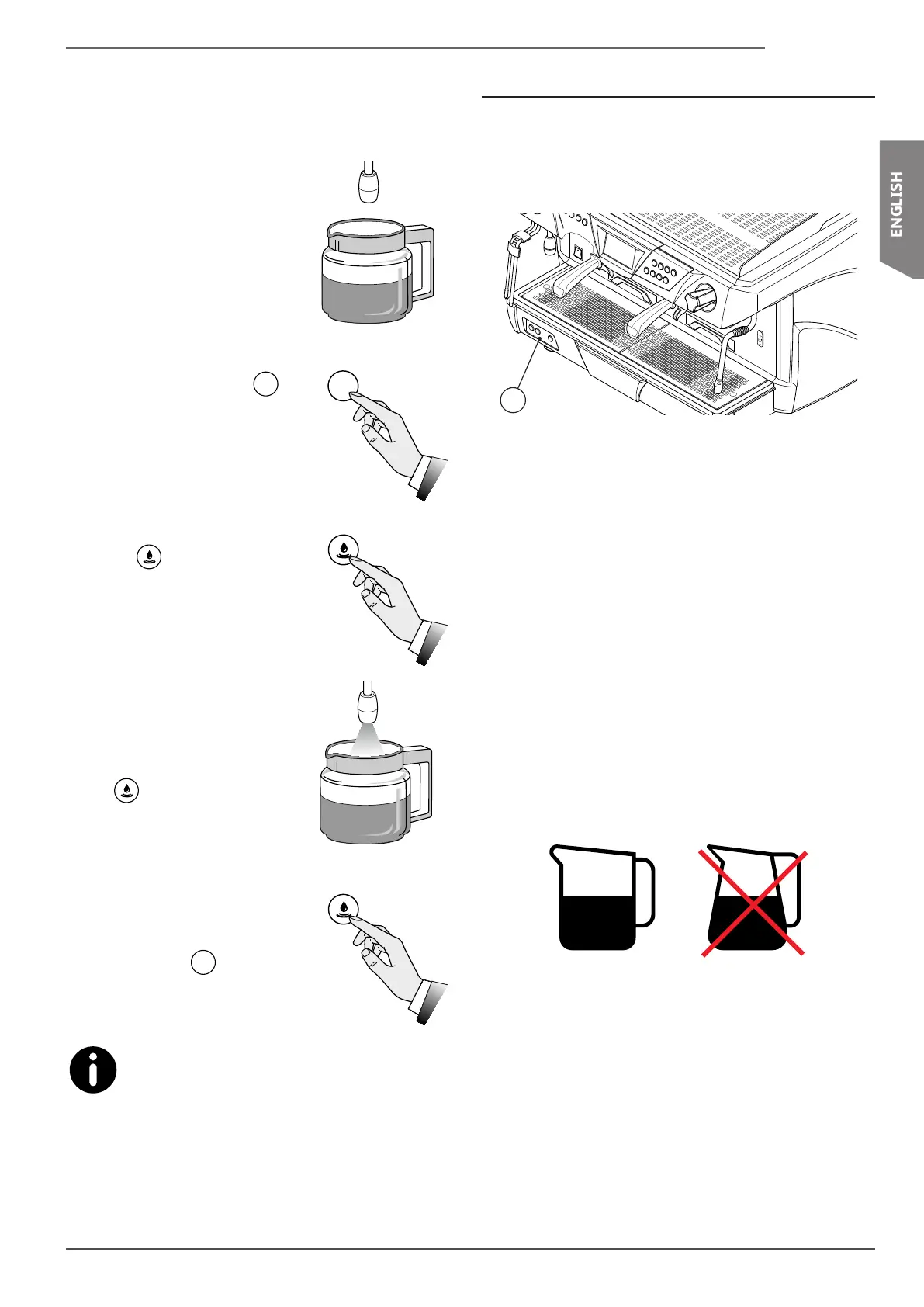
The machine is programmed by default. Should the hot water
dosesneedtobemodied,proceedasfollows:
• Place the pot under the hot water
spout.
• Press and hold down the
Prog
Stop
but-
ton on the left pushbutton panel
for 5 seconds: all of the dose but-
tonsLEDswilllightup.
• Press the hot water dispensing
button
.
• Wait for the dispensing process to
nish; toconrm the dose, press
the
button again.
• Whenyouhavenishedprogram-
ming, press the
Prog
Stop
button.
The tea buttons are found on the keypads of each
group. These can be programmed individually and pro-
vide doses that are independent from one another.
The 4GR version has 2 hot water spouts.
The 2 keypads on the left control the left hot water spout,
while the 2 keypads on the right control the right hot water
spout.
6.8 Automatic steam wand (optional)
The automatic steam wand can be used for automatically
frothing milk at the programmed temperature.
It can be controlled using the keypad (15) located on the
base of the machine.
15
6.8.1 Tips regarding its use
• Onlyfroththeamountofmilkthatyouintendtouse;once
heated, the milk will have to be completely poured out of
the jug and cannot be reheated.
• The automatic steam wand only guarantees an accuracy
of ± 3°C between the set temperature and the actual milk
temperature, if the starting milk temperature is 4°C.
• As the steam automatically stops dispensing when the set
milktemperatureisreached,onlyllthejughalfwayin
order to prevent the milk froth from spilling out.
• Use a suitably-sized jug for the amount of milk that re-
quires frothing (approx. 200 ml is recommended) and
make sure that it is circular and not conical (see the im-
age).
Prog
Stop










 To Next Page