ASUS RS720-E7/RS12; RS720-E7/RS12-E 6-37
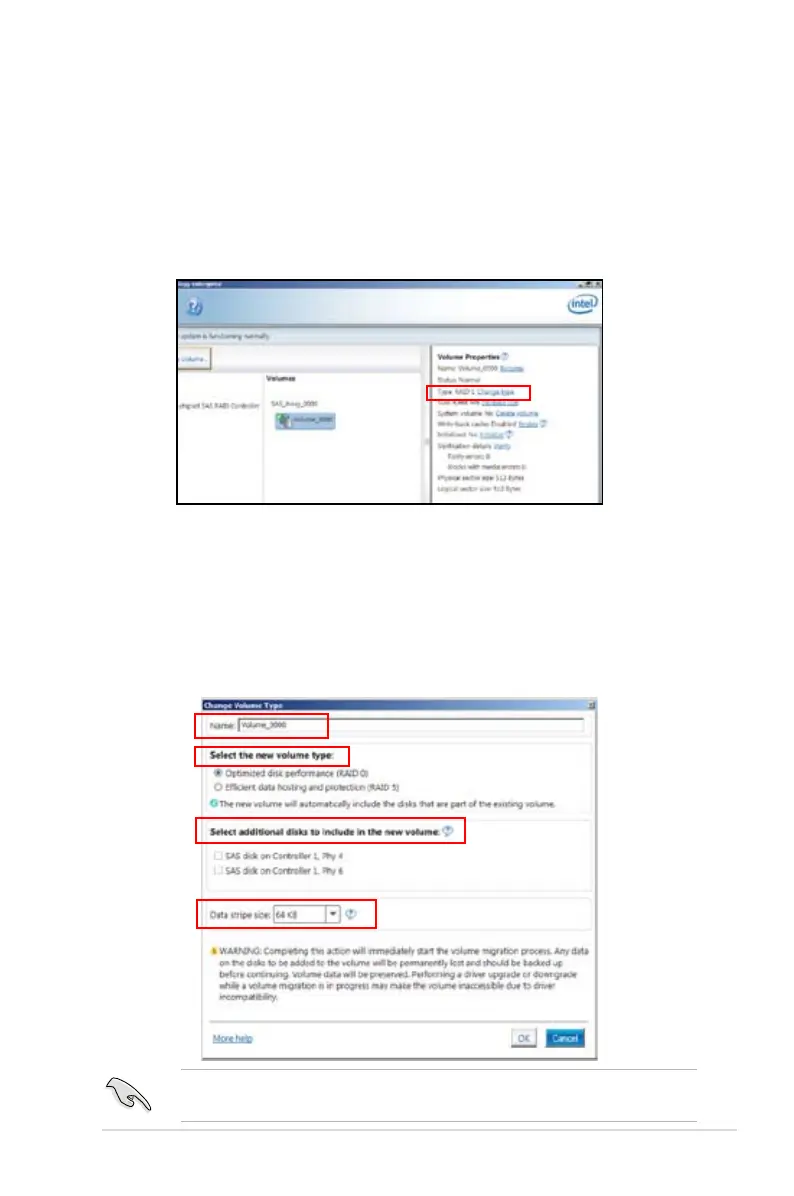
6.4.2 Change Volume Type
When you are nished to create a RAID set, you can view or change related items
in the
Volume Properties
eld.
According to the following steps to change the type in
Volume Properties
:
1. Click the SAS array items you want to change in
Volumes
eld.
2 From the
Volume Properties
eld, select
Type:RAID 1 Change type
.
We recommend a lower stripe size for server systems, and a higher stripe size
for multimedia computer systems used mainly for audio and video editing.
3. You can change the
Name
,
Select the new volume type
, and
Select
additional disks to include in the new volume
if needed.
4. Then select the
Data stripe size
for the RAID array (for RAID 0, 10 and 5
only), and then click
OK
. The available stripe size values range from 4 KB to
128 KB. The following are typical values:
RAID 0: 128KB
RAID 10: 64KB
RAID 5: 64KB














 To Next Page