Chapter 2: Hardware Information
2-6
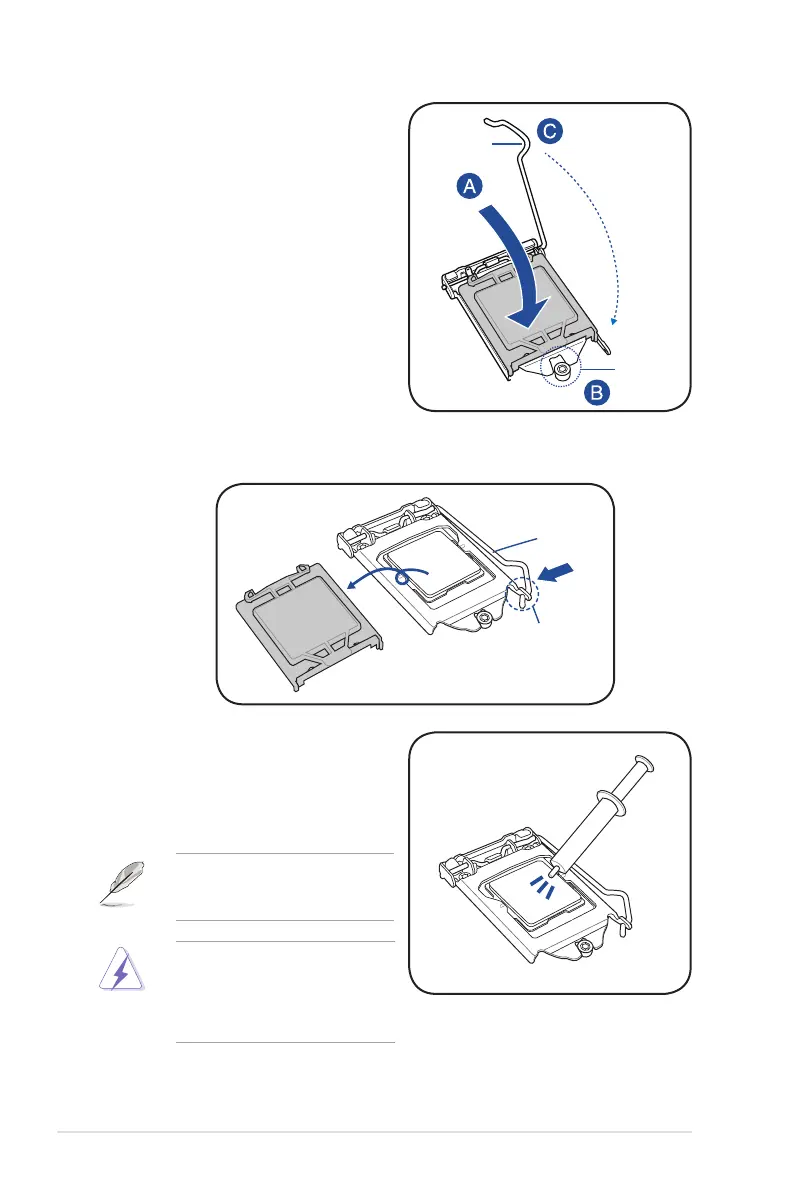
5. Closetheloadplate(A),ensuringthat
the front edge of the load plate slides
undertheretentionlock(B)thenpush
downtheloadlever(C).
Retention
lock
Load lever
6. Insert the load lever under the retention tab to remove the PnP cap from the CPU
socket.
Retention tab
Load lever
7. Apply some Thermal Interface Material
totheexposedareaoftheCPUthatthe
heatsinkwillbeincontactwith,ensuring
that it is evenly spread in a thin layer.
Someheatsinkscomewithpre-
applied Thermal Interface Material. If
so,skipthisstep.
The Thermal Interface Material is
toxicandinedible.DONOTeatit.If
it gets into your eyes or touches your
skin,washitoffimmediatelyandseek
professional medical help.













 To Next Page