3-30
Chapter 3: BIOS setup
Chapter 3
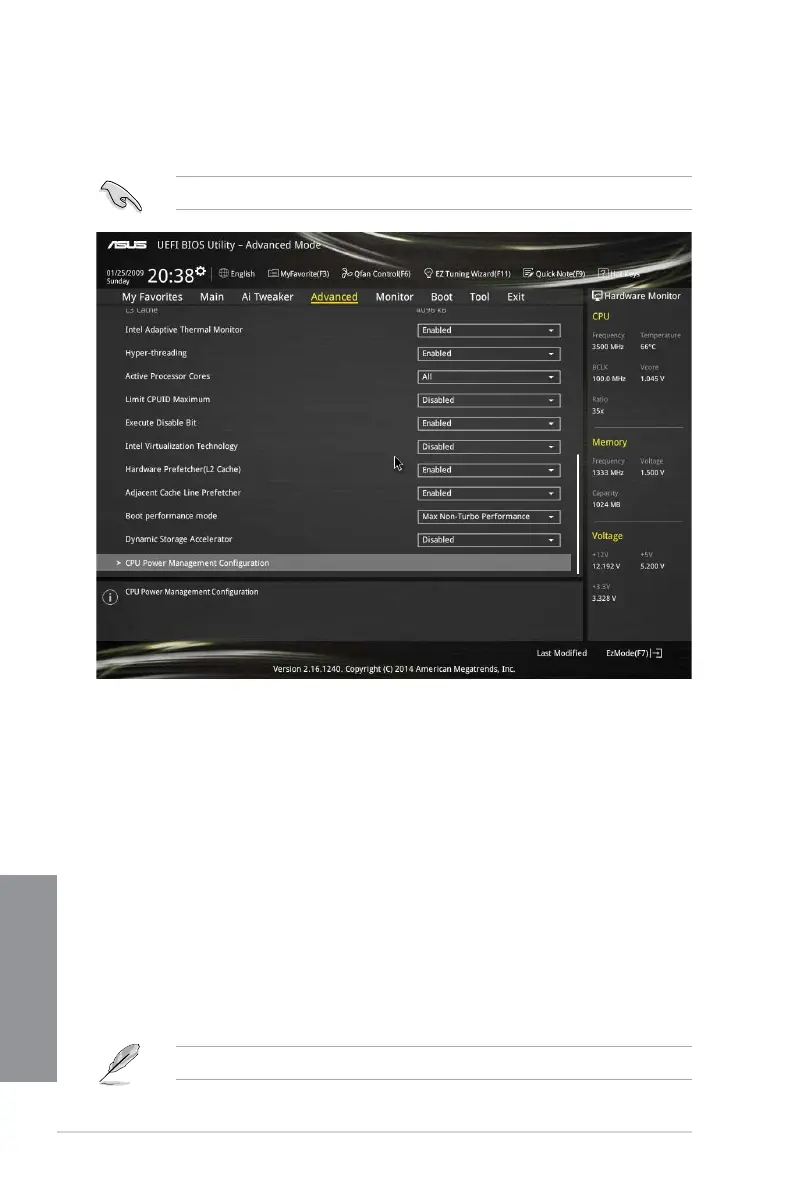
Intel Adaptive Thermal Monitor [Enabled]
This item allows you to protect the CPU by decreasing its frequency as it reaches the thermal
throttle point. The thermal monitor includes TM1 (Thermal monitor 1), TM2 (Thermal monitor
2), and EMTTM (Enhanced Multi-threaded Thermal Monitoring). Conguration options:
[Disabled] [Enabled]
Hyper-threading [Enabled]
The Intel Hyper-Threading Technology allows a hyper-threading processor to appear as two
logical processors to the operating system, allowing the operating system to schedule two
threads or processes simultaneously.
[Enabled] Two threads per activated core are enabled.
[Disabled] Only one thread per activated core is enabled.
Active Processor Cores [All]
This item allows you to select the number of CPU cores to activate in each processor
package. Conguration options: [All] [1] [2] [3]
For some CPU types, only [All] and [1] appear.
3.6.1 CPU Configuration
The items in this menu show the CPU-related information that the BIOS automatically
detects.
The items in this menu may vary based on the CPU installed.


 To Next Page