HIRO Installation Manual GDO-12V1
25
© Copyright 2019
A - Adjustment Mode Parameters
10. Appendix
Adjustment Mode
Adjustments can be made to functions such as Light times,
Auto Close functions etc.
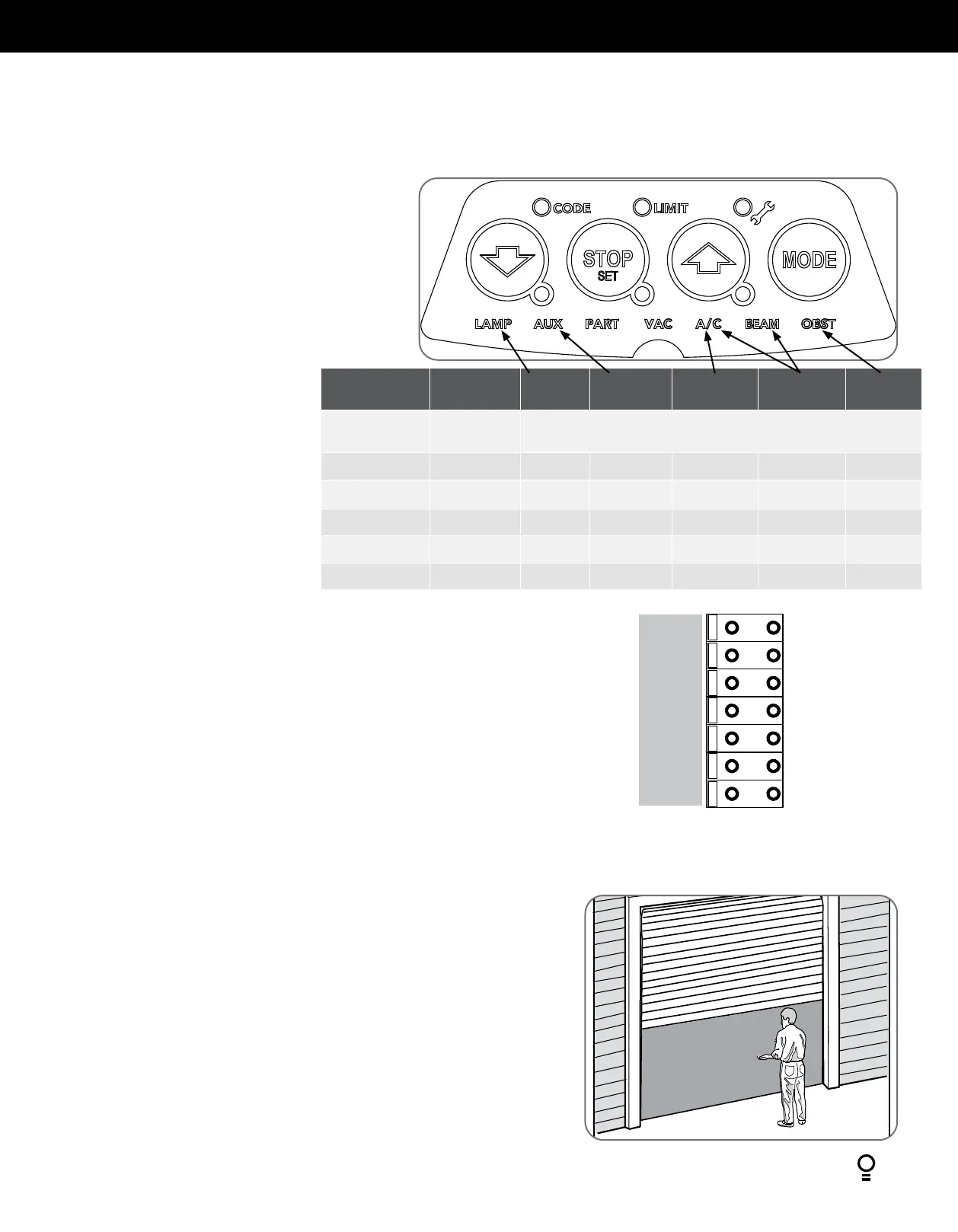
LAMP LED = Adjust light time
AUX LED = Adjust Aux Output time / mode
A/C LED = Adjust STD Auto-close time
A/C & BEAM LEDS = Adjust PE triggered Auto-close time
OBST LED = Adjust Margin
The below table shows the parameters that can be altered.
a. Press and release the MODE button until the Spanner LED
Appendix
When activated, PART mode drives the door to a preset position from the close position,
therefore allowing a pedestrian or parcel to go under the door.
a. Drive and stop the door at the desired PART mode open position by pressing the
transmitter button coded for Open/Stop/Close operation.
b. Press the MODE button twice to highlight the LIMIT LED.
c. Press the BLUE CLOSE button to scroll through to highlight the PART LED.
d. Press and hold the RED STOP / SET button for 2 seconds and release.
Refer to Appendix E to code a transmitter to PART Mode.
B - Setting the PART (Partial) Mode position
SB1
0V
SB2
0V
OSC
0V
AUX
Auxiliary Output
The auxiliary output can be used to control alarm or another garage door opener. A valid
transmission from the pre-coded transmitter will cause the auxiliary output to pulse for
approximately 1 (one) second. The maximum DC voltage must not exceed 35 volts DC. Maximum
current must not exceed 80 ma.
LEDS
VALUE LIGHT
TIME
AUX TIME
/ MODE
A/C
FUNCTION
P.E A/C
FUNCTION
MARGIN
SETTING
OPEN & STOP
& CLOSE
PG3 custom
setting
OTHER VALUE
OPEN HIGH 180s Toggle 90s 60s 20
OPEN & STOP MED-HIGH 120s 60s 60s 30s 15
STOP MED 60s 30s 30s 15s 12
CLOSE & STOP MED-LOW 30s 1s 15s 5s 9
CLOSE LOW 0s Mimic light OFF OFF 7
(Adjustment Mode) is highlighted.
b. One of the word LED’s (LAMP, AUX, etc)
will highlight.
c. Use the BLUE CLOSE or GREEN OPEN
buttons to move to the particular
parameter.
d. Press RED STOP / SET to enter the
adjustment mode.
e. The OPEN, STOP and CLOSE LEDS will
now flash and indicate the parameters
value as shown in table below.
f. Use the BLUE CLOSE or GREEN OPEN
buttons to adjust the parameter value by
one step up or down.
g. Press RED STOP / SET to save the new
value or MODE to cancel the edit - flashing will stop.
h. To enter another parameter repeat from Step a.


 To Next Page