HIRO Installation Manual GDO-12V1
27
© Copyright 2019
The GDO-12 HiRo™ has the ability to set travel limits using a Remote Control
Transmitter, allowing free movement around the garage to better assess the
desired limit positions. In order to use a Remote Control Transmitter, it must
first have at least one of its buttons coded to the door controller. The function
assigned to the Remote Control Transmitter’s buttons is of no concern here as
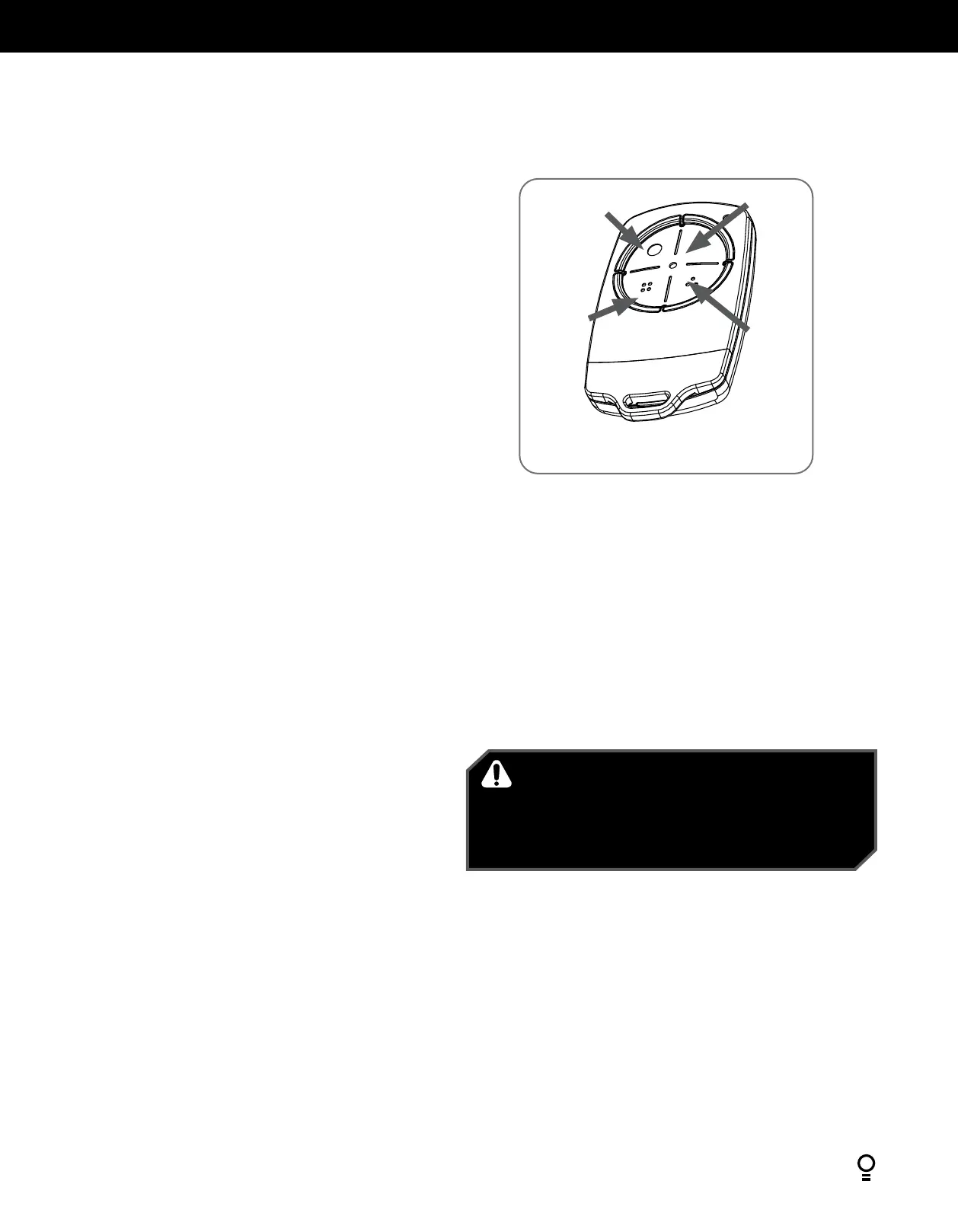
the buttons are temporally assigned to OPEN, SET, CHANGE DIRECTION and
CLOSE (Fig. D.1).
D.1 Code A Remote Control Transmitter For Limit Setting
D - Setting Limits via Transmitter
Appendix
a. Switch power on and the BLUE LED on the CLOSE button will start to
flash to indicate that the opener is ready to set the Close travel limit
b. Press the MODE button to highlight the CODE LED.
c. Press and HOLD the RED STOP / SET button to enter the code set
procedure.
d. Press and hold button 1 on the Premium Remote Conrtol for 2 seconds,
then release Remote Control Transmitter button.
e. Press and hold button 1 on the remote control button again and hold
for 2 seconds the release.
f. Release the RED STOP / SET button. The remote control button is now
coded, press to test and observe the speed of the door through a full
cycle.
g. The drive speed is set to the fastest setting by default. This may not be
suitable for larger doors:
CLOSE limit:
(i) Using the programmed Remote Control Transmitter, press and hold
the button 4 to close. To inch the door, single presses of the button 4
will move the door to desired limit.
(ii) While inching (to CLOSE) to set the close speed, press and hold
button 4 on the remote and by pressing the
SET button 2 the opener will cycle through all three speed
modes as shown in table.
(iii) Once at the desired speed, release the remote button 4.
(iv) Continue inching the door to the desired position. We
recommend the CLOSE limit position being the first point of
contact of the rubber strip ( at the bottom of the door) with the
ground.
(v) If the door overshoots, press the OPEN button 1 on the remote
to move the door in the OPEN direction.
(vi) When the door is at the desired CLOSE position, press the SET
button 2, the GREEN LED on the OPEN button will now flash.
OPEN limit:
(i) Using the programmed Remote Control Transmitter, press and hold
the button 1 to open. To inch the door, single presses of the
button 1 will move the door to desired limit.
(ii) While inching (to OPEN) to set the open speed, press and
hold button 1 on the remote and by pressing the
SET button 2 the opener will cycle through all three speed
modes as shown in table.
(iii) Once at the desired speed, release the remote button 1.
(iv) Continue inching the door to the desired position. We
recommend the OPEN limit position being the height of the
garage opening
(v) If the door overshoots, press the CLOSE button 4 on the
remote to move the door in the CLOSE direction.
(vi) When the door is at the desired OPEN position, press the
SET button 2. The door will now automatically close and
open to calculate the safety obstruction settings.
WARNING! The door will automatically close, open and
close again after the next step. Ensure that nothing is in
the door’s path.
AVERTISSEMENT! La porte va se fermer puis s’ouvrir
automatiquement, avant de se fermer. S’assurer que rien
ne bloque l’ouverture ou la fermeture de la porte.
Button 1
(Inch Open)
Button 4
(Inch
Close)
Button 2
(Set)
Fig D.1
Button 3
(Change
Direction)


 To Next Page