Centipede
TM
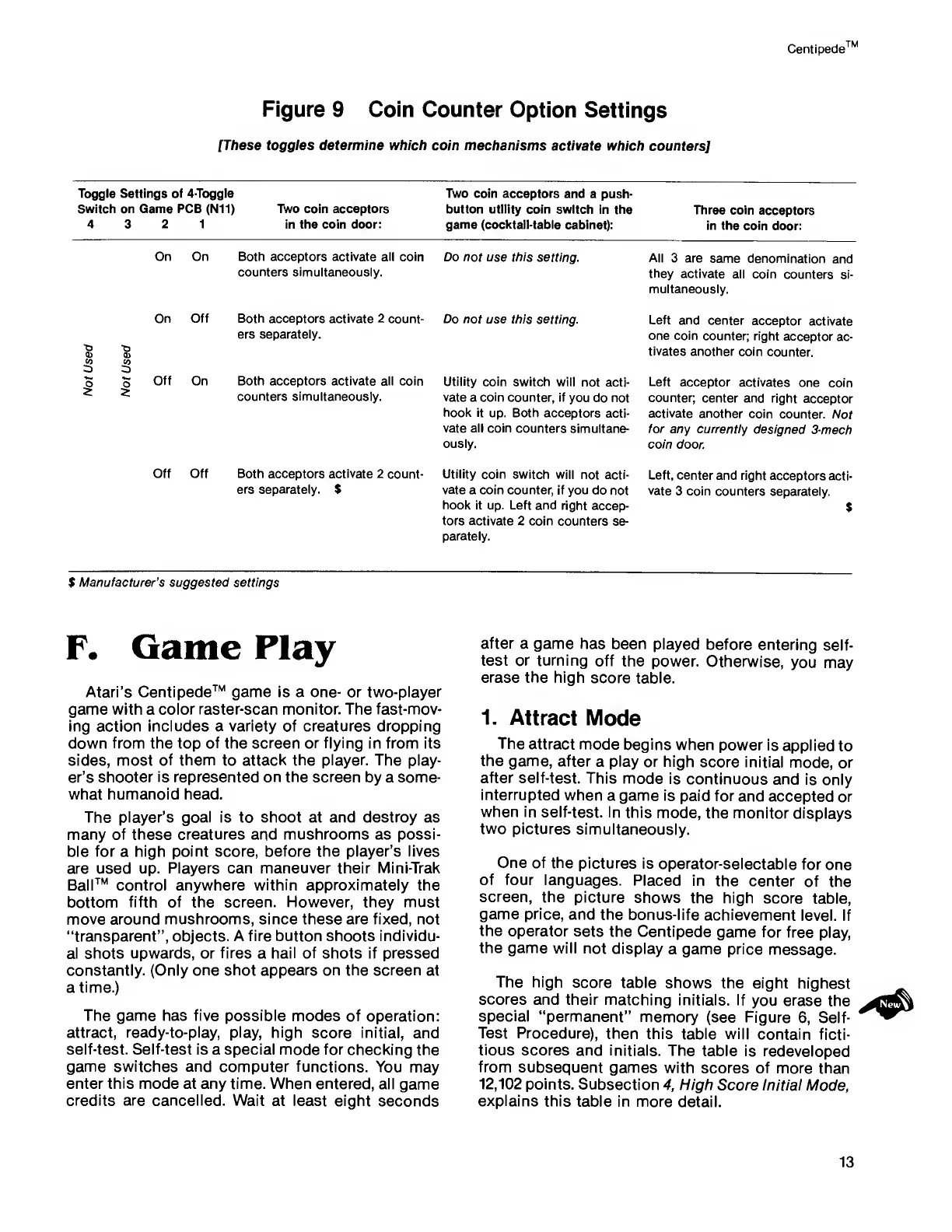
Figure
9 Coin Counter
Option Settings
[These toggles determine which
coin mechanisms activate which
counters]
Toggle Settings of 4-Toggle Two coin acceptors
and a
push-
Switch on Game PCB (Nil) Two coin acceptors
button utility coin switch
in the
Three coin
acceptors
4
3
2 1
in the coin door: game
(cocktail-table cabinet):
in the coin
door:
On On Both acceptors activate all coin
Do not use this
setting.
counters simultaneously.
All
3 are
same denomination
and
they
activate
all coin
counters si-
multaneously.
On Off
•o
0)
«
o
2
s
o
2
Off On
Both acceptors activate 2
count-
ers separately.
Both acceptors activate all coin
counters simultaneously.
Do not
use this setting.
Utility coin switch
will not
acti-
vate
a
coin
counter, if
you do not
hook it
up. Both acceptors
acti-
vate all coin
counters simultane-
ously.
Left and
center
acceptor
activate
one coin
counter; right
acceptor
ac-
tivates
another coin
counter.
Left
acceptor
activates
one coin
counter;
center and
right acceptor
activate another
coin
counter.
Not
for
any currently
designed
3-mech
coin
door.
Off Off Both acceptors activate 2
count-
ers separately.
$
Utility coin
switch will
not acti-
vate
a
coin
counter, if you
do not
hook it
up. Left and right
accep-
tors activate 2 coin
counters se-
parately.
Left,
center
and
right
acceptors
acti-
vate
3 coin
counters
separately.
$
$
Manufacturer’s suggested settings
F.
Game Play
Atari’s
Centipede™ game
is
a one- or
two-player
game with
a
color raster-scan
monitor. The
fast-mov-
ing action
includes
a
variety
of creatures dropping
down from the top of the screen
or
flying
in from its
sides,
most of
them
to attack the player. The
play-
er’s shooter
is represented
on
the screen
by a some-
what humanoid head.
The
player’s goal
is to shoot at and destroy as
many of these creatures and mushrooms as possi-
ble
for
a
high point score, before the player’s lives
are used up.
Players can maneuver their Mini-Trak
Ball™ control
anywhere within approximately
the
bottom
fifth
of
the screen. However, they must
move around mushrooms, since these
are
fixed, not
“transparent”, objects. A fire button shoots individu-
al shots
upwards,
or
fires
a
hail of
shots
if pressed
constantly.
(Only one shot appears on the screen
at
a
time.)
The game has five possible modes
of operation:
attract, ready-to-play, play, high
score initial,
and
self-test. Self-test
is a special mode for
checking the
game switches and
computer functions. You
may
enter
this
mode at any time. When entered,
all
game
credits are cancelled. Wait
at least eight
seconds
after
a game has been
played
before
entering
self-
test or
turning
off
the power.
Otherwise,
you may
erase
the
high
score table.
1.
Attract Mode
The
attract mode
begins
when power
is
applied
to
the game,
after
a
play
or
high
score initial
mode,
or
after
self-test.
This mode
is
continuous and
is
only
interrupted
when
a game is paid for
and
accepted
or
when in
self-test. In
this mode,
the monitor
displays
two
pictures
simultaneously.
One of the
pictures
is
operator-selectable
for
one
of four
languages.
Placed
in the
center of
the
screen,
the
picture
shows the high
score table,
game price,
and the
bonus-life achievement
level. If
the operator
sets
the Centipede
game for
free play,
the game
will not display
a game price
message.
The high
score
table shows
the eight
highest
scores
and their matching
initials. If
you erase
the
special
“permanent”
memory
(see Figure
6,
Self-
Test Procedure),
then
this table will
contain
ficti-
tious
scores and
initials. The
table is
redeveloped
from
subsequent
games
with scores of
more than
12,102
points.
Subsection
4,
High
Score Initial
Mode,
explains
this
table in more
detail.
13



 To Next Page