EasyManua.ls Logo

Atari Centipede - Cleaning; Fuse Replacement; The Control Panel I

Atari Centipede
63 pages
Print Icon
To Next Page IconTo Next Page
To Previous Page IconTo Previous Page
Loading...
Centipede
To
remove
LED
switch:
NORMALLY
CLOSED
(N.C.)
CONTACT
NORMALLY
OPEN
(N.O.)
CONTACT
LIGHT-EMITTINGDIODE
(L.E.D.)
CONTACTS
COMMON
CONTACT
Remove
all wires
from
the
faulty
switch.
Turn the
switch
counterclockwise
while
holding the
black
cone-shaped
bushing
on
the
outside
of the
control
panel.
Install a
new
switch
using
the
reverse
procedure.
Reconnect
the
harness
wires.
CAUTION
Players may
receive an
electric shock if
this
control panel is
not
properly
grounded!
After servicing any
parts on
the
panel, check
that the ground
wire is
firmly attached to
the metal tab on
the
inside of the
control panel. Only
then
should
you
lock up
the game.
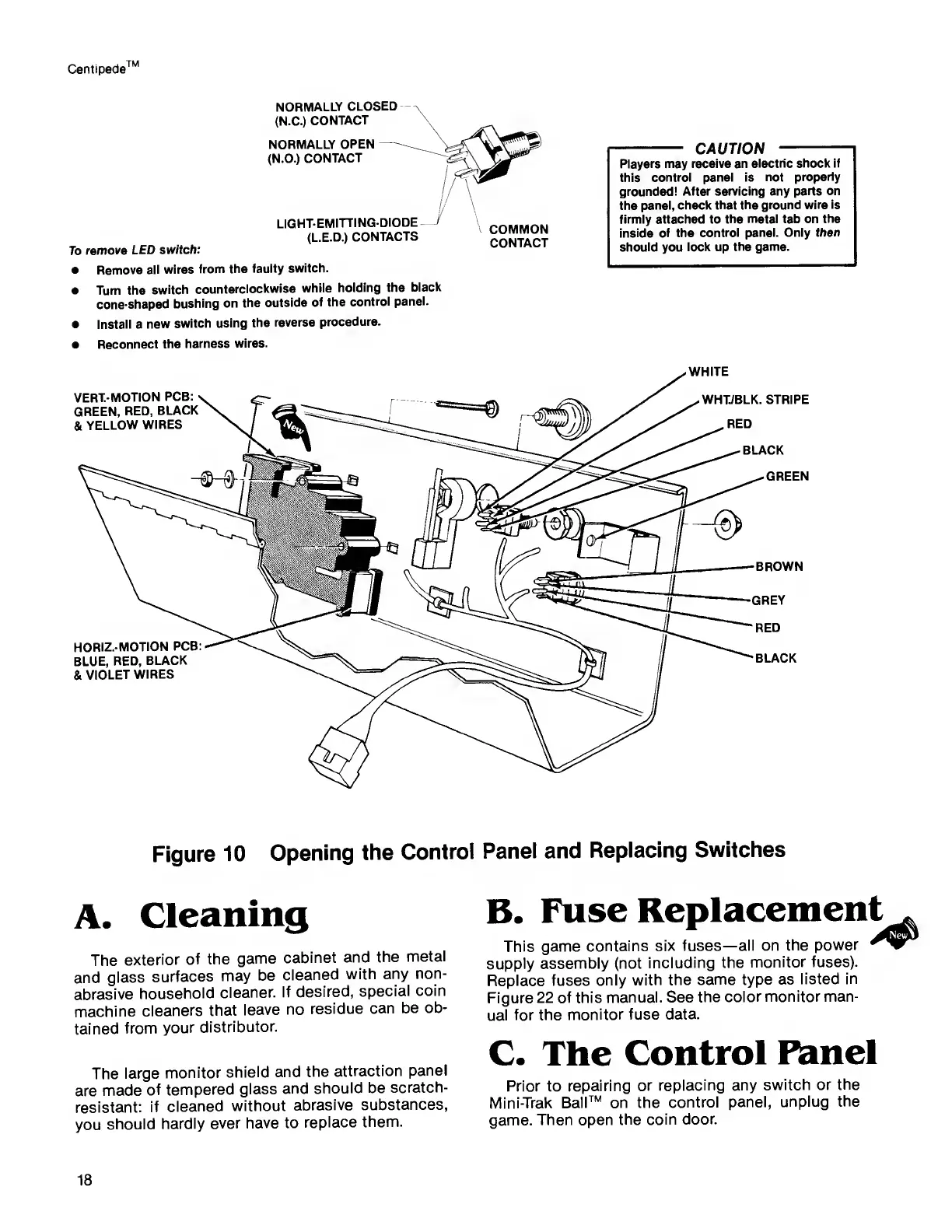
Figure
10
Opening
the
Control
Panel
and
Replacing
Switches
A.
Cleaning
The
exterior
of
the
game
cabinet
and
the
metal
and
glass
surfaces
may
be
cleaned
with
any
non-
abrasive
household
cleaner.
If
desired,
special
coin
machine
cleaners
that
leave
no
residue
can
be ob-
tained
from
your
distributor.
The
large
monitor
shield and
the
attraction
panel
are made
of
tempered
glass
and
should be
scratch-
resistant:
if
cleaned
without
abrasive
substances,
you
should
hardly
ever
have to
replace
them.
B.
Fuse
Replacement.
This game
contains
six fuses—
all on the
power
supply
assembly
(not
including the
monitor
fuses).
Replace fuses
only
with the
same type as
listed in
Figure
22 of this
manual. See
the
color monitor man-
ual for
the
monitor fuse
data.
C. The
Control
Panel
Prior to
repairing
or
replacing any
switch
or the
Mini-Trak
Ball™ on the
control
panel,
unplug
the
game.
Then open
the coin
door.
18

Related product manuals