EasyManua.ls Logo

Atari Centipede - Monitor Removal

Atari Centipede
63 pages
Print Icon
To Next Page IconTo Next Page
To Previous Page IconTo Previous Page
Loading...
Centipede
TM
D. Monitor
Removal
The following procedure should only be per-
formed
by
a qualified service technician.
A—
WARNING
Shock
Hazard
High voltages may
exist in any televi-
sion or monitor, even
with
power discon-
nected.
Use extreme
caution
and do not
touch
electrical parts of the yoke area
with
your hands or with metal objects in
your hands!
Implosion Hazard
If you
drop the monitor and the
picture
tube
breaks,
it will implode!
Shattered
glass and
the yoke can fly
6
feet
or more
from the
implosion. Use care
when re-
placing any monitor.
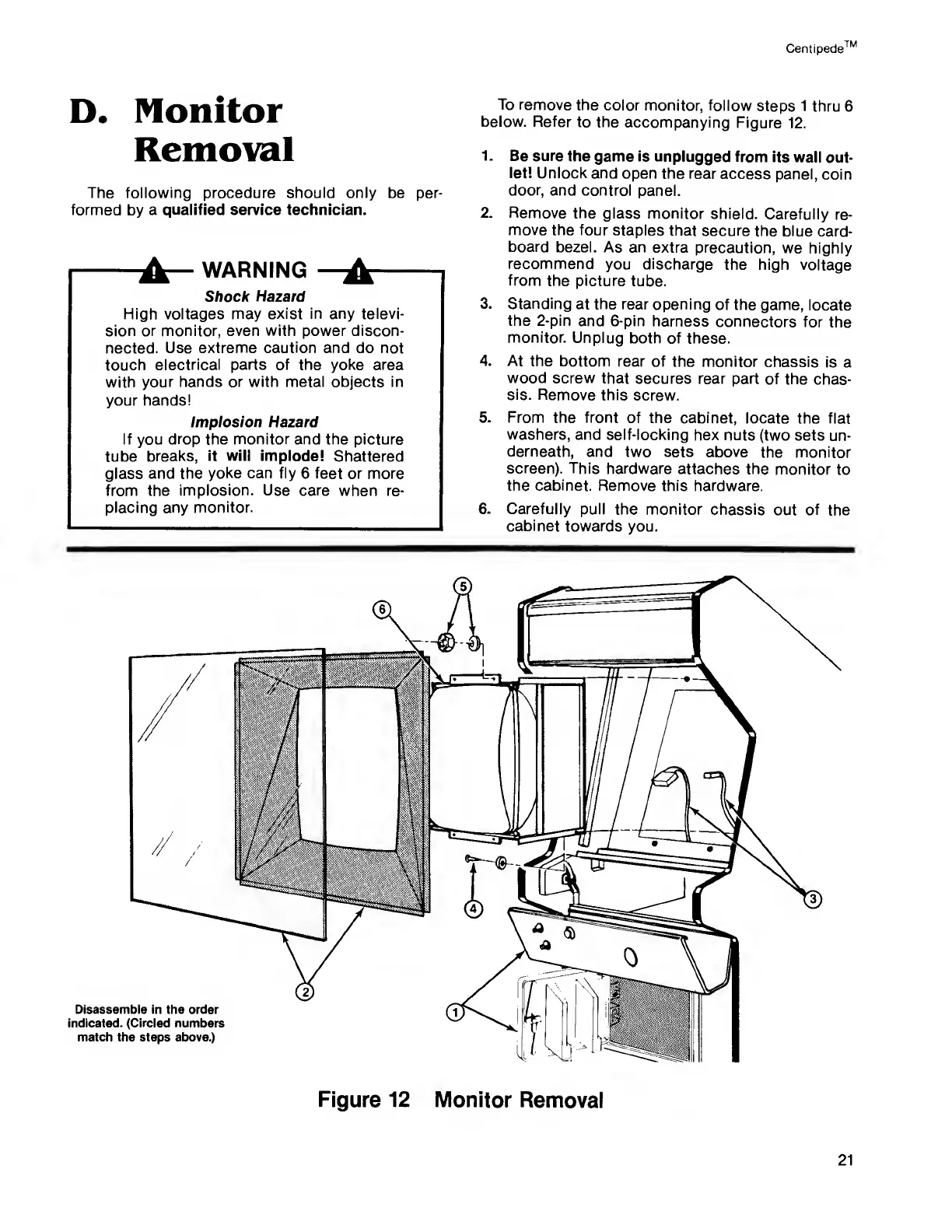
To
remove the
color monitor,
follow
steps 1
thru 6
below. Refer
to the
accompanying
Figure
12.
1.
Be sure
the game is
unplugged
from its
wall
out-
let!
Unlock and
open the rear
access
panel,
coin
door,
and control
panel.
2.
Remove the
glass monitor
shield.
Carefully
re-
move the four
staples
that secure
the blue
card-
board
bezel. As an
extra
precaution, we
highly
recommend
you discharge
the high
voltage
from
the picture
tube.
3. Standing
at the rear
opening
of the
game, locate
the 2-pin
and 6-pin harness
connectors for
the
monitor.
Unplug
both of these.
4. At
the bottom
rear of
the monitor
chassis is
a
wood screw
that
secures rear part
of the
chas-
sis.
Remove this
screw.
5.
From the front of
the cabinet,
locate the
flat
washers,
and self-locking hex
nuts
(two sets un-
derneath,
and two sets above
the
monitor
screen).
This hardware
attaches the
monitor
to
the cabinet.
Remove this hardware.
6.
Carefully pull
the monitor chassis
out
of
the
cabinet towards
you.

Related product manuals