EasyManua.ls Logo

Atari Centipede - Page 28

Atari Centipede
63 pages
Print Icon
To Next Page IconTo Next Page
To Previous Page IconTo Previous Page
Loading...
Centipede
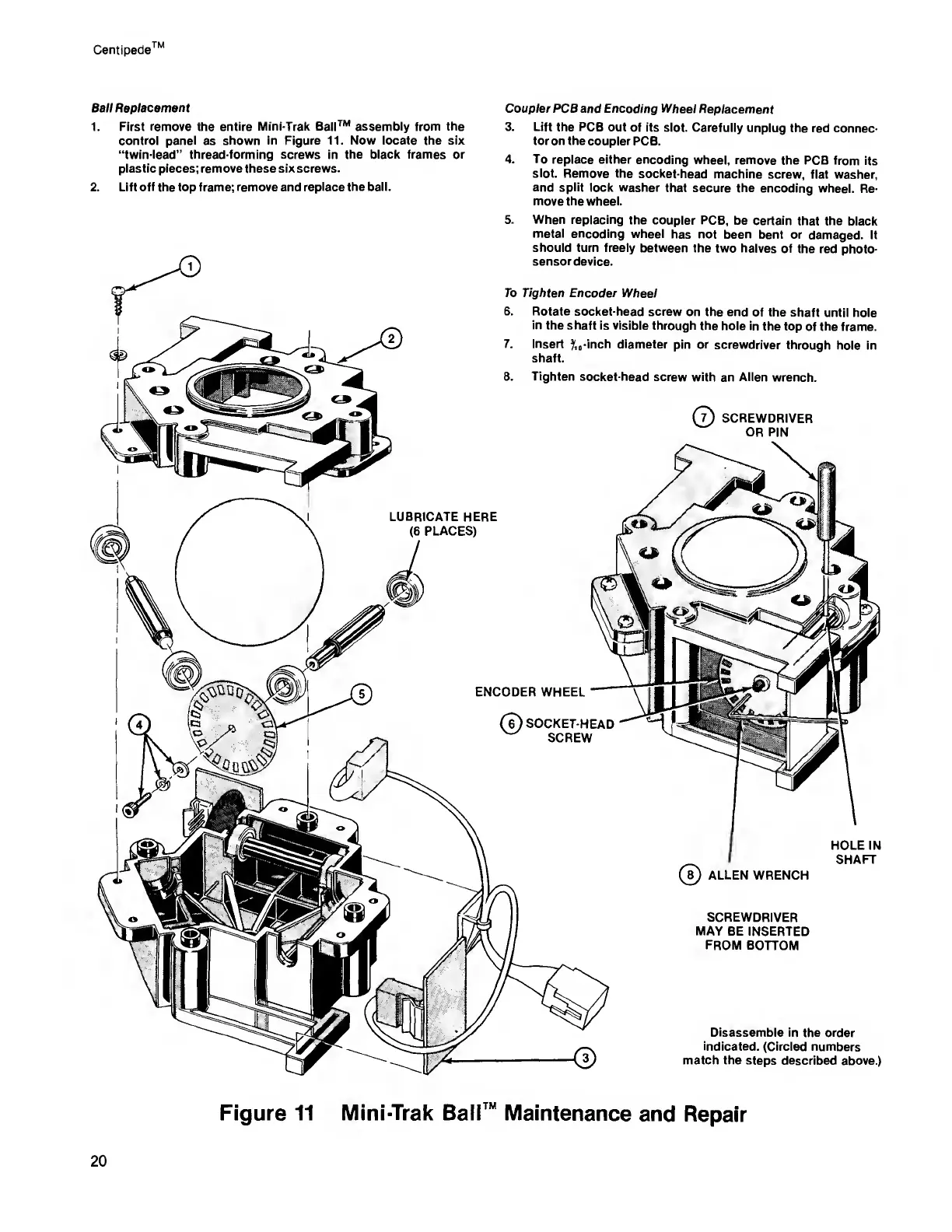
Ball Replacement
1.
First remove the
entire Mini-Trak Ball™ assembly from the
control
panel
as
shown in Figure 11. Now locate the six
“twin-lead”
thread-forming screws
in
the black frames or
plastic pieces; remove these six screws.
2. Lift
off
the top frame; remove and
replace the ball.
Coupler PCS and Encoding
Wheel
Replacement
3. Lift
the
PCB
out
of its slot. Carefully
unplug
the red connec-
tor on the coupler
PCB.
4. To
replace either encoding
wheel,
remove the PCB
from its
slot. Remove the
socket-head
machine screw,
flat washer,
and split
lock washer
that secure the
encoding wheel.
Re-
move the wheel.
5.
When replacing
the coupler PCB,
be certain
that the
black
metal
encoding wheel
has not been
bent or
damaged. It
should turn freely
between the two
halves of
the red
photo-
sensor
device.
To Tighten Encoder
Wheel
6. Rotate
socket-head screw
on the end
of the shaft
until hole
in
the shaft is visible
through the
hole in
the top
of
the
frame.
7.
Insert
?,
0
-inch
diameter
pin
or
screwdriver
through
hole in
shaft.
8.
Tighten
socket-head
screw with
an
Allen
wrench.
(?)
SCREWDRIVER
OR PIN
LUBRICATE
HERE
(6
PLACES)
.©IKS
^
<\
^
o
ENCODER WHEEL
(?)
SOCKET-HEAD
SCREW
HOLE IN
SHAFT
(?)
ALLEN WRENCH
SCREWDRIVER
MAY
BE INSERTED
FROM BOTTOM
Disassemble
in the order
indicated.
(Circled numbers
match the steps
described above.)
Figure 11 Mini-Trak Bali™
Maintenance
and
Repair
20

Related product manuals