EasyManua.ls Logo

Atari Centipede - Fluorescent Tube and Speaker Replacement

Atari Centipede
63 pages
Print Icon
To Next Page IconTo Next Page
To Previous Page IconTo Previous Page
Loading...
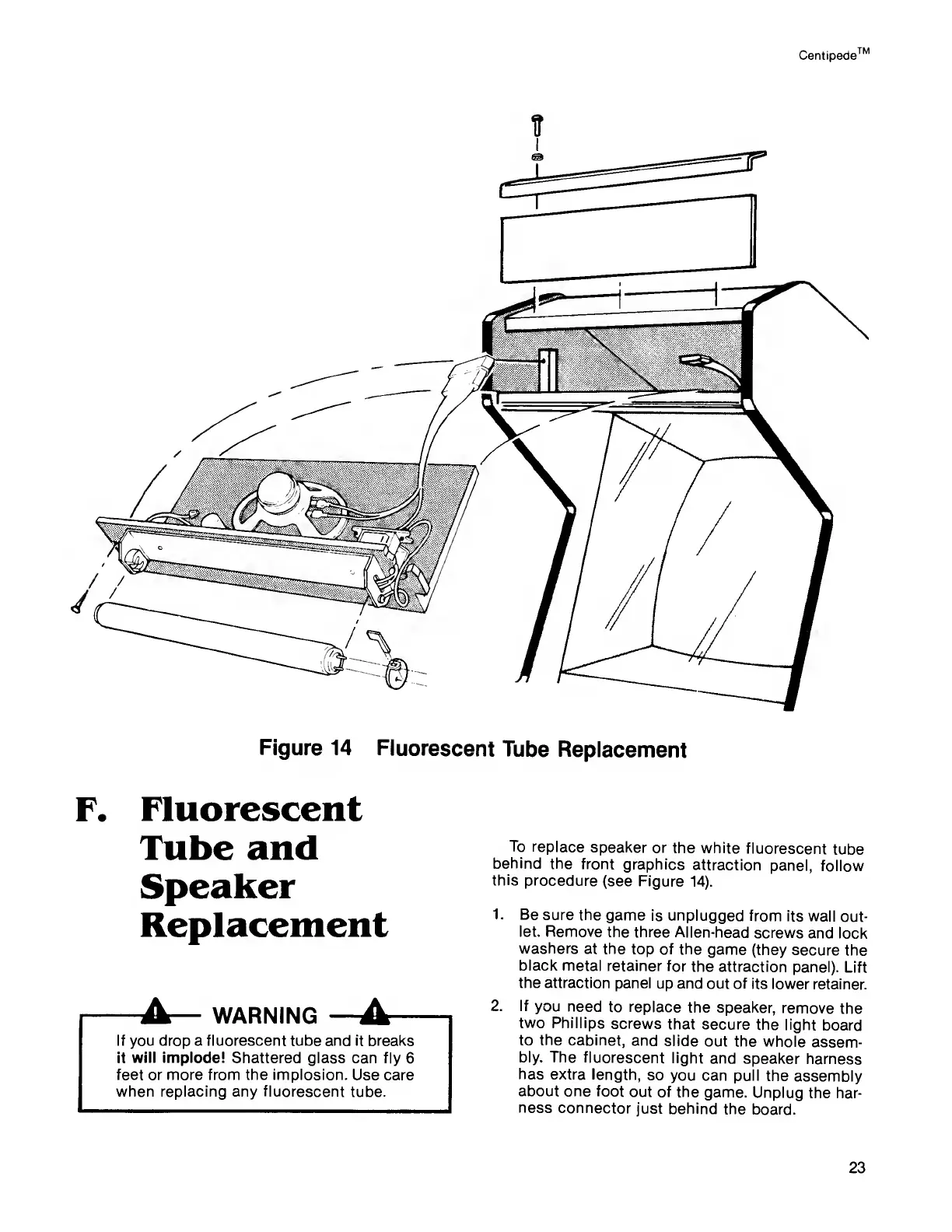
Centipede
TM
Figure
14
Fluorescent
Tube
Replacement
To
replace
speaker
or
the white
fluorescent
tube
behind
the
front
graphics
attraction
panel,
follow
this
procedure
(see Figure
14).
1.
Be
sure the
game
is unplugged from
its wall
out-
let. Remove
the three
Allen-head
screws
and lock
washers
at the
top of the
game (they
secure
the
black metal
retainer
for the
attraction
panel).
Lift
the attraction
panel up
and out of
its lower
retainer.
2. If
you need
to replace the
speaker,
remove the
two
Phillips
screws
that secure
the
light
board
to
the
cabinet,
and
slide
out the
whole
assem-
bly. The
fluorescent
light
and
speaker
harness
has
extra
length,
so
you can pull
the
assembly
about one
foot
out of the
game.
Unplug
the har-
ness
connector
just behind
the
board.
Fluorescent
Tube and
Speaker
Replacement
Jk
WARNING
A
If you drop a fluorescent tube and it breaks
it will implode! Shattered
glass can fly
6
feet or more from the implosion.
Use care
when replacing any fluorescent
tube.
23

Related product manuals