IPPBX IP2G4A User Manual
~ 19 ~ ATCOM TECHNOLOGY CO., LIMITED
3.3 Register onto IPPBX with your IP phone
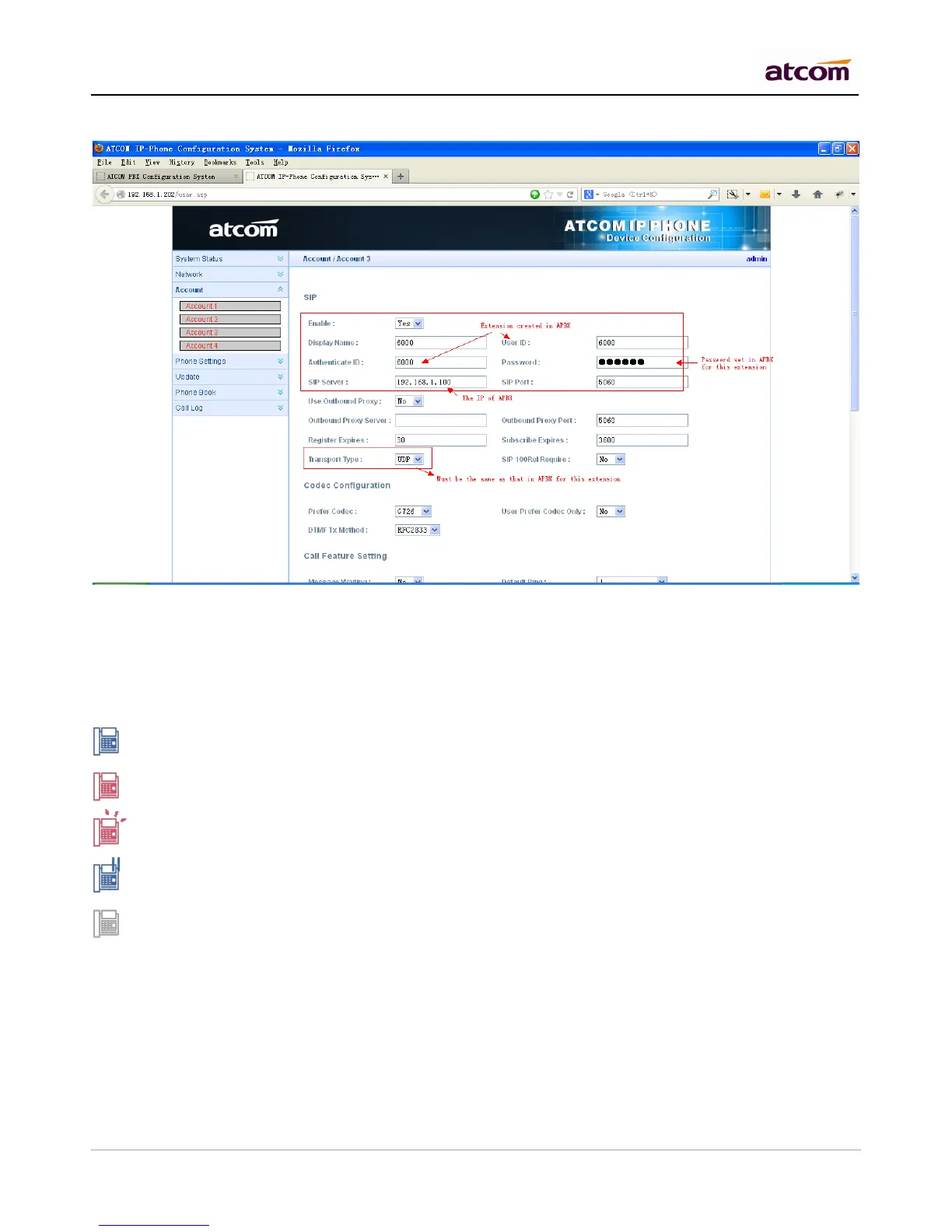
Login the web administration page of IP phone and set the account information.
After successfully register with 6000 and 6001, you can make interior calls among 6000, 6001, 6101(FXS) now.
3.4 Extensions Status
This page is used to check the extensions status.
Idle: The extension is registered and idle.
Busy: The extension is on the phone.
Ringing: The extension is ringing.
Hold: The extension is on hold
Unavailable: The extension is not registered and unreachable.
NOTE: If this page response slowly, please be patient to wait the output before check other pages. Otherwise,
other pages cannot be displayed correctly since IPPBX is accessing database while status checking, and
database is locked for other pages’ request.



 To Next Page