ATI Q46H/85 PAA System Part 2 – Analyzer Mounting
14
O&M Manual
Rev F (8/17)
2.3 Panel Mounting
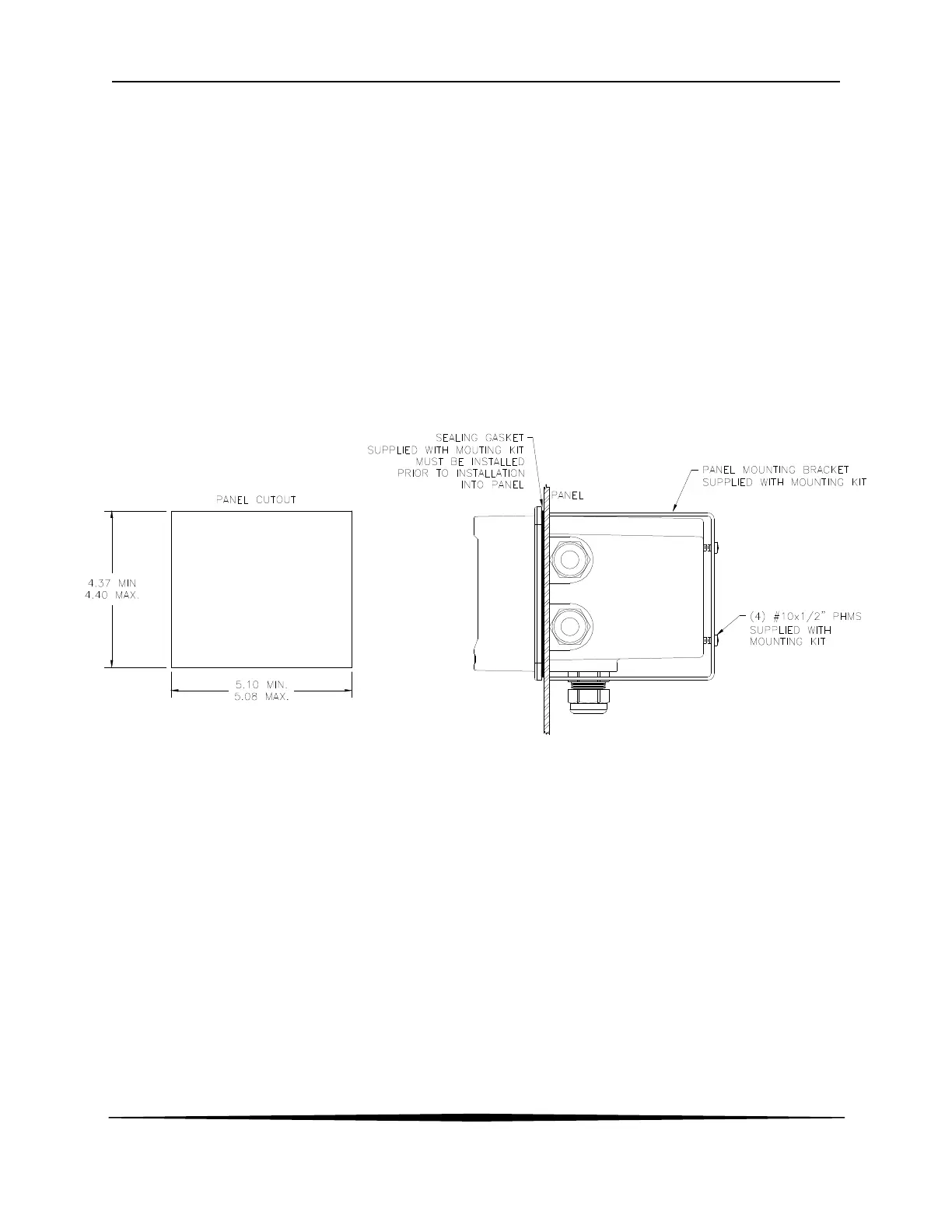
Panel mounting uses the panel mounting flange molded into the rear section of the enclosure.
Figure 8 provides dimensions for the panel cutout required for mounting.
The panel mounting bracket kit must be ordered separately (part number 05-0094). This kit
contains a metal retainer bracket that attaches to the rear of the enclosure, 4 screws for
attachment of this bracket, and a sealing gasket to insure that the panel mounted monitor
provides a water tight seal when mounted to a panel.
The sealing gasket must first be attached to the enclosure. The gasket contains an adhesive on
one side so that it remains in place on the enclosure. Remove the protective paper from the
adhesive side of the gasket and slide the gasket over the back of the enclosure so that the
adhesive side lines up with the back of the enclosure flange. Once in place, you can proceed to
mount the monitor in the panel.
Figure 8 - Panel Mount Cutout


 To Next Page