18 MAN - Pyrolytic Oven - REV: Original | E. Software Overview
E.2 Main Screen
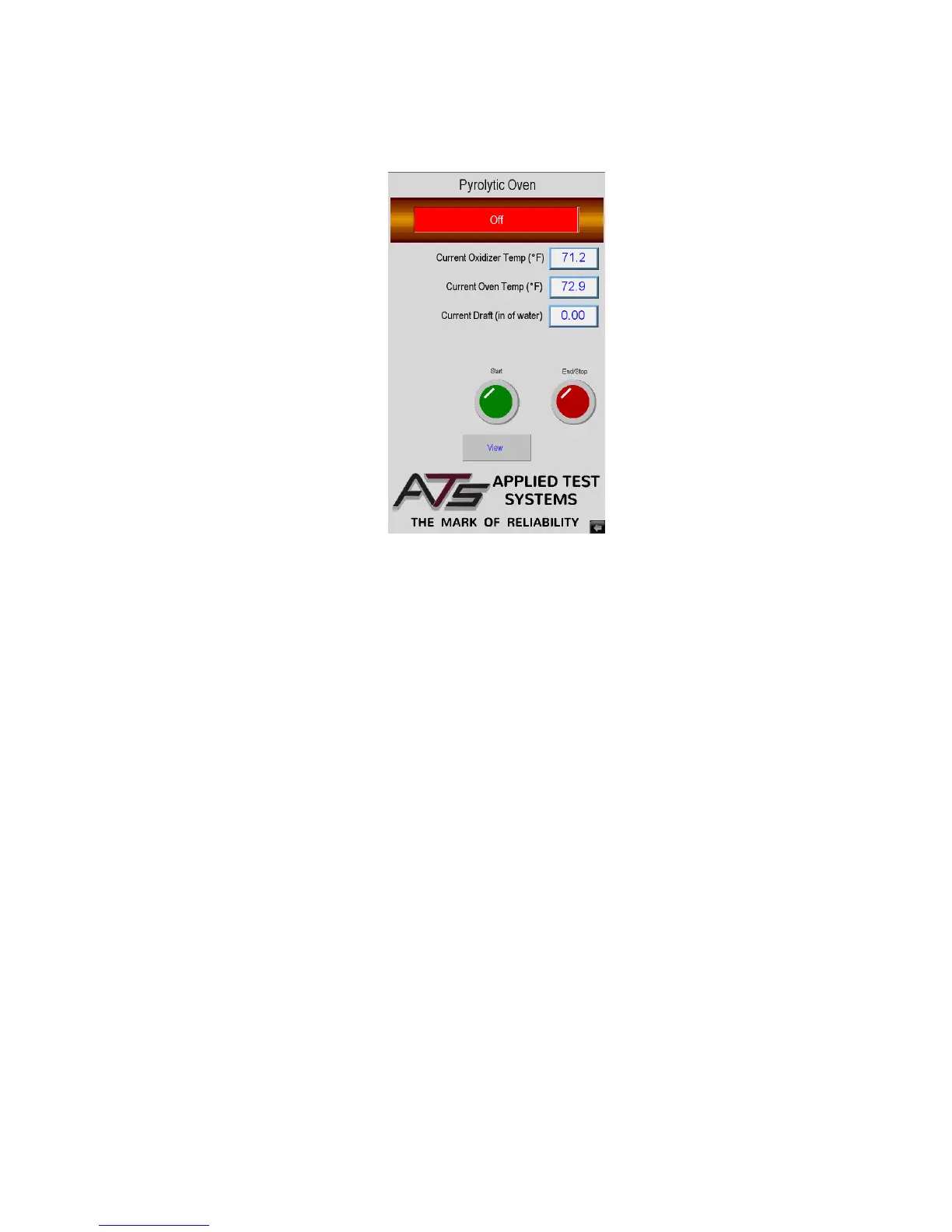
Figures E.2 shows the Main Screen that is shown when the Pyrolytic Oven is started. It allows you to setup and run
oven cycles.
This screen will show values for Oxidizer chamber temperature and Oven temperature. It also has several controls
to set-up and run the oven.
Start Button
Used to tell the system that parts are loaded, to start the oven cycle.
End/Stop Button
Used to tell the system to nish the cycle. It can also be used anytime the oven is in cycle to stop the cycle. When
the run cycle has nished this button will blink to show the cycle is nished. If this button is pressed anytime that the
oven is hot the system will go into cool down before you can open the door.
Alarm Button
If the system has an Alarm, Warning, or Fault the Alarm Button will be displayed and the Start Button is hidden. This
can be seen in Figure E.3. The operator will have to press the Alarm Button to go to the alarm screen and clear the
alarm condition before the system can start another cycle.
View Button
Used to get to all other screens in the system for Set-up. This will be hidden and a Graph Button will be displayed
when a cycle is running.
Figure E.2 - Main Screen


 To Next Page