MAN - Pyrolytic Oven - REV: Original | H. Maintenance 35
Part No. Afterburner (Oxidizer) Parts
XXXXXXX Thermocouple, K, 1/8” by 6” long, 36” leads
XXXXXXX Air Pump, Oxidizer
Part No. Oven Trays & Pans
XXXXXXX Tray, S.S., Regular
XXXXXXX Tray, S.S., Catalytic
XXXXXXX Pan, Drain, S.S.
H.8 New HMI Software
From time to time a new software version may come out for the HMI. Below are instructions for downloading the
new software. The new version of software must be on the root of a ash drive.
1. Power up the machine.
2. Open USB port cover and install ash drive containing the new version of software into the USB port.
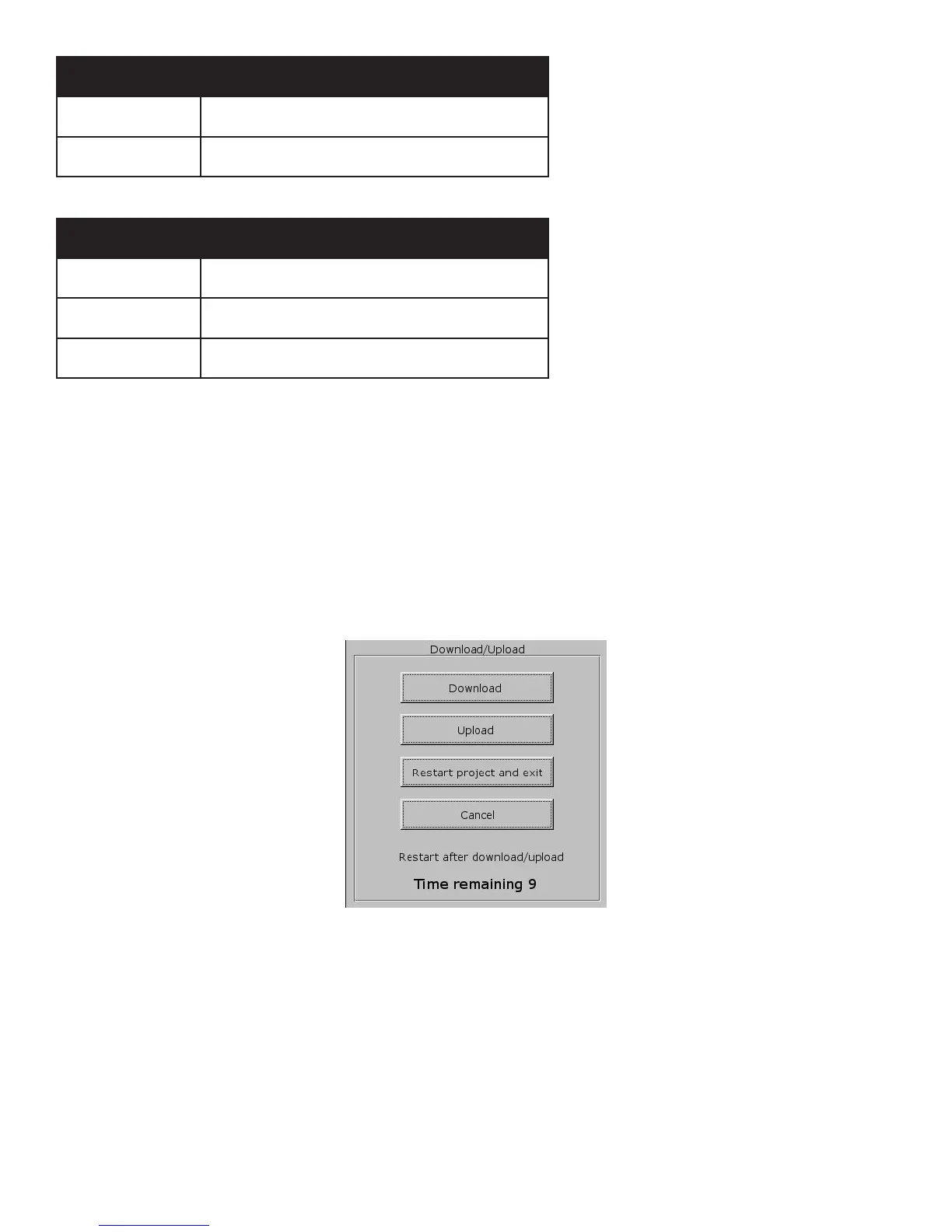
3. After a few seconds the menu in Figure H.1 will appear. Choose Download.
4. Another pop-up menu will appear prompting for a password. Using the keyboard displayed on the screen (Figure
H.2), enter 111111. Check the box that indicates Download Project les and uncheck the boxes that indicate Clear
History les and Download History les and select OK.
Figure H.1 - Pop-Up Menu


 To Next Page