Chapter 3
AMP523/RM523 Quick start guide
ThischapterguidesyouthroughthesetupprocessforabasicAMP523/RM523
projectwheretoalinelevelaudiosourceandamicrophoneareconnecteddirectly.An
externalvolumecontrollerandremotewallmixerareinstalledremotely.
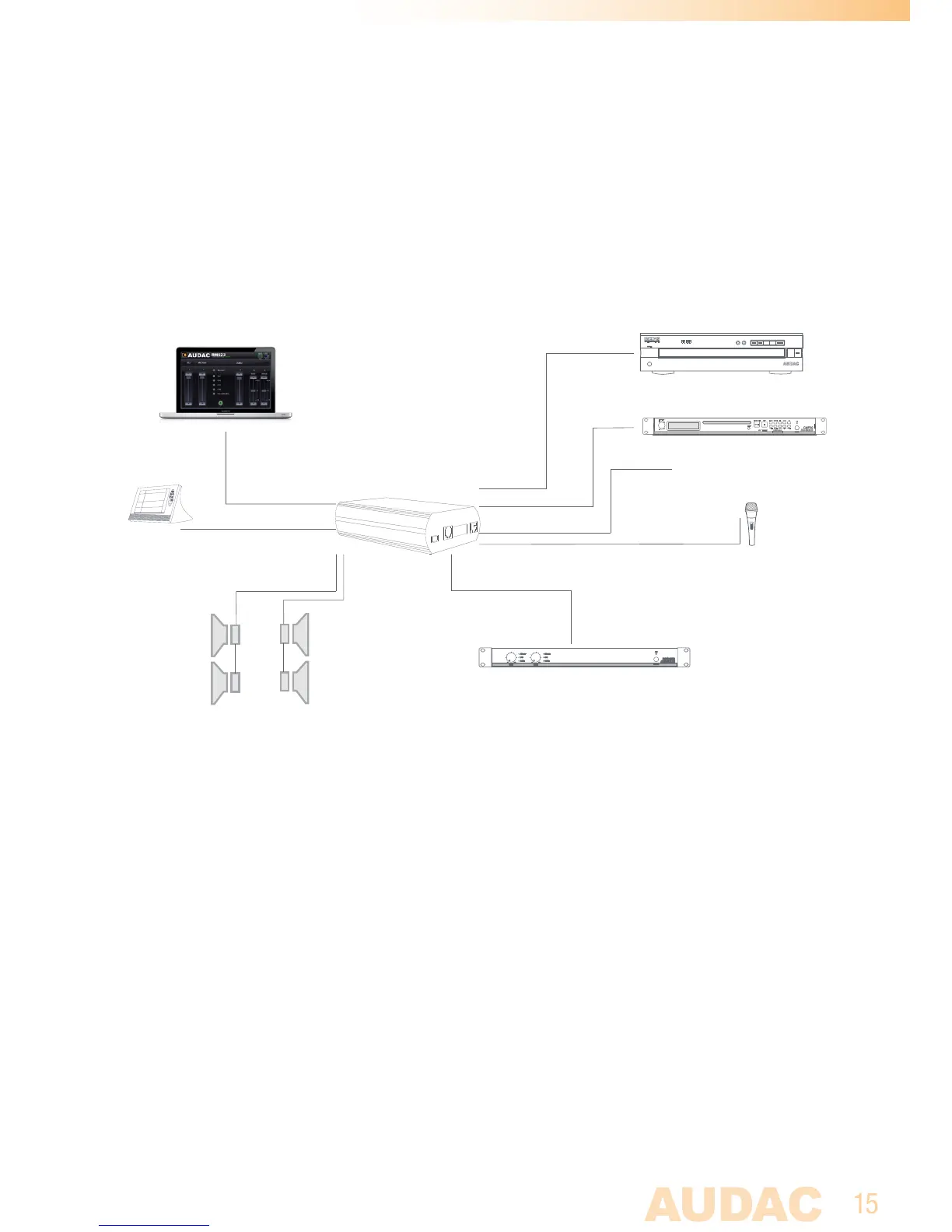
Overview of the AMP523/RM523 setup
Connecting the AMP523/RM523
1) Connecting audio inputs
Connectallyouraudiosources(CD-players,tuners,mp3players,microphones,...)
totheaudioinputsoftheAMP523/RM523.Allthedirectaudioinputsareconnected
withthe18-pinsEuroTerminalblock.Thepinlayoutforthe18-pinsconnectoris
shownatthefrontpaneloverviewatpage11ofthisusermanual.Thewiringdiagram
forconnectingstereolinesourcesandmicrophonesisshownatpage10ofthisuser
manual.
2) Connecting audio outputs
DependingwhethertheAMP523ortheRM523isusedinyourapplication,two
differentkindsofoutputsareavailable.Bothofthemarecontainingalinelevel
cd player
tuner
mp3 player
stereo
line input
balanced
mic input
stereo
line output
TCP/IP
RS232
home
automation
system
.........
stereo
line input
stereo
line input
1
2
3
4
5
6
ok
computer
2 x 15 W



 To Next Page