Main screen
Afterthecorrectpasswordhasbeenentered,themainscreenoftheuserinterface
willbeloadedasshownbelow.
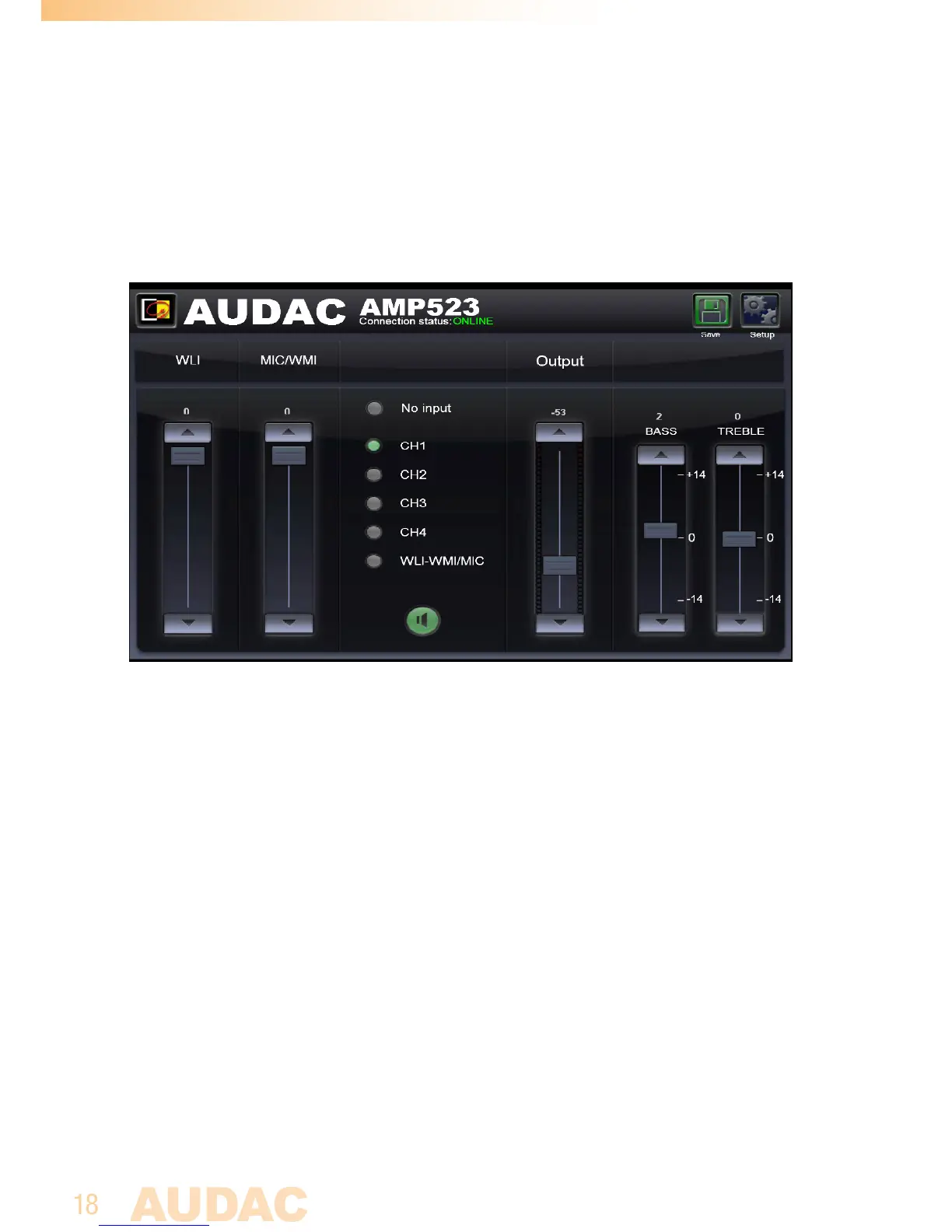
Main screen for AMP523/RM523
Thiswindowshowstheselectionbuttonsforall5inputchannels(CH1toCH4and
WLI-WMI/MIC)accompaniedwithamutebutton,MixingfadersfortheWLIandMIC/
WMIChannels,aGeneralvolumefaderandtwobandtonecontrolforTrebleandBass
equalization.
Connection status
AtthetopcentrepositionistheConnectionStatusdisplayed.Tohavecommunication
withthedevice,theconnectionstatusmustshow‘ONLINE’.
Input channel selection
Theinputchanneltoberoutedwiththeoutputcanbeselectedbyusingtheselection
buttonsinthecentrepositionofthemainscreen.Selectionbuttonsareshownfor“No
input”,thedirectlineinputsChannel1toChannel4(CH1toCH4),andthemicrophone
inputwhichismixedwiththesignalscomingfromtheadditionalinputunitsasWLI
andWMIunits.



 To Next Page