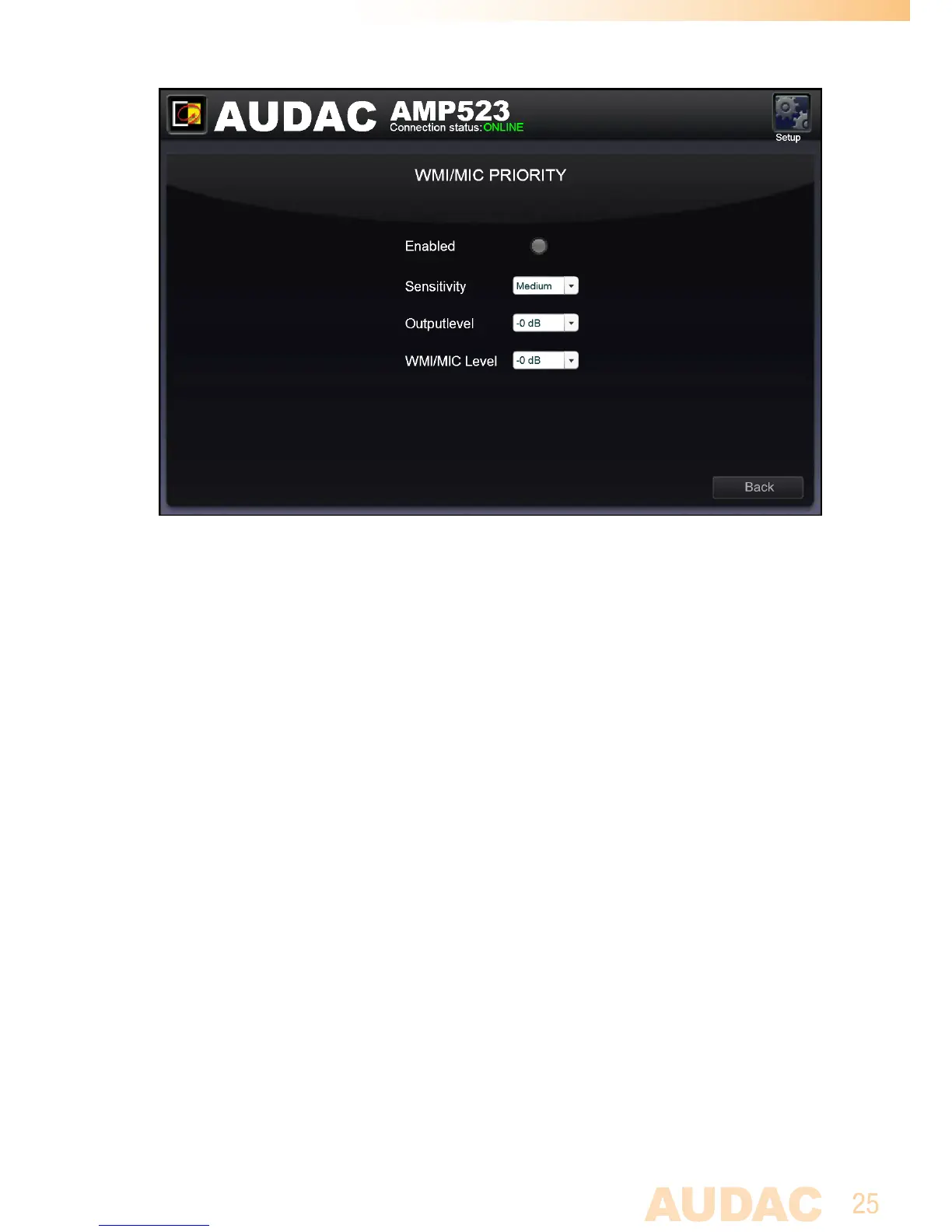
Priority settings screen for AMP523/RM523
Enabled
Theprioritycanbeenabledbyclickingthe“Enabled”buttonontop.Thisbuttonwill
turngreenwhenpriorityisenabled.
Sensitivity
Thesensitivityfortheprioritychannelcanbeputon“High”,“Medium”or“Low”.
Hereby,thelevelwhenswitchingtotheprioritychannelcanbeset.Whenit’ssetto
“High”,itwillswitchtothemicrophonechannelwhenonlyasmallsignalisappliedto
themicrophoneinput(whenthetalkerisspeakingverysoftly).Whenit’ssetto“Low”,
itwillswitchtothemicrophoneinputwhenalargesignalisappliedtothemicrophone
input(whenthetalkerisspeakingveryloud).The“Medium”settingisinbetween
“High”and“Low”.Thecorrectsettingforyourapplicationdependsonthemicro-
phonebeingused,thebackgroundnoise,thepersonwho’stalking,...
Output Level
Thesoundleveloftheprioritysignalcanbeadjustedwiththisdropdownlist.This
way,thevolumecanchangewhenapriorityannouncementismade.Forexample,to
makesureaprioritymessageisalwaysheardatthemaximumvolume,...
Thedefaultoutputlevelforprioritymessagesissetto0dBandcanbeadjusted
between0dBand-∞dB,instepsof1dB.



 To Next Page