Dante PCIe-R Card
CONFIDENTIAL. Copyright © 2014 Audinate Pty Ltd. All Rights Reserved.
-10-
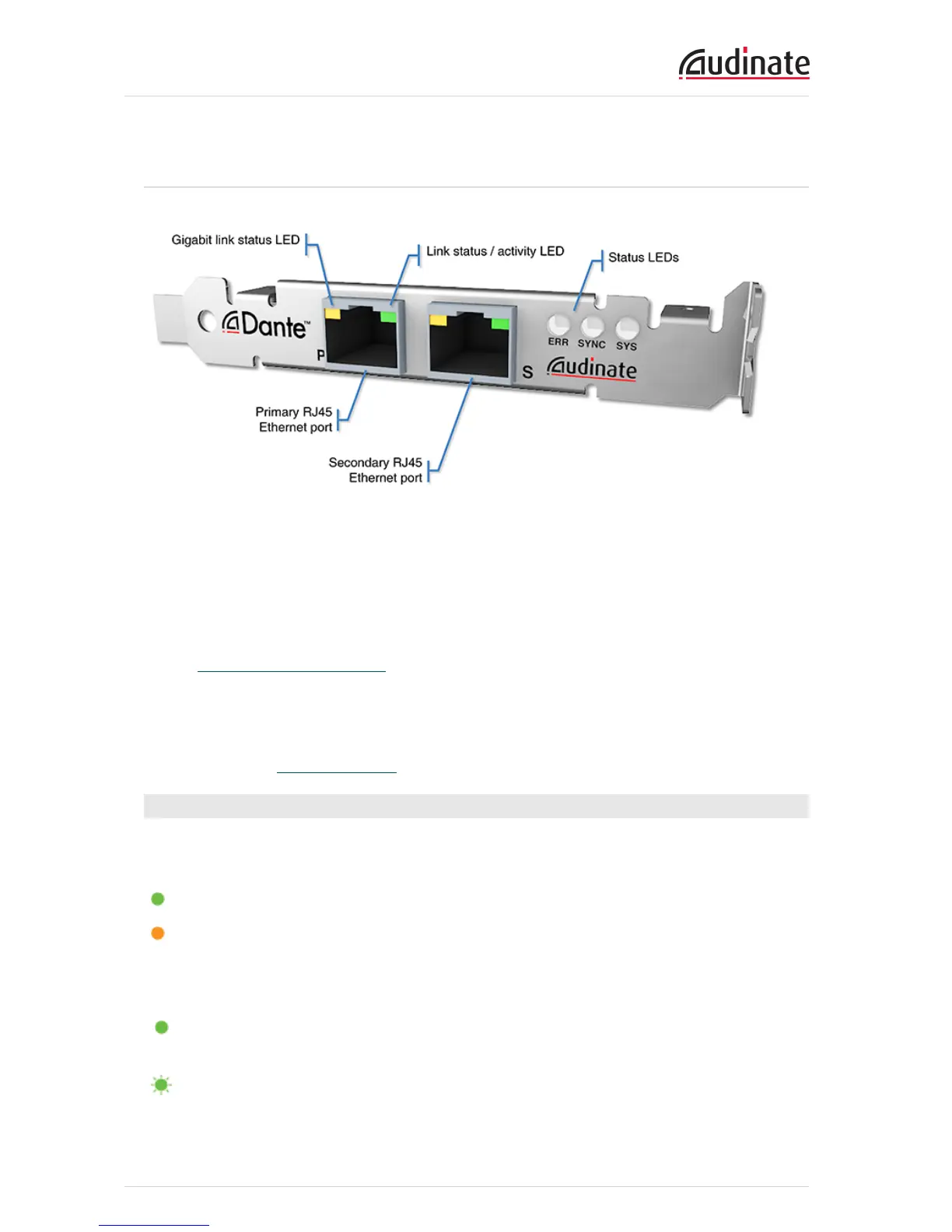
Dante PCIe-R Connectors and Indicators
Gigabit link status LED
Orange indicates an established Gigabit Ethernet link.
Link status / activity LED
Green indicates an established link; flashing indicates link activity.
Status LEDS
Indicate system and clock sync status.
Primary RJ45 Ethernet port
Used to connect to the primary Dante network for transmission and reception of audio traffic.
Secondary RJ45 Ethernet port
Used to connect to a secondary network for glitch-free redundancy.
Status LEDs
The status LEDs indicate the following conditions:
SYS – Indicates the status of the Dante system on this card.
A green light indicates the system has booted successfully and is operating properly.
The SYS LED will be amber while the system is booting. If it persists, the system has failed to boot
correctly.
SYNC – Indicates the clock synchronization status of the Dante device.
A solid green light indicates that the device is a Dante PTP clock slave and is synchronized to the
PTP master.
A flashing green light indicates that the device is the Dante PTP clock master.


 To Next Page