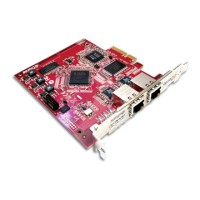
Dante PCIe-R Card
CONFIDENTIAL. Copyright © 2014 Audinate Pty Ltd. All Rights Reserved.
-15-
Connecting to a Network
In order to use your Dante PCIe-R, you will need to set up an Ethernet network connecting:
n The computer on which the Dante PCIe-R is installed
n The computer running Dante Controller (if it’s not the same computer), and
n Any other Dante-enabled audio equipment you may have.
Before You Set Up Your Network - Important Notes
Gigabit Ethernet Support
Your Dante PCIe-R has been designed to perform with Gigabit Ethernet networks.
Note: Connecting your Dante PCIe-R to older 100Mbit/s Ethernet switches or equipment is not
supported.
When connecting your Dante PCIe-R to a switch, make sure it supports Gigabit Ethernet and you are
connected to Gigabit Ethernet ports.
Choosing a Gigabit Ethernet Switch
There are a number of affordable standard Gigabit Ethernet switches available that will allow you to get the
best performance out of your Dante network.
Dante uses standard Ethernet and IP Quality of Service (QoS) to ensure its high-quality synchronization is
not affected, even on loaded networks. Switch features to look for on a product datasheet include:
n DSCP-based QoS support with four queues and strict priority queuing
n Filtering and ACL support
n If you need to run long cables, consider fiber support including SFP pluggable modules
n Managed switches allow you to manage the switch and monitor network performance, and are recom-
mended for installs
n
If you use managed switches, ensure that they allow EEE to be disabled. Make sure that EEE is
disabled on all ports used for real-time Dante traffic. See this FAQ for more information.
n
If you use unmanaged switches, do not use Ethernet switches that support the EEE function,
because you cannot disable EEE operation in these switches.
Note: If you have chosen a switch that has been used before, you may need to check its settings to
ensure it doesn’t have an incompatible configuration loaded.
For more information about choosing switches, please visit the Support section of the Audinate website
(www.audinate.com).
Choosing Ethernet Cabling
Dante uses completely standard Ethernet and IP, so it also uses standard Ethernet cabling, including
Cat5e, Cat6 and fiber.


 To Next Page