Dante PCIe-R Card
CONFIDENTIAL. Copyright © 2014 Audinate Pty Ltd. All Rights Reserved.
-19-
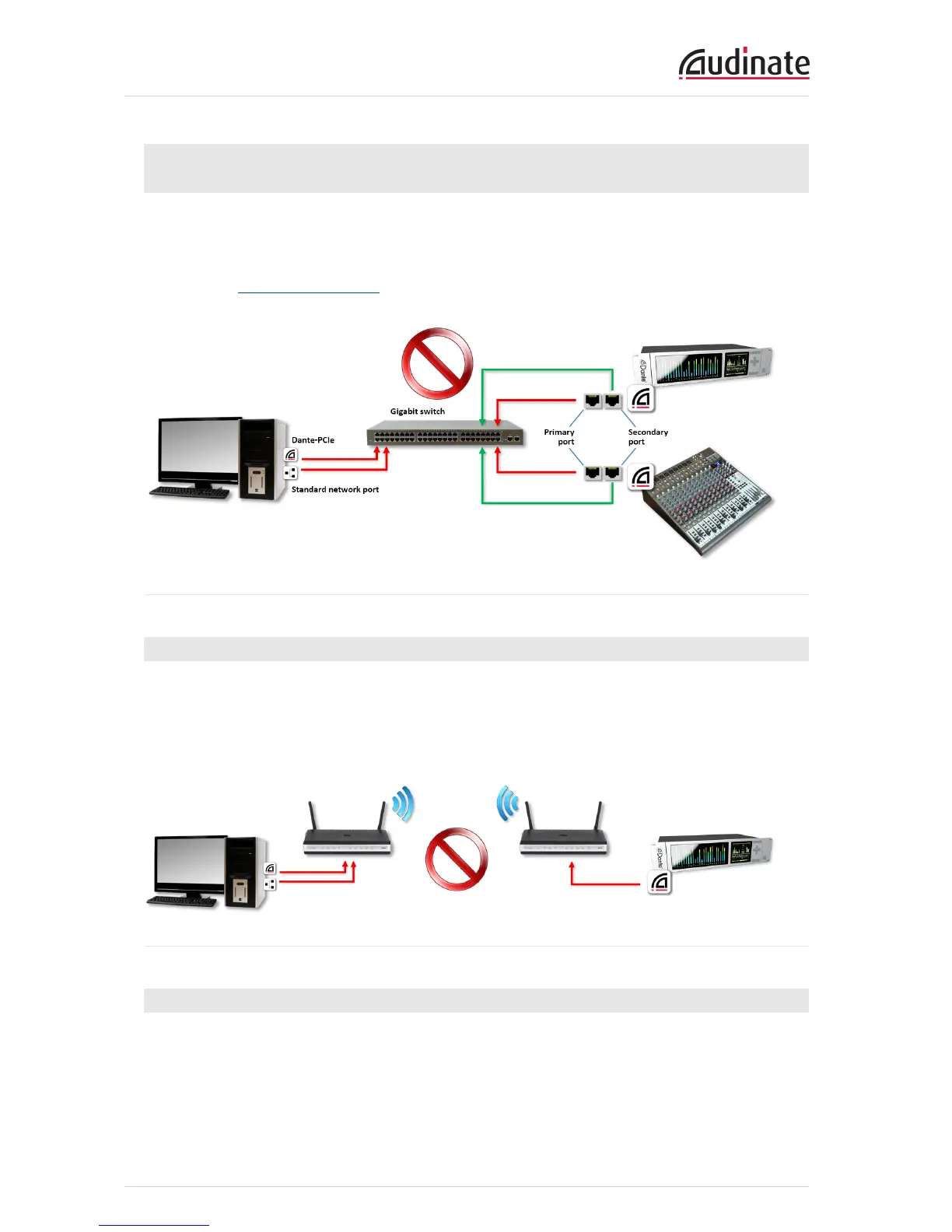
Connecting Primary and Secondary redundant networks to the same
switch
When using Dante redundancy with any Dante-enabled device, two separate networks must be used.
You CANNOT connect any secondary network connections to a switch used for the primary network, or
any primary network connections to a switch used for the secondary network.
Please refer to Network Configuration for information about the correct configuration to use.
Figure 2 - Unsupported redundant network configuration
Dante Audio Traffic over Wireless Networks
Wireless Ethernet networks should not be used to carry Dante audio traffic, and Audinate applications
installed on a PC or Mac will not allow selection of Wireless Ethernet interface, or any other non-standard
wired Ethernet interface.
You should not install any wireless components in your Dante network.
Figure 3 - Example wireless configuration (unsupported)
Use of 100Mbps Network interface
The use of 100 Mbps network with a Dante PCIe-R is not supported.
You must only connect a Dante PCIe-R to Gigabit interfaces:
n Gigabit switches, or a Gigabit port on an Ethernet switch
n Gigabit network interface on a PC or Mac


 To Next Page