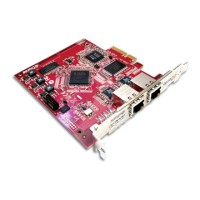
Dante PCIe-R Card
CONFIDENTIAL. Copyright © 2014 Audinate Pty Ltd. All Rights Reserved.
-4-
Contents
About Audinate 6
About Dante 6
Getting Started 8
About your Dante PCIe-R 9
Dante PCIe-R Specifications 9
Dante PCIe-R Connectors and Indicators 10
Status LEDs 10
Installing the Card 12
Before You Install 12
Installing and Removing the Dante PCIe-R 12
Installing the Dante PCIe-R Driver 12
System Requirements 12
OperatingSystem 12
Windows 12
Mac OS X 13
Hardware 13
Configuration Options 14
Windows Standard PC Configuration 14
Windows High-performance PC Configuration 14
Connecting to a Network 15
Before You Set Up Your Network - Important Notes 15
Gigabit Ethernet Support 15
Choosing a Gigabit Ethernet Switch 15
Choosing Ethernet Cabling 15
Network Configuration 16
General Information 16
About Dante Redundancy 16
Network Configuration: Non-redundant 16
Network Configuration: Redundant 17
Unsupported Dante Network Configurations 18
Straight-through connection to another Dante-enabled device 18
Connecting Primary and Secondary redundant networks to the same switch 19
Dante Audio Traffic over Wireless Networks 19
Use of 100Mbps Network interface 19
Dante PCIe-R Basic Operation 20
Pre-operation Checklist 20
Using Dante Controller 20
Setting Up Audio Routes 21


 To Next Page