Dante PCIe-R Card
CONFIDENTIAL. Copyright © 2014 Audinate Pty Ltd. All Rights Reserved.
-18-
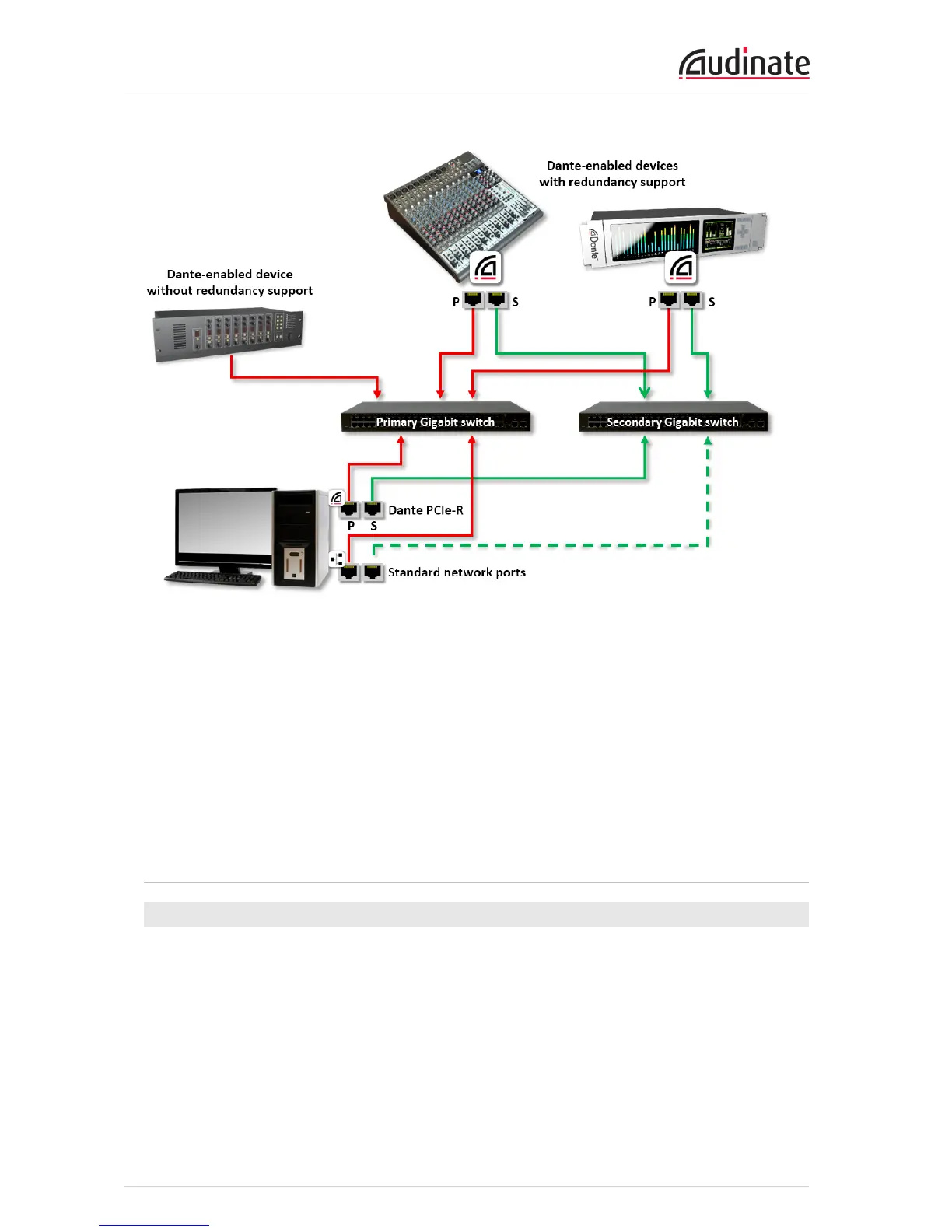
1. Make sure all computers are set to automatically configure their IP address.
2. Power on the switches.
3. Connect the primary Dante ports on each Dante device to the primary Gigabit switch.
4. Connect the secondary Dante ports on all redundant Dante devices to the secondary Gigabit switch.
5. Connect the computer running Dante Controller to the primary switch, via its standard network inter-
face (or to both switches if the computer has two or more network interfaces).
You may need to reboot the computers if they have active previous IP network configurations. All devices
will automatically be assigned IP network configurations.
Unsupported Dante Network Configurations
Straight-through connection to another Dante-enabled device
Because the Dante PCIe-R is a dedicated Dante audio interface, the Dante Controller software must
connect to the network via the standard network adaptor on the computer on which Dante Controller is
installed.
Because of this, a ‘straight-through’ connection from the Dante PCIe-R to another Dante-enabled device is
impossible – a Gigabit switch must always be used.


 To Next Page