28
Control Units
Manually locate a required control system for testing through a series of
choices. Follow the menu driven procedures and make proper selections;
the application guides the user to the proper diagnostic function menu
based on selections.
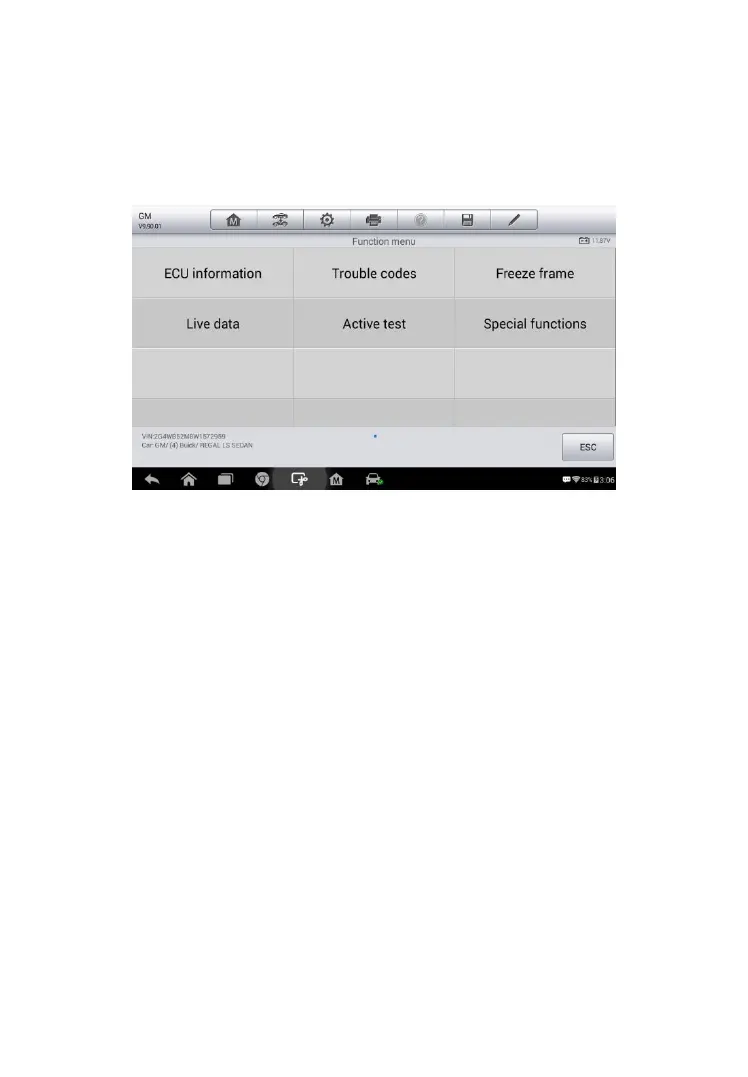
The Function Menu options vary slightly for different vehicles. The function
menu may include:
ECU Information – provides the retrieved ECU information in detail. An
information screen opens upon selection.
Trouble Codes – includes Read codes and Erase codes functions.
Displays detailed information of DTC records retrieved from the test
vehicle’s ECU and erases DTC records and other data from the test
vehicle’s ECU.
Freeze Frame – displays the freeze frame data of the DTCs.
Live Data – retrieves and displays live data and parameters from the
test vehicle’s ECU.
Active Test – provides specific subsystem and component tests. This
selection may appear as Actuators, Actuator Test, or Function Tests,
etc., and the tests options vary depending on the manufacturer and
model.
Figure 4- 11 Sample Function Menu














 To Next Page